
Everyone knows they should be saving, but understanding exactly how fast your money will grow requires more than mental math. It requires a solid savings account interest calculator. Whether you are building an emergency fund, saving for a down payment, or simply parking cash in a high-yield account, you need visibility into how your balance will compound over time.
The problem with most online calculators is that they are "toys." You visit a website, manually look up your bank balance, type it in, guess your monthly contribution, and hit calculate. The moment you close that browser tab, the data is lost. The next time you want to check your progress, you have to start over.
There is a better way. Instead of relying on static, one-time-use widgets, you can build a "living" calculator in Quadratic. By connecting your spreadsheet directly to your live bank balances, you can create a dashboard that updates your projections automatically every time you log in. This transforms a simple math problem into a dynamic financial planning tool.
The math behind the magic: how interest compels growth
Before diving into the workflow, it is helpful to understand the mechanics of what you are building. When users search for how to calculate compound interest on savings account balances, they are usually looking for the formula that dictates how money multiplies.
There are two main types of interest: simple and compound. Simple interest is calculated only on the principal amount. Compound interest, however, is interest earned on both the money you deposited and the interest you have already earned. This exponential growth is why a savings account interest calculator is so vital—it reveals the "snowball effect" of your cash.
For your spreadsheet, the standard formula for compound interest is:
A = P(1 + r/n)^(nt)
- A: The future value of the investment/loan, including interest
- P: The principal investment amount (the initial deposit or current balance)
- r: The annual interest rate (decimal)
- n: The number of times that interest is compounded per unit t
- t: The time the money is invested for
When setting this up, relying on the Annual Percentage Yield (APY) is usually the most accurate method. APY takes into account the frequency of compounding (daily, monthly, or quarterly), giving you a standardized number to use for your projections. To calculate savings account interest accurately in your sheet, you will use the APY as your rate variable to project future growth based on your real-time starting point.
Building your dynamic savings dashboard
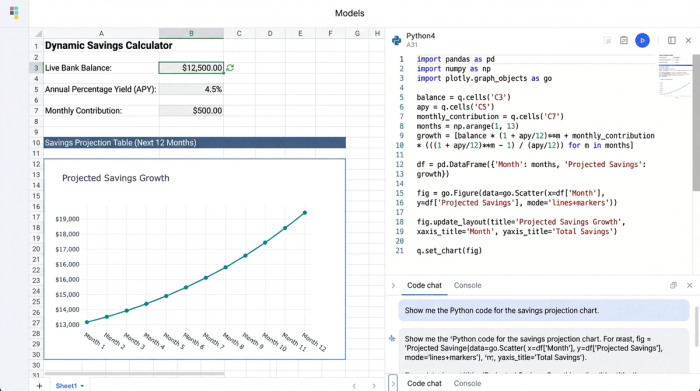
Now, let’s move from theory to practice. In a standard spreadsheet or web tool, you would type your starting balance into a cell. In Quadratic, you can do something much more powerful: sync your actual balance.
Step 1: Syncing your balance
This is the key differentiator. Rather than manually entering "$5,000" and having it become outdated the next day, you can connect Quadratic to your financial data sources. When you build your interest calculator savings account dashboard, you reference the cell containing your live bank balance as the "Principal" ($P$) in your formula.
This means your calculator is always up to date. If you spend money or make a deposit, your projection updates automatically the next time the data refreshes.
Step 2: Setting variables
Next, you need to define the variables that you can control. Create specific input cells for:
- Monthly Contribution: The amount you plan to add to the account every month.
- Interest Rate (APY): The current rate offered by your bank.
By keeping these as separate input cells, you create a saving account interest calculator monthly workflow that is easy to adjust. If your bank raises its rates or you decide to increase your monthly savings, you change one cell, and the entire timeline recalculates.
Step 3: The projection formula
With your live balance and variables set, you can build the schedule. You can use standard spreadsheet formulas or, if you prefer more control, use Python directly within the Quadratic grid. A Python script can loop through the next 12, 24, or 60 months, applying the interest rate and adding the monthly contribution to each period, instantly generating a clean table of your future wealth.
Scenario planning: high-yield vs. traditional accounts
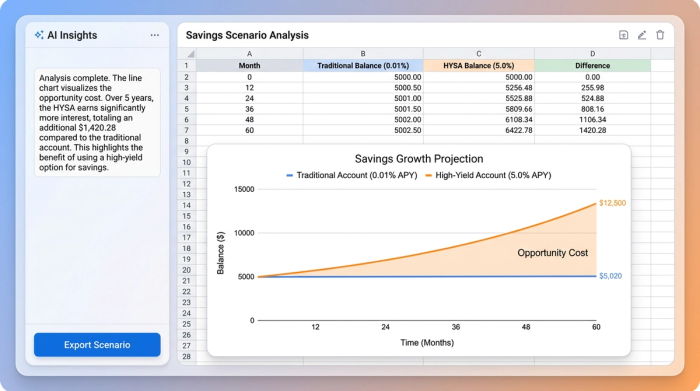
One of the most valuable uses of this tool is comparing different banking products. Many people leave significant cash in checking accounts earning near-zero interest because they haven't visualized the opportunity cost. You can use your dashboard as a high interest savings account calculator to see exactly what you are missing.
In Quadratic, you can run side-by-side scenarios:
- Scenario A: Your current balance in a traditional checking account (0.01% APY).
- Scenario B: Moving that same live balance to a High-Yield Savings Account (HYSA) (e.g., 4.5% or 5.0% APY).
Because you are using Python or advanced formulas, you don't need to duplicate the whole sheet. You can simply create a "Rate Comparison" block. The logic helps you build a high yield savings account interest calculator that shows the difference in hard dollars over one year. Seeing that a simple transfer could result in hundreds or thousands of dollars in "free" money is often the "aha!" moment that drives better financial decisions.
Projecting your emergency fund and short-term goals
Beyond general growth, you likely have specific targets. You might be trying to calculate interest on savings account balances to see when you will hit a specific milestone, such as a $20,000 emergency fund, using a dedicated savings goal tracker.
You can use your connected calculator to work backward. If you have $5,000 today (pulled from your live bank feed) and an APY of 5%, you can adjust the "Monthly Contribution" variable until the projection hits $20,000 at your desired date (e.g., 12 months from now).
The beauty of a dynamic tool is the feedback loop. If you miss a contribution one month, your live balance won't increase as expected. When you open Quadratic, the calculator will automatically show that your goal date has slipped, prompting you to increase next month's contribution to get back on track. A static web calculator can never give you that level of accountability.
Why a connected calculator beats a static web tool
There are dozens of free calculators on the web, but building your own savings account interest rate calculator in Quadratic offers distinct advantages for serious planning, including specialized tools like the best financial calculators for mortgage planning:
1. Accuracy: You eliminate manual data entry errors. Your starting point is always your actual, real-time financial reality.
2. Context: A Quadratic spreadsheet allows you to view your savings growth alongside your budget, investment portfolio, or debt payoff plan, and even calculate your net worth in the same workspace.
3. Flexibility: Web tools are rigid. If you want to calculate savings account interest after taxes, or adjust for inflation, you can simply add those columns to your Quadratic sheet. You can customize the logic to fit your specific life circumstances.
Start calculating your cash growth
Building wealth is rarely about hitting a home run; it is about consistency and visibility. When you can see exactly how your daily habits and interest rates compound over time, you are more likely to stick to your plan.
Stop guessing with one-off web tools that lose your data the moment you close the tab. By building a permanent, automated dashboard, you gain a clear view of your financial future, much like using a financial forecasting template. With Quadratic, you can turn a simple savings account interest calculator into a powerful engine for decision-making, ensuring that your cash is always working as hard as you do.
Use Quadratic to Build Your Dynamic Savings Account Interest Calculator
- Sync live bank balances: Connect directly to your financial accounts to ensure your starting principal is always your real-time balance, eliminating manual data entry errors.
- Automate compound interest calculations: Create a "living" dashboard that automatically updates your projections as your balance or monthly contributions change.
- Run powerful savings scenarios: Easily compare the impact of different interest rates (e.g., high-yield vs. traditional) or adjusted contributions to visualize future growth and opportunity costs.
- Track specific financial goals: Project when you'll hit targets like an emergency fund, with automatic feedback if your progress deviates from the plan.
- Integrate and customize your financial view: Combine savings projections with budgets, investments, or net worth calculations in a single workspace, adding custom logic for taxes or inflation.
Stop using static tools and start building a real-time view of your money's growth. Try Quadratic.
