
Table of contents
Planning a wedding is a massive logistical challenge whether you are a professional event planner or an engaged couple. Keeping track of RSVPs, budgets, and vendors can quickly become chaotic. Most couples default to standard tools, but a typical Excel spreadsheet wedding planner or Google wedding planner spreadsheet often feels clunky, sterile, and overwhelming. The solution is building an all in one wedding planner spreadsheet using Quadratic. This article will walk through how a real user built a premium, hyper-organized workspace that is both visually stunning and functionally robust.
Why settle for basic? The need for a "client-ready" workspace
While apps like The Knot wedding planner spreadsheet are excellent for basic checklists, they often lack the deep, customizable data tracking required for a complex event. Conversely, traditional tools treat event coordination like corporate accounting. A standard spreadsheet wedding planner might hold your data, but it does little to inspire confidence or joy.
Quadratic takes a different approach. Your planning tool should match the elegance of the event itself. For event professionals, a "client-ready" presentation is crucial for building trust. For couples, a stress-free and beautiful interface makes the planning process genuinely enjoyable.
Designing the visual experience in Quadratic
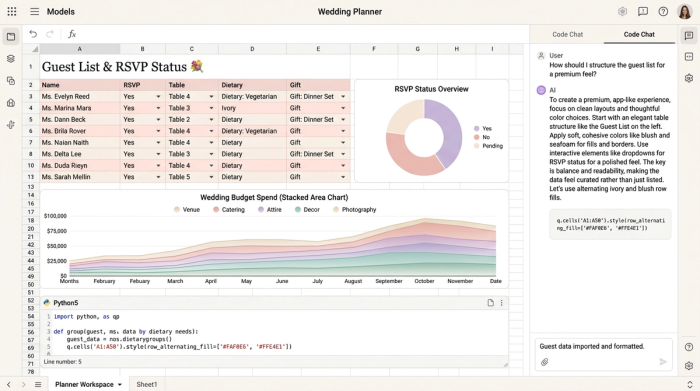
In Quadratic, this user applied specific design constraints to elevate the workspace. They utilized soft wedding colors, clean and minimal layouts, and subtle dividers to create a soothing aesthetic. Bold headers and frozen rows ensure the sheet remains highly usable without compromising its premium look. This thoughtful design approach turns a simple spreadsheet wedding planner into an interactive, app-like experience right in the browser.
Building your all-in-one wedding planner spreadsheet
A successful wedding requires orchestrating countless moving parts, which often benefits from following best practices for organizing tabular data. By bringing everything into one unified workbook, you prevent crucial details from falling through the cracks. This user leveraged Quadratic to create a comprehensive all in one wedding planner spreadsheet, utilizing a multi-tab setup that organizes every phase of the event. If you are looking to build your own wedding planner spreadsheet template, this structure is the perfect starting point.
The wedding budget planner
Financial tracking is often the most stressful part of event preparation, but understanding average wedding budget allocation percentages and using an effective wedding spending spreadsheet can alleviate much of that stress. In this workspace, the user dedicated a specific tab to act as a complete wedding budget planner spreadsheet. They set up automated calculations to effortlessly track estimated costs against actual spend. By including formulas that automatically update remaining balances as new expenses are entered, the user created a dynamic financial overview that eliminates manual math errors.
Guest list and RSVP management
Managing the guest list requires granular data tracking. The user built a dedicated sheet featuring specific columns for plus-ones, dietary restrictions, zip codes, and RSVP statuses. This level of organization ensures that every guest's needs are accounted for, from meal preferences to seating arrangements.
Vendor coordination & timeline checklists
A beautiful wedding relies on seamless execution. The user created a detailed workflow for tracking vendor contracts, payment deadlines, and day-of timelines. From the initial consultation to final delivery, every vendor interaction is documented in a clean and structured format.
Adding interactive features and data visualization
What truly sets this workspace apart is its technical superiority. If you want to incorporate free wedding planner spreadsheet features that rival expensive paid applications, interactivity is key. This user utilized Quadratic to answer the demand for hyper-organization.
To streamline data entry, the user implemented dropdown menus for task statuses and priorities. They also applied conditional formatting to automatically cross out completed tasks and highlight high-priority items. This provides instant visual feedback and keeps the most critical to-dos front and center.
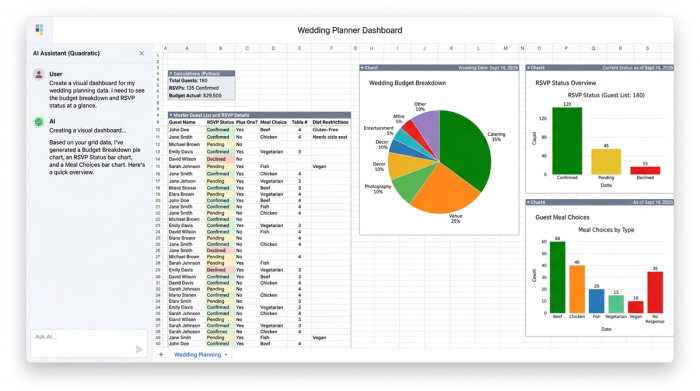
A major gap in traditional planning tools is the lack of visual analytics, despite the clear benefits of data visualization for understanding complex information. Quadratic solves this by allowing users to add integrated charts directly next to their data. The user built visual dashboards to represent budget breakdowns, using pie charts to compare venue costs against catering expenses. They also created RSVP metrics with bar charts displaying attending versus declined guests. These visual elements provide an instant, easily digestible overview of the event's status.
How to get started with your own Quadratic wedding planner
This workflow demonstrates the immense value of combining the raw power of tabular data with the beauty of a premium app. You no longer have to choose between functional data tracking and aesthetically pleasing checklists.
You can start building your own free wedding planner spreadsheet by signing up for Quadratic today. Whether you want to recreate the wedding planner spreadsheet template outlined above or design a custom workspace from scratch, Quadratic provides the tools you need. If you are searching for a wedding planner spreadsheet free of the usual clutter and limitations, this approach offers unparalleled flexibility. Wedding planning should be a joyful experience, and having a beautiful, interactive, and automated workspace makes all the difference.
Use Quadratic to build your all-in-one wedding planner spreadsheet
- Create a visually stunning and "client-ready" wedding planner spreadsheet that simplifies complex logistics and impresses stakeholders.
- Consolidate all planning details—from budget and guest lists to vendors and timelines—into one hyper-organized, multi-tab workspace.
- Automate financial tracking with real-time calculations for estimated costs, actual spend, and remaining balances, preventing manual errors.
- Manage guest lists with granular detail, including RSVPs, plus-ones, dietary restrictions, and seating arrangements, all in one place.
- Streamline vendor coordination and timelines using structured workflows, payment deadlines, and interactive status updates.
- Enhance organization and clarity with interactive features like dropdown menus, conditional formatting, and integrated charts for instant visual insights into your event's status.
Ready to build your ultimate wedding planner spreadsheet? Try Quadratic
