Table of contents
- The "yours, mine, and ours" approach to budgeting
- Why you need a connected template (not just a spreadsheet)
- How to set up your couples budget in Quadratic
- Visualizing the "money date"
- Advanced customization: savings goals and sinking funds
- Financial intimacy through transparency
- Use Quadratic to manage your couples budget
Money is frequently cited as the leading cause of stress in relationships, often because partners struggle to balance the need for transparency with the desire for individual autonomy. Couples are usually presented with a binary choice: merge every cent into a single joint account and lose your independence, or keep everything separate and struggle to achieve shared goals. Neither option feels quite right for a modern partnership.
The most effective solution is often a hybrid approach, a system that tracks shared bills and individual spending side-by-side. However, executing this strategy requires the right tools. A standard spreadsheet often breaks under the complexity of multiple bank accounts, and mobile apps are frequently too rigid to handle custom "yours, mine, and ours" logic.
This is where a connected couples budget template in Quadratic changes the dynamic. By moving beyond static rows and columns, Quadratic allows you to build a flexible, automated system that respects both your shared life and your individual freedom. If you are looking for a comprehensive budget for couples template that handles real-world complexity, this guide will show you how to set it up.
The "yours, mine, and ours" approach to budgeting
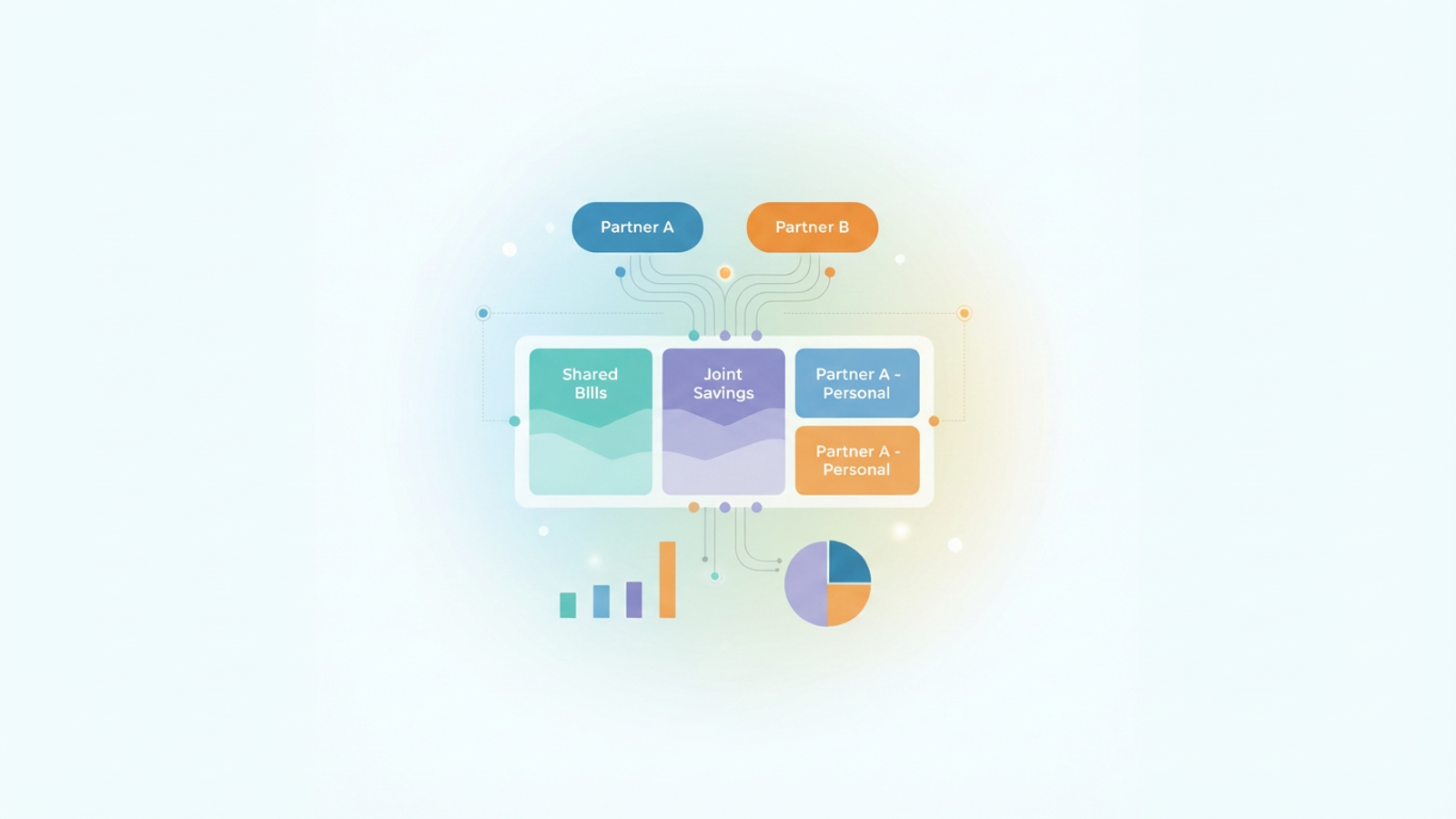
Before diving into the technical setup, it is helpful to understand why the hybrid model is the preferred method for many financially successful partners. When searching for a married couple budget template or advice on managing household funds, you generally encounter three models.
The first is the 100% shared model, where all income goes into one pot. While simple, this often leads to friction over personal purchases. The second is the 100% separate model, which functions more like a roommate arrangement and makes saving for a house or retirement difficult.
The third, and often most sustainable, is the hybrid model. In this setup, you maintain a joint account for bills and savings while keeping personal accounts for guilt-free discretionary spending. The difficulty lies in the execution. A standard budget template for married couples usually requires you to manually log into two or three different bank accounts, download CSV files, and copy-paste data into a spreadsheet. This manual friction is the primary reason couples stop budgeting after a few months.
Why you need a connected template (not just a spreadsheet)
If you have tried using a standard couple budget template in Google Sheets, you likely ran into the visibility problem. To see the whole picture, you have to nag your partner to update their side of the spreadsheet. This turns financial management into a chore rather than a strategic conversation.
Quadratic solves this by acting as a connected data workspace rather than a static grid. Unlike a basic Google Sheets budget template for couples, Quadratic allows you to connect directly to live data sources, such as bank accounts and credit cards, using secure integrations.
This connectivity offers a significant advantage: visibility without the loss of privacy. You can configure the template to pull in transaction data automatically. This means you can see that the electric bill was paid without needing to ask, and your partner can see that the mortgage is covered, all without having to manually enter every coffee purchase or grocery run.
How to set up your couples budget in Quadratic
Building a system that works requires a workflow that aggregates income, separates expenses, and visualizes the bottom line, which is key for a successful paycheck budget planner. Here is how to use the Quadratic couples monthly budget template to streamline your finances.
Step 1: Consolidate income and accounts
The first step is bringing the data together. In Quadratic, you can connect Partner A’s accounts and Partner B’s accounts into a single workspace. Because Quadratic supports SQL and Python natively within the spreadsheet, you can query these data sources to create a "Total Household Income" view.
This aggregate view is essential for understanding your true buying power. Instead of checking two separate banking apps to see if you can afford a vacation, the template sums up all inflows to give you a single, accurate number for the month.
Step 2: Define the "shared" bucket
Once the data is flowing, you need to identify what counts as a joint expense. These are your fixed costs, including rent or mortgage, utilities, insurance, and groceries.
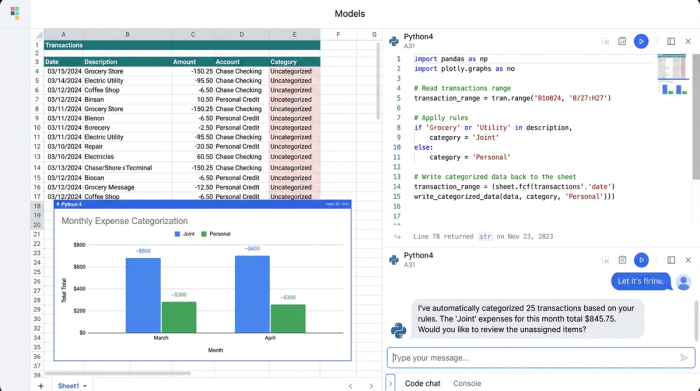
In a standard couple budget template, you might have to color-code these rows manually. In Quadratic, you can use simple Python scripts or standard formulas to tag transactions automatically. For example, you can set a rule that any transaction from "City Utilities" or "Whole Foods" is automatically categorized as "Joint." This auto-populates the shared column of your budget, ensuring your fixed costs are always visible and up to date.
Step 3: The "personal" allowances
The secret to financial harmony is the "no-questions-asked" fund. This is money that each partner can spend on hobbies, dining out, or personal items without needing approval from the other.
The template allows you to filter individual discretionary spending into separate columns. Partner A’s golf fees and Partner B’s subscription boxes stay in their respective columns. This separation is vital because it protects the joint bottom line while preserving a sense of autonomy. You can see that your partner spent money, but because it comes from their personal bucket, it does not impact the household bills.
Step 4: Automating the monthly view
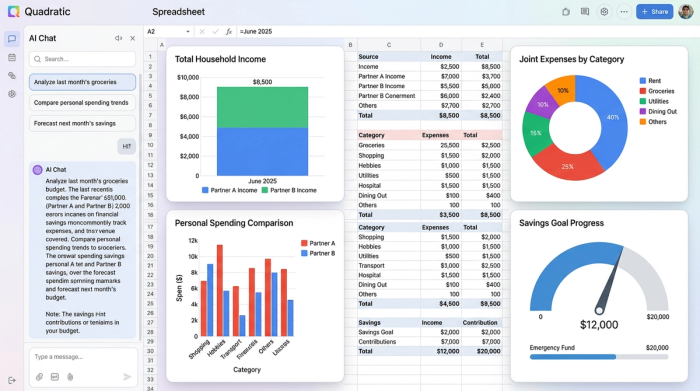
The final output is a dashboard that provides a unified view of Income vs. Joint Bills vs. Personal Spending. Because Quadratic is built for data visualization, this is not just a wall of numbers. You can view clear graphs showing exactly how much of the household income is committed to bills and how much remains for savings.
Visualizing the "money date"
One of the most common pieces of advice for couples is to have a regular "money date" to review finances. However, without a good system, these dates often turn into arguments about receipts.
Using a connected dashboard changes the tone of the conversation. Instead of asking "Why did you buy this?" you can look at the objective data together. The template shows exactly how much is left for debt payoff or savings goals. The conversation shifts from accusatory to collaborative. You can spend fifteen minutes reviewing the dashboard, confirm that you are on track, and move on with your evening.
Advanced customization: savings goals and sinking funds
Life is rarely linear, and income is not always equal. A static budget template for couples often breaks when one partner earns significantly more than the other, or when one partner has variable freelance income.
Because Quadratic is code-enabled, you can build custom formulas to handle these complex scenarios. If you decide to split bills proportionally based on income—for example, Partner A pays 60% and Partner B pays 40%—you can program that logic directly into the sheet. If you are saving for a wedding or a down payment, you can create "sinking funds" that automatically allocate a percentage of income toward those specific goals every month.
Financial intimacy through transparency
A great budget is not about restriction. It is about alignment. When both partners have a clear, real-time view of where the money is going, stress decreases and trust increases. By moving away from manual entry and disjointed apps, you remove the administrative burden of managing a household.
Stop fighting over who forgot to update the spreadsheet. A connected workflow allows you to focus on your shared goals rather than the data entry. If you are ready to modernize how you manage money together, the Quadratic couples budget template provides the flexibility and power you need to succeed.
[Get the Quadratic Couples Budget Template]
Use Quadratic to manage your couples budget
- Automate your "yours, mine, and ours" budget: Connect all bank accounts to automatically pull transaction data, eliminating manual entry and ensuring real-time accuracy.
- Gain complete financial visibility without sacrificing privacy: Consolidate all joint and personal income and expenses into a single, dynamic dashboard for a clear overview.
- Automatically categorize shared bills and personal spending: Use custom formulas or Python scripts to tag transactions, keeping fixed costs current and individual allowances distinct.
- Tailor your budget to unique financial situations: Program custom logic for proportional bill splitting, variable incomes, or dedicated savings funds directly within the sheet.
- Facilitate constructive "money dates": Review objective, real-time financial dashboards together, shifting conversations from arguments to collaborative planning.
Modernize your shared finances and build a budget that truly works for both of you. Try Quadratic.
