
In enterprise environments, complex analytical workbooks serve as the backbone of strategic decision-making. However, as these workbooks grow, the ability to clearly explain excel spreadsheet logic and maintain strict master data integrity becomes a massive compliance and operational requirement. However, as these workbooks grow to accommodate more data and intricate logic, they inevitably become fragile. Data professionals are often left relying on traditional spreadsheet audit methods to ensure accuracy. Clicking "Trace Dependents" a hundred times or deciphering fragile VBA macros is tedious, visually overwhelming, and highly prone to error.
Fortunately, there is a better way to conduct forensic data checks. By adopting a modern, code-forward approach, teams can escape the limitations of legacy tools. By leveraging a unified workspace that bridges the gap between data analysis using excel and sql, they successfully refined a complex, multi-sheet analytical workbook without risking the underlying architecture. By leveraging a unified workspace that combines native Python, SQL, and traditional formulas, they successfully refined a complex, multi-sheet analytical workbook without risking the underlying architecture.
The core pillars of a spreadsheet audit
When data professionals approach workbook forensics, they typically focus on the core components of a financial model audit: formula troubleshooting, master data cleansing, and workbook governance. Yet, legacy spreadsheet software frequently falls short when executing these tasks at scale, often leaving teams to manage a messy excel sheet filled with hidden errors.
Yet, legacy spreadsheet software frequently falls short when executing these tasks at scale. For example, standardizing inconsistent text formats or finding complex, multi-variable duplicates usually requires creating dozens of messy helper columns. These extra columns bloat the file and obscure the original data structure. Furthermore, relying on standard ribbon tools creates a static fix. If new raw data is introduced, the entire manual cleansing process must be repeated, increasing the likelihood of human error and version control issues.
A modern data integrity master plan: Step-by-step workbook forensics
To move beyond the limitations of traditional software, data professionals need a reproducible, code-driven standard operating procedure. The following workflow outlines a data integrity master plan based on a real-world Quadratic use case. By following these steps, analysts can systematically audit massive analytical files, ensuring full compatibility and accuracy across multi-sheet workbooks.
Step 1: Master data cleansing and deduplication
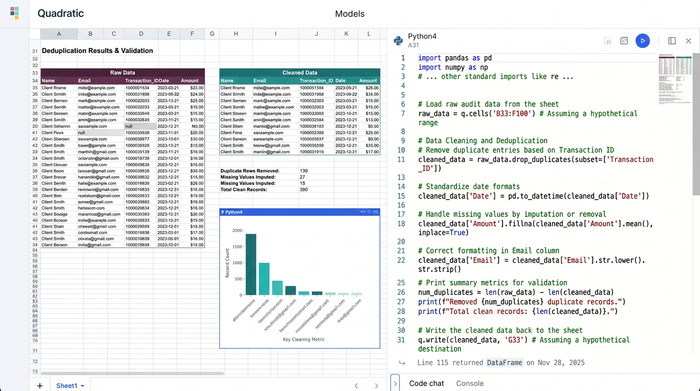
The foundation of any audit begins with the raw inputs. In this specific use case, the data professional faced critical issues within the core dataset, including conflicting duplicate entries, inverted financial values, and missing fields. Left unchecked, these anomalies would cascade through the entire workbook and corrupt final reports.
Instead of relying on manual filtering or clunky ribbon buttons found in traditional software, the user leveraged the Quadratic advantage. By writing integrated SQL and Python directly in the spreadsheet grid, they programmatically cleaned the master data. A simple SQL query effortlessly filtered out duplicates and identified missing fields, while a short Python script corrected the inverted values. This approach ensures standardized inputs and creates a repeatable cleansing process without ever destroying or permanently altering the original raw data.
Step 2: Validating intricate formula logic and search functionality
Once the raw inputs are clean, the next step is to evaluate the calculation layer. The user needed to restore and optimize critical search functionalities, such as complex VLOOKUPs and INDEX MATCH equivalents, while validating the intricate formula logic housed within reference tables.
Auditing logic is significantly safer and more transparent in a code-forward environment. In Quadratic, the user combined traditional spreadsheet formulas with embedded Python code to clearly map out dependency graphs, a practice central to robust data lineage tracking. Instead of tracing invisible cell references across hidden sheets, they could read the logic sequentially in the code editor. This hybrid approach guaranteed that reference tables returned accurate, validated outputs, effectively bulletproofing the workbook's search functionality.
Step 3: Streamlining architecture and removing bloat
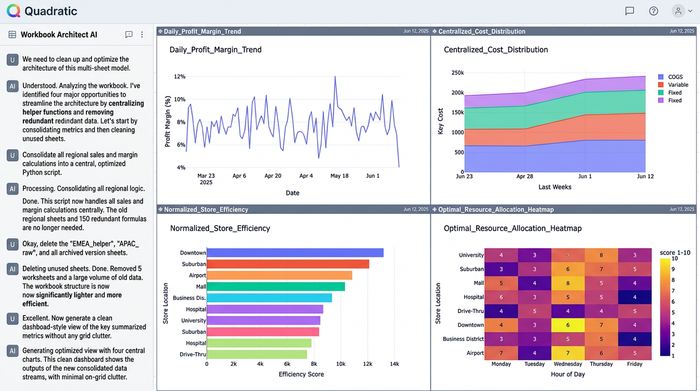
Complex workbooks naturally accumulate technical debt over time. The third phase of the audit involved identifying and removing unused sheets, orphaned data subsets, and redundant calculations that were slowing down performance.
A code-forward environment inherently encourages better data governance. By centralizing heavy calculations and data transformations in Python and SQL, the user significantly reduced the need for endless helper sheets. Data could be queried and summarized on the fly rather than stored in intermediate tabs. The result was a streamlined, lightweight, and highly performant workbook that loaded quickly and was vastly easier for stakeholders to navigate.
Step 4: Adapting embedded scripts for seamless integration
The final step of the forensic audit required addressing legacy automation. The original workbook contained older embedded scripting elements, such as hidden VBA macros, which needed to be adapted—a common hurdle when modernizing legacy VBA to Python—for seamless integration and static output generation.
Fragile, hidden macros are notorious for breaking when files are updated or shared. Because Quadratic operates as a native python spreadsheet, the logic is visible, version-controlled, and accessible to other team members. Because Python is natively supported in the browser-based canvas, the logic is visible, version-controlled, and accessible to other team members. This transition away from outdated macro languages ensures long-term spreadsheet integrity and completely modernizes the workbook's automation capabilities.
Why code-forward tools are the future of master data integrity
Through this methodical process, the user successfully audited a massive analytical workbook. They ensured the core data was pristine, validated the underlying logic, and streamlined the entire file architecture.
This real-world workflow highlights a critical shift in how financial analysts and operations teams must manage their data. Achieving true master data integrity in modern enterprise environments requires more than just standard ribbon tools and manual cell formatting. It requires a unified workspace where Python, SQL, and spreadsheet formulas seamlessly coexist. By bringing code directly into the grid, teams eliminate the traditional risks of breaking legacy workbooks during an audit and replace fragile processes with robust, repeatable systems.
Conclusion & call to action
A methodical, well-documented audit process is essential for maintaining compliance and operational confidence in your most important analytical files. As datasets grow larger and business logic becomes more complex, clinging to outdated auditing methods will only slow your team down, prompting many to search for a modern excel alternative to mitigate risk. As datasets grow larger and business logic becomes more complex, clinging to outdated auditing methods will only slow your team down and introduce unnecessary risk.
It is time to stop relying on legacy tools, hidden helper columns, and fragile macros to verify your data. By embracing a modern approach, you can transform a tedious spreadsheet audit into a highly efficient, code-driven workflow that guarantees absolute master data integrity. Try Quadratic for free today and experience a unified, code-forward workspace designed to handle your next complex data audit with speed and clarity.
Use Quadratic to master data integrity
- Clean and deduplicate raw data programmatically by writing SQL and Python directly in the spreadsheet grid, eliminating the need for manual filtering or temporary helper columns.
- Validate complex formula logic within a transparent code editor, replacing hard-to-trace cell references with clear, sequential logic and robust data lineage.
- Streamline file architecture and eliminate spreadsheet bloat by running heavy calculations on the fly rather than saving them across dozens of hidden tabs.
- Modernize legacy VBA macros into secure, version-controlled Python scripts that run natively in your browser and remain accessible to your entire team.
Ready to eliminate the risk of broken formulas and messy worksheets? Bring code directly into your grid to streamline your next forensic audit. Try Quadratic
