Best KPI tracking: build a system for actionable insights

KPI tracking.

Most companies claim to be data-driven, yet they often track everything while understanding very little. It is common for organizations to build elaborate sales data visualization dashboards that eventually turn into charts that no one actively uses to make decisions. This often happens due to the presence of stale data.

The best KPI tracking is not about finding the flashiest visualization tool or the most expensive enterprise platform. It is about building a trustworthy system of governance and data integrity. A successful tracking system prioritizes a reliable pipeline where definitions are consistent, data flows are automated, and the calculation logic is transparent. When teams trust the source and the math, metrics transform from passive observations into active drivers of business strategy.

What defines the best KPI tracking system?

To evaluate the effectiveness of your measurement efforts, you must move beyond the basic definition of a Key Performance Indicator (KPI) and look at the attributes of the system that manages it. A robust system does more than display numbers; it facilitates understanding and action.

The primary goal of tracking metrics is to drive decisions, not just to provide status updates. If a metric changes significantly and no one knows what action to take, it is likely a vanity metric. A strong system highlights actionable data points that trigger specific operational responses.

A balanced system monitors both leading and lagging indicators, such as revenue or cohort analysis, which tell you what has already happened. It also tracks leading indicators, such as pipeline velocity or user activation rates, which enable predictive modeling and data analytics techniques to predict future performance. Relying solely on lagging indicators is like driving while looking only in the rearview mirror.

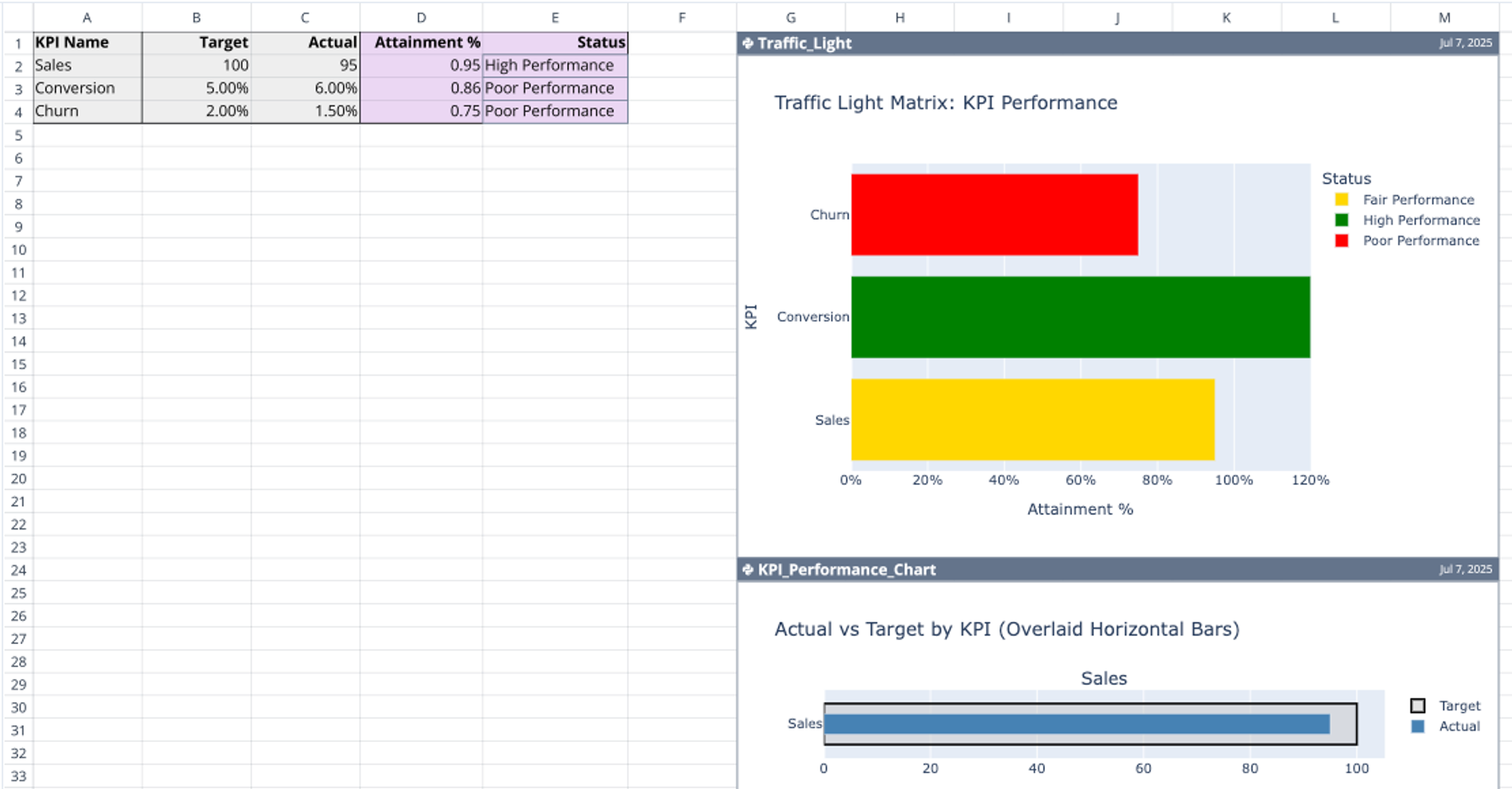
Numbers in isolation are meaningless. The best KPI dashboards present data alongside targets, historical benchmarks, and variance analysis. Seeing a revenue figure of $1 million is not helpful without knowing if the target was $800,000 or $1.2 million. Business data analysis with context allows stakeholders to instantly understand performance health without needing to ask follow-up questions.

The 3 pillars of trustworthy KPI data

For a KPI tracking system to be effective, it must be built on a foundation of trust. If a department head questions the accuracy of a number during a meeting, the discussion shifts from strategy to data validation, and momentum is lost. Trust is established through three core pillars:

1. Consistent definitions (the governance layer)

One of the fastest ways to erode trust is shadow definitions, where finance teams define “Gross Margin" differently than sales or operations teams, impacting financial data visualization for modern finance teams. In a high-functioning system, every metric has a single, agreed-upon calculation that is used universally. Effective financial data analytics ensures that when two people talk about churn, they are mathematically discussing the same concept.

2. Reliable data flows (the integrity layer)

Manual data entry is the enemy of accuracy. Systems that rely on humans copying and pasting data from CSV exports into spreadsheets are prone to error and inevitably become stale. The ideal approach involves automated pipelines that connect directly to the source of truth, such as your database or CRM. This ensures that the metrics on the screen always reflect the current reality.

3. Transparent logic (the auditability layer)

The black box problem is a significant issue in many reporting tools. If a stakeholder sees a spike in a metric but cannot click through to see exactly how that number was calculated, they will hesitate to trust it. The best KPI tools offer transparency, allowing users to audit the database analytics or formula logic to verify the data lineage and ensure the data is being processed correctly.

Why most KPI tracking frameworks fail

Even with good intentions, many KPI frameworks collapse under the weight of poor implementation. Understanding these pitfalls helps in designing a more resilient system.

The siloed spreadsheet

When tracking lives in disconnected, offline files, version control is immediately lost. One manager updates a file on their desktop, while another team makes decisions based on an outdated version. Without a centralized environment, the organization fractures into competing narratives based on different datasets.

The rigid dashboard

Many of the top KPI software options on the market force users into pre-set visualizations and rigid data models, making it difficult to create a custom dashboard Google Analytics for tailored GA4 reporting. While these tools look professional, they often obscure the underlying calculation logic. When an anomaly appears, it becomes difficult to debug the issue because the "how" is hidden behind a polished user interface.

Data quality neglect

Tracking KPIs on top of dirty data leads to bad strategic decisions. If the underlying data source is messy, no amount of visualization will fix the problem. According to Gartner, poor data quality costs organizations an average of $12.9 million each year. A good system must include a layer for data cleaning and transformation before the metric is calculated.

Building your system: a workflow for accuracy

Creating a reliable KPI tracking environment requires a deliberate workflow as part of a solid data infrastructure and analytics strategy. Before purchasing software, teams should focus on the architecture of their data. Here are three practical steps to achieve this:

Step 1: Audit and define

Start by mapping out the 3–5 critical metrics for each department. Do not just name them; write down the exact SQL logic or formula required to calculate them. This exercise often reveals discrepancies in how different team members understand the same metric.

Step 2: Establish connectivity

Ensure your tracking layer can pull directly from live sources. Whether your data lives in Snowflake, Salesforce, or Stripe, the best KPI tracking software allows you to establish a direct connection. This eliminates the need for manual exports and ensures that your reports are always up to date.

Step 3: Centralize the calculation

Bring your data into a unified environment where the calculation happens in one place. Avoid scattering logic across fifty different tabs or multiple software platforms. Centralization makes it easier to audit logic, fix errors, and ensure everyone is looking at the same truth.

How Quadratic streamlines transparent KPI tracking

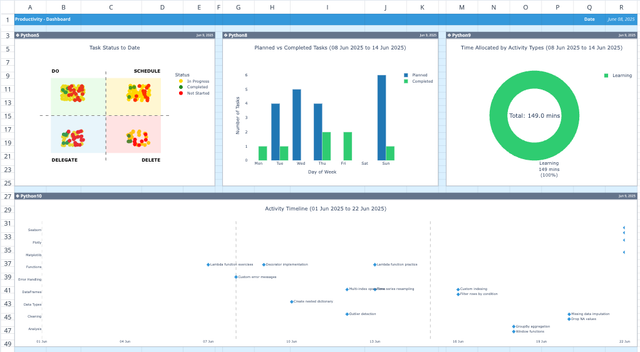
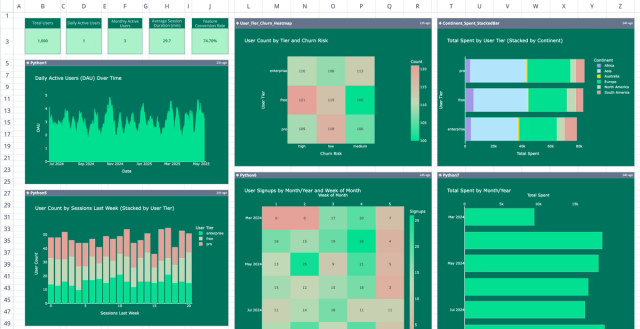
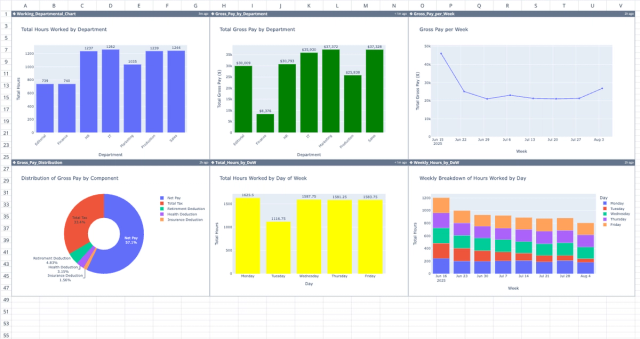
Quadratic simplifies KPI tracking by combining data analysis, modeling, and visualization within a single spreadsheet environment. Teams can connect directly to live data sources, analyze metrics using formulas or code, and create visual dashboards without switching tools.

AI data analysis and visualization

Quadratic’s built-in AI capabilities help teams analyze KPI data quickly and uncover meaningful trends. Users can prompt the AI to explore datasets, generate analysis queries, or identify unusual changes in key metrics.

This makes it easier to understand why KPIs are moving in a certain direction. Instead of manually combing through large datasets, analysts can quickly surface patterns and correlations that reveal the drivers behind performance changes. Let’s see how it works.

First, I import my dataset into Quadratic:

Data imported in Quadratic: best kpi software

Data analysis and visualization in Quadratic: best KPI tracking software

Suppose I want to get insights into the KPI performance per department, all I need to do is ask using plain English:

In this image, I ask prompt Quadratic AI, “Analyze the average 'target_achievement_pct' for each 'department' and identify which departments are performing best and worst.”

It creates a breakdown of the best and worst departments and also generates a chart to easily visualize the result. Quadratic’s AI-generated visualizations help stakeholders quickly see how metrics are trending, identify performance gaps, and track progress toward business goals.

Native support for programming languages

Quadratic is also a coding spreadsheet that supports programming languages such as Python, SQL, and JavaScript directly within the spreadsheet. This allows analysts to perform advanced KPI calculations, run statistical analyses, or perform quantitative data analysis without leaving the platform.

For example, teams can use Python libraries to analyze customer retention trends, model revenue growth, or forecast future KPI performance. This level of flexibility makes Quadratic particularly useful for organizations that want to go beyond simple dashboard reporting.

Collaboration

KPI tracking often requires a collaboration analytics platform that connects analysts, product teams, operations leaders, and executives.

By working within the same collaborative environment, teams can review metrics, discuss trends, and align on performance goals more effectively. This approach reduces confusion and ensures everyone is working from the same set of metrics.

Direct connection to multiple data sources

KPIs are most valuable when they reflect the latest business performance. Quadratic allows users to query databases directly using SQL or connect to APIs and other operational data sources.

This ensures KPI dashboards can update with live data, giving teams real-time visibility into important metrics.

How Quadratic compares with the best KPI tracking tools

In this section, we’ll see how Quadratic compares with other KPI tracking tools.

MetricQuadraticPower BITableauGeckoboard
AI-Driven KPI analysisBuilt-in AI helps analyze datasets and identify KPI trends or anomalies directly in the workspaceAI Copilot can generate summaries, visuals, and insights from datasetsLimited built-in AI; mostly visualization-driven insightsMinimal AI analysis; primarily dashboard monitoring
AI-Generated KPI VisualizationsGenerate charts and dashboards using Python libraries or AI prompts for flexible KPI reportingAI Copilot can generate report visuals from natural language promptsStrong visualization tools but typically created manuallyPrebuilt KPI widgets and templates
Programming Language SupportNative support for Python, SQL, and JavaScript for custom KPI calculations and analytics workflowsUses DAX and Power Query for modeling and transformationsUses Tableau calculations and optional Python/R integrationNo native programming environment
Data connectivityConnect directly to databases and APIs to track KPIs with live operational dataConnects to many enterprise data sources and unified dashboardsStrong connectivity to cloud data warehouses and BI sourcesConnects to 90+ business tools to display live KPIs
Predictive KPI TrackingSupports predictive analytics and forecasting directly with Python ML librariesAutoML models can generate predictions inside dashboardsExternal ML integrations needed for predictive modelsLimited predictive analytics capabilities
CollaborationReal-time collaboration in shared workspaces for teams to build and iterate KPI reports togetherDashboards can be shared across teams with role-based accessStrong sharing and publishing features for dashboardsDashboards can be shared via links

Conclusion

The best KPI tracking system is ultimately the one that your team trusts enough to act on. That trust is not built through pretty colors or complex charts, but through transparency and reliable data flows. By treating KPI tracking as a governance system rather than just a display problem, you ensure that your metrics serve as true guides for your business strategy.

Quadratic allows you to build a comprehensive and functional KPI dashboard with live connected data so your team can monitor the right metrics. Try Quadratic for free.

Frequently asked questions (FAQs)

What defines the best KPI tracking system for actionable insights?

The best KPI tracking system goes beyond mere observation, focusing on actionability to drive decisions. It balances both leading and lagging indicators and provides crucial context like targets, historical benchmarks, and variance analysis on your KPI dashboards.

Why is data trust critical for effective KPI tracking software?

Data trust is critical because inconsistent definitions, unreliable data flows, or hidden calculation logic can erode confidence and derail strategic discussions. The most effective KPI tracking software establishes trust through consistent definitions, automated data pipelines, and transparent logic, ensuring everyone believes in the numbers.

How does Quadratic enhance the transparency of KPI dashboards?

Quadratic empowers users to build transparent KPI dashboards by centralizing data and calculation logic in a collaborative spreadsheet environment. It allows stakeholders to inspect the underlying Python or SQL code for any metric, fostering trust and clarity in how each KPI is derived, making it a powerful solution among the best KPI tracking tools.

Quadratic logo

Get started for free

The AI spreadsheet built for speed, clarity, and instant insights, without the pain.

Try Quadratic free