QuickBooks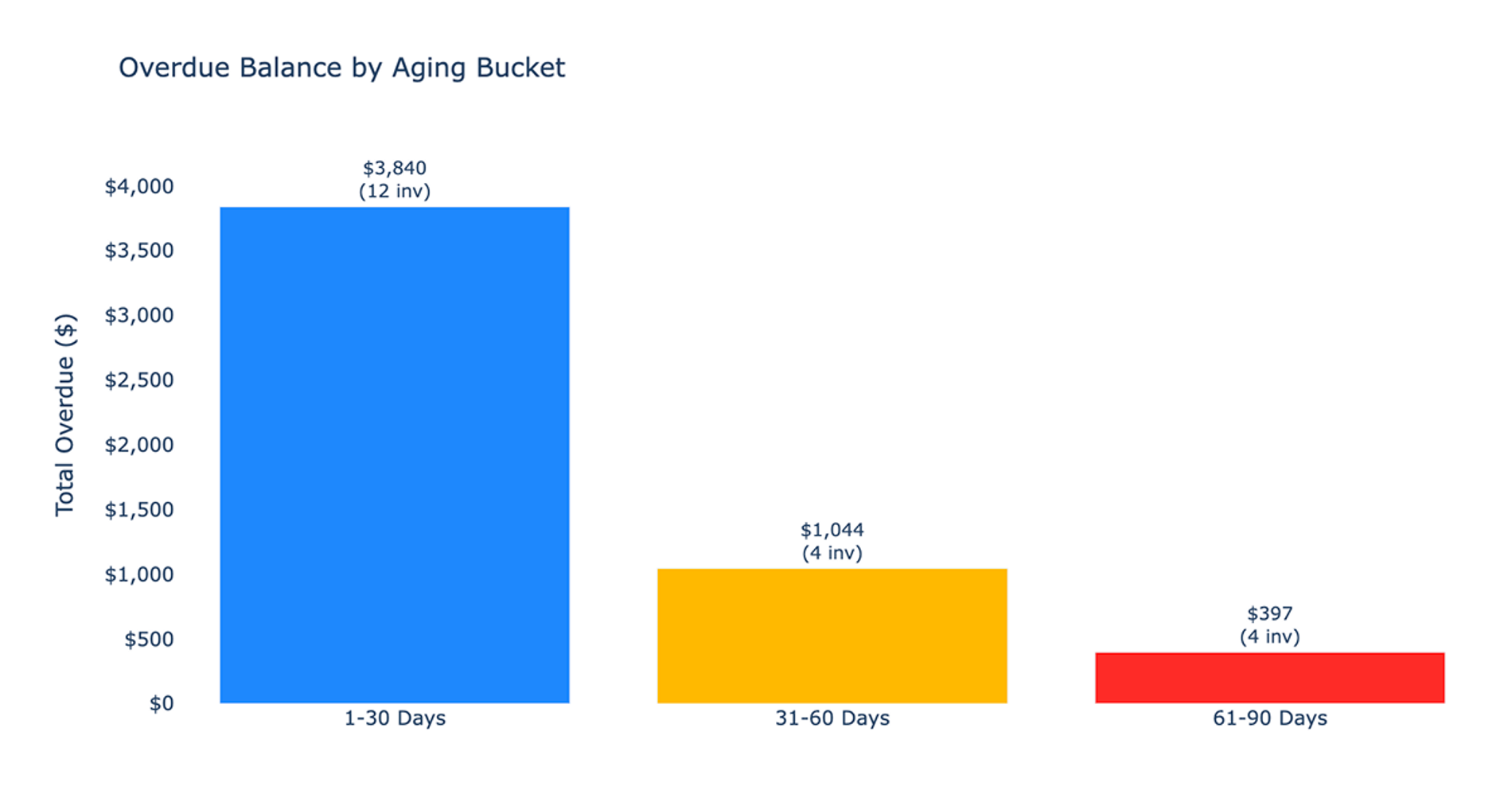
What you’ll get
- Overdue invoices table
- Top overdue customers
- Aging summary
- Follow-up priorities section
What this recipe does
This recipe connects directly to your QuickBooks data to identify, age, and prioritize unpaid customer accounts for collections follow-up. It automates the entire aging and prioritization process, replacing the need to maintain a manual overdue invoice template.
By analyzing your live data, the recipe surfaces customer concentration risks and provides practical recommendations for immediate collection actions.
Connected data used for overdue invoices
The workflow pulls raw data directly from your selected QuickBooks connection. It automatically locates the primary invoices connection table within your schema to begin the financial data analytics.
To ensure accuracy, the recipe requires a direct balance field to determine the remaining amount due without needing to infer open balances from separate payment records. From this table, it extracts key details including invoice identifiers, document numbers, transaction dates, due dates, customer names, total amounts, remaining balances, currencies, and sales terms.
How the review workflow progresses
Initial data inspection and setup
The recipe inspects the source tables to confirm the presence of an invoices table and a reliable balance field. It then initializes an as-of date control set to the current date to anchor all aging calculations.
Each record is evaluated to determine if an invoice overdue condition is met, defined as having a positive balance and a due date earlier than the as-of date. Finally, it generates a current filters section documenting the connection used, the as-of date, the overdue definition, and any data limitations.
Core analysis and aging calculation
Once the setup is complete, the recipe builds a base query containing all necessary invoice history. It calculates the exact days an overdue invoice has been outstanding relative to the as-of date.
Each unpaid record is then categorized into standard aging buckets of 1 to 30, 31 to 60, 61 to 90, and 90 plus days.
Optional customer drill-down
After the main report is built, the recipe offers exactly one follow-up step to drill into a specific customer selected from the main report.
If selected, it creates a dedicated sheet focusing entirely on the chosen customer. This view compiles that customer's complete invoice history, total invoiced, total overdue, payment activity, and aging distribution. It also generates a written assessment recommending specific collection actions for that customer.
What the recipe builds
Analytical tables
The workflow generates four distinct tables to organize your accounts receivable data:
- Overdue Invoices table detailing invoice numbers, customers, dates, days overdue, original amounts, current overdue amounts, and aging buckets
- Aging Summary table aggregating invoice counts and total overdue balances by aging bucket, including a total row
- Customer Overdue Summary table ranking customers by total overdue balance, showing overdue invoice count, maximum days overdue, and primary aging bucket
- Largest Overdue Invoices table listing the top ten highest-value overdue accounts
Visualizations
To make the data easier to interpret, the recipe creates two charts for financial reporting:
- Bar chart displaying the total overdue balance across each aging bucket
- Horizontal bar chart ranking the top overdue customers by total balance
Text summaries and priorities
Alongside the data tables and charts, the recipe provides written context to guide your next steps:
- Follow-Up Priorities section highlighting recommended actions based on largest balances, oldest ages, multiple unpaid bills, and higher aging bucket concentrations
- Plain-language summary explaining the total overdue balance, aging distribution, and customer concentration risks
- Risks and opportunities section noting potential escalation concerns, data limitations, or unrecorded overdue invoice charges
Who this Overdue Invoices Review recipe is for
This recipe is built for teams and individuals who need clear visibility into unpaid accounts:
- Accounts receivable and finance teams needing to track and manage outstanding balances for effective month end close accounting
- Business owners looking for immediate visibility into cash flow bottlenecks and customer concentration risk
- Collections staff requiring prioritized lists of which customers to contact first based on balance and age