QuickBooks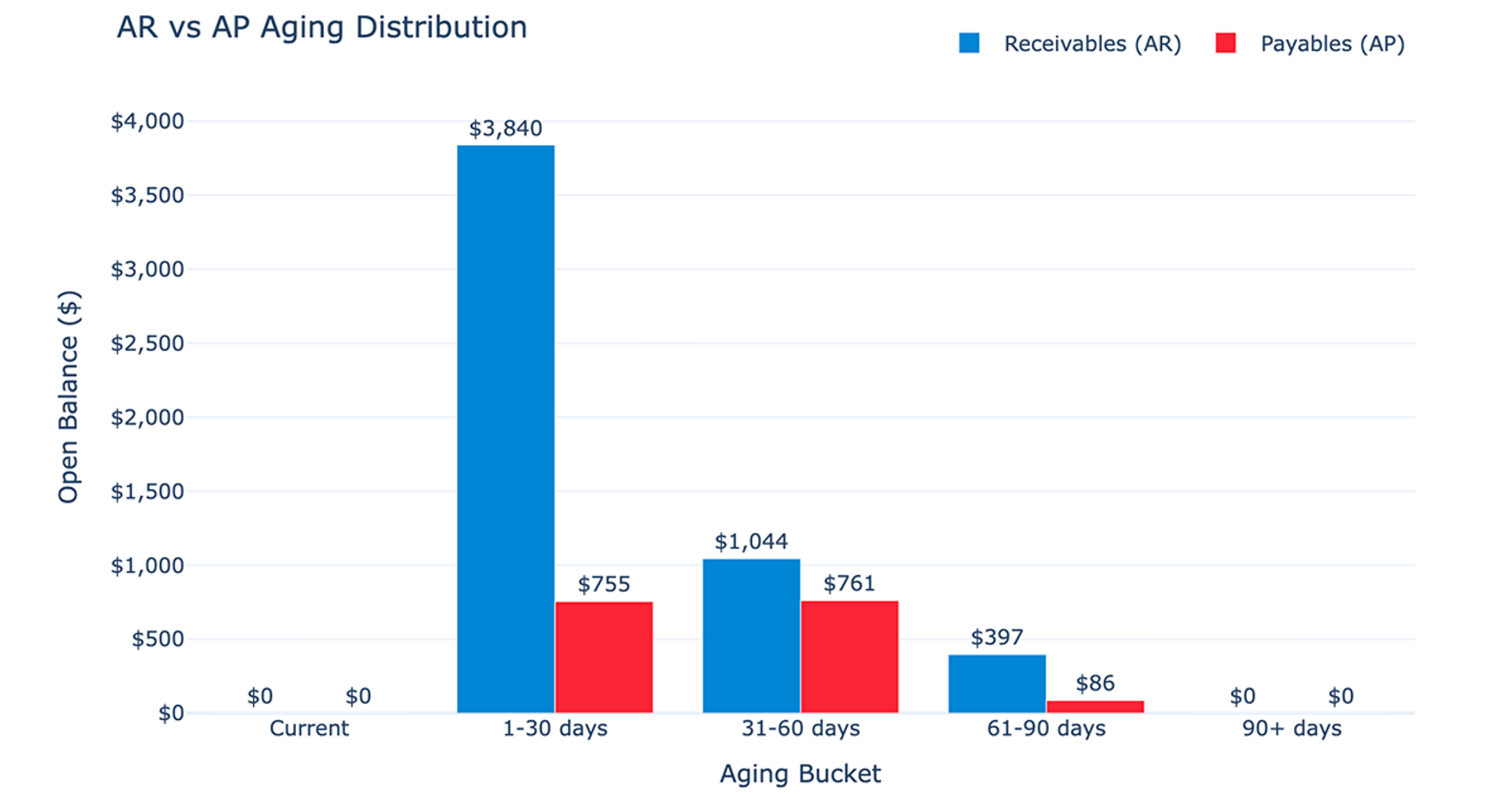
What you’ll get
- Close issue summary
- Uncategorized / suspicious item review
- Issue distribution charts
- AR/AP aging profile chart
- Large balance change review
What the Month-End Close Accounting recipe does
This recipe produces a Month-End Close Prep Pack designed to surface items that require attention before finalizing a financial period. By connecting directly to your accounting data, it automates the data-gathering phase of the month end close process and consolidates your transaction history into a unified format.
The workflow evaluates data across five specific risk categories. It identifies uncategorized transactions, flags unusual journal entries, highlights large account balance changes, and reviews aging working-capital items. Finally, it generates an actionable summary that assesses the overall cleanliness of the period and highlights the biggest risks so you can close with confidence.
Connected data used in this workflow
This workflow uses raw data pulled directly from a selected QuickBooks connection. It builds a comprehensive view of your finances by extracting and combining several key datasets:
- Unified transaction history combining purchases, invoices, bills, payments, deposits, sales receipts, credit memos, and bill payments
- Journal entries including dates, amounts, adjustment flags, and line details
- Chart of accounts data for current account balances, classifications, and account types
- Open receivables and open payables derived from invoices and bills with positive remaining balances
Because QuickBooks only provides point-in-time account balances without historical snapshots, the recipe relies on transaction activity to approximate balance changes.
How the month end close accounting workflow progresses
The recipe begins by inspecting the underlying QuickBooks schema to discover available tables and columns for transactions, entries, and balances. It then queries date ranges across key transaction tables to set the most recent full month as the default close period and the prior month as a comparison period.
Next, Quadratic creates five reusable source tables containing all available history for transactions, journal entries, balances, receivables, and payables. The workflow evaluates this source data to compute issue counts, total amounts, and priority ratings for the five core issue categories. Finally, it surfaces these flagged items in detailed review tables to support standard accounting month end close procedures.
What the recipe builds
Running this recipe generates a complete, interactive report sheet inside Quadratic. The outputs include:
- Editable dashboard controls for adjusting the close period start and end dates
- A filters and assumptions section documenting the active connection, active periods, issue checks, and data limitations
- A Python-driven Issue Counts summary table detailing the counts, amounts, and priority ratings for each issue category
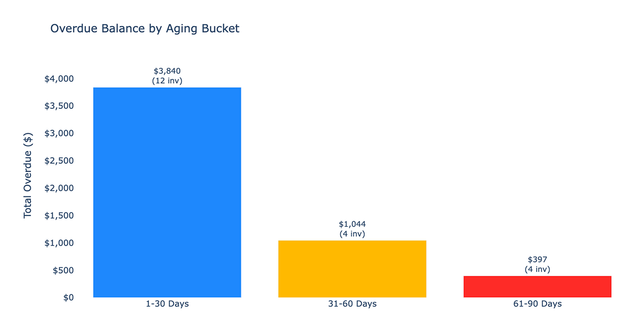
- Detailed review tables for uncategorized transactions, unusual journal entries, large account balance changes, overdue receivables, and overdue payables
- Two charts visualizing the issue distribution by category and the AR versus AP aging profile
- A plain-language close summary assessing overall period cleanliness and highlighting top risks
Optional drilldown: Issue type analysis
After the main report is built, the recipe supports an optional follow-up analysis. It accepts a user selection to drill into one specific issue category, such as uncategorized transactions.
Where the schema allows, this drilldown generates a detailed breakdown of the selected issue by transaction type and entity. It performs concentration analysis and applies priority flags for entities exceeding specific dollar thresholds. The result is a dual-panel chart and a plain-language summary indicating which items should be reviewed first.
Who this Month-End Close Accounting recipe is for
This recipe is built for finance professionals who need to streamline their period-end reviews:
- Accounting teams needing an automated month end close checklist accounting workflow to catch categorization errors
- Finance managers looking to quickly review unusual journal entries and large account balance changes before locking a period
- Controllers requiring visibility into overdue invoices and the accounts payable month end close process to manage working capital risks