You are working all the time, but the bank account doesn't seem to reflect the effort. It is a source of anxiety that highlights the common financial management challenges independent contractors face, often keeping them up at night. You send invoices and log hours, yet at the end of the month, the liquidity just isn't there, highlighting the need for a comprehensive freelance income tracker.
The problem often lies in how we measure work. Most advice suggests signing up for a rigid time tracking app for freelancers or, conversely, manually typing start and stop times into a static Excel sheet. Neither method gives you the full picture. One is a stopwatch; the other is a calculator. Neither connects your effort directly to your actual cash flow.
To run a sustainable business, you need a workflow that combines time logs with financial reality in a single view, often best managed through an automated accounting spreadsheet. Effective freelance time tracking isn't just about counting minutes; it is about connecting effort to income to reveal your true profitability. By using a connected spreadsheet like Quadratic, you can bridge the gap between your calendar and your bank account.
Why you need to track "effective rate," not just hours
There is a significant difference between your "billable rate" (what you quote the client) and your "effective hourly rate" (what you actually earn). Your effective rate is calculated by dividing your total income from a project by the total hours worked—including the unbilled administrative time, revisions, and meetings. For a deeper dive, learn how to calculate your effective hourly rate.
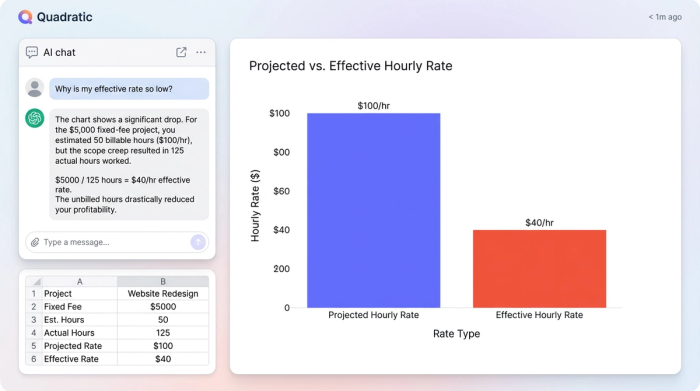
This is where the "fixed-fee trap" destroys margins, illustrating the common risks associated with fixed-price projects for freelancers. If you quote a client $1,000 for a website refresh expecting it to take 10 hours, your projected rate is $100 per hour. However, if scope creep sets in and the project drags on for 25 hours, your effective rate drops to $40 per hour. If you had expenses—like stock photos or plugin licenses—that rate drops even further.
A standard freelance time tracker will tell you that you worked 25 hours. It does not instinctively warn you that your margin has collapsed. By the time you realize the project was a financial drain, you have already moved on to the next one. To fix this, you need a system that functions as a comprehensive income and expense tracker for freelancers, giving you a real-time look at your margins.
The landscape: rigid apps vs. manual spreadsheets
When looking for a solution, freelancers usually find themselves stuck between two extremes.
On one side, you have SaaS tools. The best time tracking app for freelancers often comes with slick mobile interfaces and timers. However, these tools usually keep your data in a silo. They are excellent at logging time but poor at flexible financial modeling. You generally cannot import a live feed of your bank transactions to compare against your time logs without complex integrations or expensive enterprise tiers.
On the other side, you have traditional spreadsheets. Using a free time tracker for freelancers often means downloading a basic Excel template. While this offers flexibility, it requires manual data entry. You have to type in every hour worked and every payment received. This friction leads to procrastination, and eventually, the spreadsheet is abandoned.
Quadratic offers a third path: the connected spreadsheet. It provides the infinite canvas and custom logic of a spreadsheet but allows you to pull in live data from banks, payment processors, and databases. This creates a time tracking software for freelancers workflow that is both automated and deeply customizable.
The workflow: linking hours to profit in Quadratic
The power of using a tool like Quadratic lies in its ability to sync disparate data sources—your time logs and your money—into one cohesive view. Here is how a real-world workflow operates when you move beyond simple clock-punching.
Step 1: The input (time)
First, you set up a simple data table in Quadratic to act as your log. Because Quadratic supports Python and SQL natively, you can query this data easily later, but the entry can be as simple as columns for "Date," "Client," "Project," "Hours," and "Notes." You or your subcontractors log time here as you work.
Step 2: The sync (money)
Instead of manually typing in when an invoice is paid, you use Quadratic’s built-in integrations to pull live data from your bank or payment processor (like Stripe or PayPal). This creates a live ledger of actual deposits and expenses that updates automatically. You are no longer guessing if a client has paid; the data is right there in the grid.
Step 3: The connection
With both datasets in the same environment, you can map specific time logs to specific income events. You can write simple formulas or use SQL queries to group total hours worked by project and subtract any project-specific expenses found in your bank feed from the total revenue.
Step 4: The result
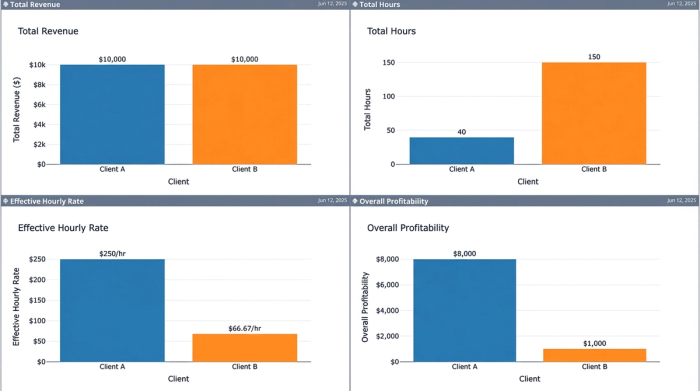
The spreadsheet now automatically calculates the "Real" hourly rate for that specific project based on actual cash received versus hours logged. You might discover that while you billed Client A and Client B the same $2,000 fee, Client A required 15 hours of work while Client B required 40. Your dashboard instantly highlights that Client A is more than twice as profitable, providing key insights for P&L analysis and project profitability.
Using a freelance time tracking app workflow inside a programmable spreadsheet transforms data into a decision-making engine.
Analyzing your business intelligence
Once this system is running, it changes how you manage your week. You are no longer just looking at a list of tasks; you are analyzing business intelligence, underscoring the value of integrating various data sources for business intelligence.
You can instantly identify leaks in your revenue. Perhaps you notice a recurring pattern of "unbilled tweak time" on projects that use a specific software stack. Or maybe you see that travel expenses are eating into the margins of your consulting gigs because you aren't billing for mileage correctly.
This data allows for objective client comparison. You can view a scatter plot of your clients, mapping them by "Effective Hourly Rate" vs. "Total Revenue." You will likely find high-maintenance clients who pay a lot in total but very little per hour, and low-maintenance clients who generate high effective rates.
A healthy routine involves a "Monday Morning Review." Before you start your week, you check your Quadratic dashboard. You look at which projects are approaching their hourly budget caps and which invoices are outstanding. This ensures you never work for free and helps you prioritize high-value work over low-value busy work.
Is a free time tracking app enough?
Many solopreneurs start their search looking for a free time tracking app for freelancers. If your only goal is to know how many hours you sat at your desk, a free app is sufficient. It functions perfectly well as a digital stopwatch.
However, if your goal is to run a profitable business that scales, focusing on efficient small business operations, a stopwatch is not enough. You need financial modeling. Free apps rarely offer the ability to cross-reference time logs with bank feeds or create custom profitability formulas. Quadratic offers a tier that allows for this sophisticated modeling without the limitations of standard "free" apps, giving you the power of a data analyst without needing to hire one.
Conclusion
Freelance time tracking is a financial activity, not just an administrative one. Every hour you log is a cost, and every payment you receive is revenue. If your tools keep these two datasets separate, you will never see the full picture of your business's health.
Don't settle for tools that force you to choose between automation and customization. By using a connected spreadsheet, you can link your hours to your profit and pay, ensuring that you are compensated fairly for the value you provide. You can start tracking your effective rate today by setting up a simple profitability template in Quadratic.
Use Quadratic to track freelance time and profit
- Automatically link your time logs with live income and expense data from banks and payment processors.
- Instantly calculate your true "effective hourly rate" and project profitability, revealing actual margins.
- Uncover hidden revenue leaks and identify which projects are genuinely profitable, not just high-billing.
- Build a dynamic, customizable dashboard that provides a real-time, comprehensive view of your freelance business's financial health.
- Streamline your financial reviews, ensuring you always work for fair compensation and prioritize high-value tasks.
Start making smarter financial decisions for your freelance business. Try Quadratic.
