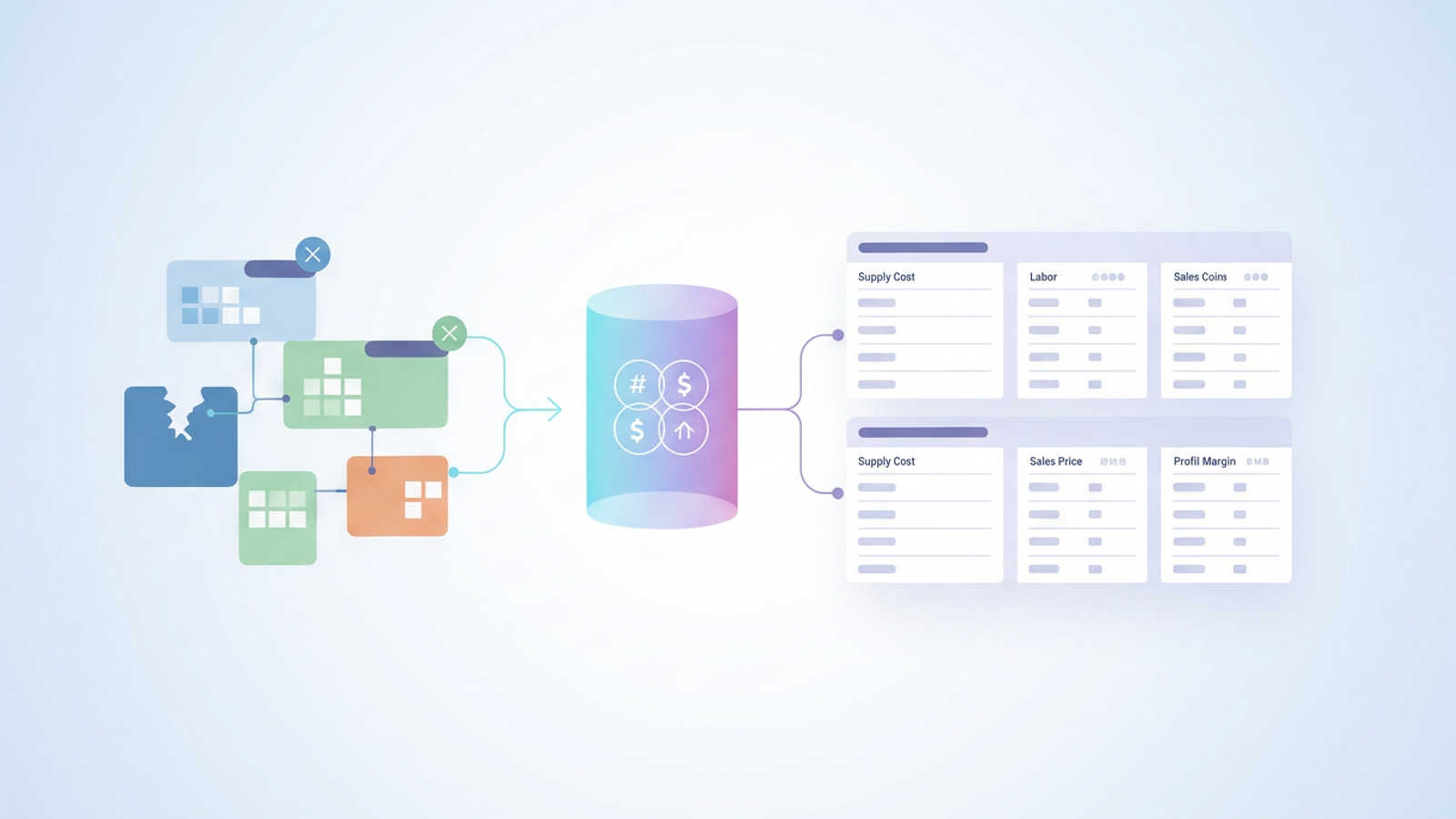
Importing vendor pricing data only to have your formulas immediately break is a frustrating reality for many hospitality managers and executive chefs. Accurate recipe costing, much like managing a detailed budget format for an event, is about more than just high-level business strategy. It requires a foundation of reliable, clean data. Without it, your menu pricing becomes a guessing game.
Quadratic offers a practical solution to this exact problem. It allows food and beverage professionals to clean messy vendor data and create professional, multi-sheet recipe cards without the headache of fragile spreadsheets.
The business value of accurate recipe costing
Mastering your menu costs is vital for restaurant survival. In an industry where notoriously thin margins prevail, being a few cents off on a core ingredient can severely impact your profitability over time.
A true recipe cost encompasses several moving parts, including your supply cost, labor, and wastage, all feeding into the resulting total cost. Accurate inputs are the only way to generate reliable outputs like your sales price, profit margin, adjusted sales price, and mark-up price, often determined by a precise food cost percentage formula.
Many managers start this process by downloading a basic recipe cost calculator. However, as a menu grows and vendor prices fluctuate, managing these calculations requires a robust, standardized system capable of handling real-world complexity, often informed by principles of menu engineering.
The common pitfall: messy data and broken templates
Standard spreadsheet templates often fail when applied to real restaurant operations. When you export pricing data from a vendor portal or a point of sale system, the numbers frequently import as text.
This seemingly small data formatting issue breaks everything. Formulas fail to compute, profit margins calculate incorrectly, and your carefully formatted recipe costing template suddenly becomes useless, highlighting the critical need to audit an operational performance report.
A generic free recipe costing calculator might work perfectly for a single dish typed out by hand, but it falls apart when you try to scale it across multiple categories using imported data, a common challenge in small business operations. Generic troubleshooting guides rarely address the specific, high-stakes complexities of restaurant menu management.
How to build and fix your recipe cards in Quadratic
Let us look at a practical workflow using Quadratic as your food recipe costing software. Imagine managing standardized recipe cards across four separate sheets, each representing a different menu category, while ensuring every calculation is perfectly accurate.
Step 1: organizing multi-sheet menu categories
Instead of cramming all your dishes into one overwhelming view, Quadratic allows you to separate the menu into distinct sheets. You can easily create dedicated tabs for Appetizers, Mains, Desserts, and Beverages. This separation ensures financial data integrity and makes it much easier for your culinary team to navigate the workbook during a busy shift or planning meeting.
Step 2: fixing "text-to-number" formula errors
The most common technical hurdle in this process is dealing with imported vendor prices that format as text. When a spreadsheet reads a price like "4.50" as a text string instead of a number, any formula relying on that cell will return an error.
Quadratic makes it simple to convert these text strings back into numeric values. You can clean the data without altering the actual values or wasting hours manually retyping vendor prices. This ensures your foundational data is structurally sound before any math takes place.
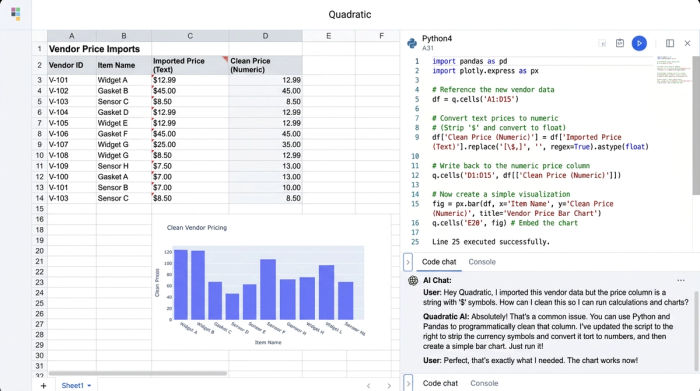
Step 3: calculating margins, waste, and pricing
With clean data in place, Quadratic functions as an advanced recipe costing calculator. You can confidently build out your columns. Supply Cost, Labor, and Wastage all feed directly into your Total Cost, and this robust data foundation also supports advanced inventory analytics.
From there, you use the Total Cost to automatically calculate the Sales Price, Profit Margin, Adjusted Sales Price, and Mark-up Price. Because the underlying data is clean and correctly formatted, these formulas update reliably whenever ingredient costs change.
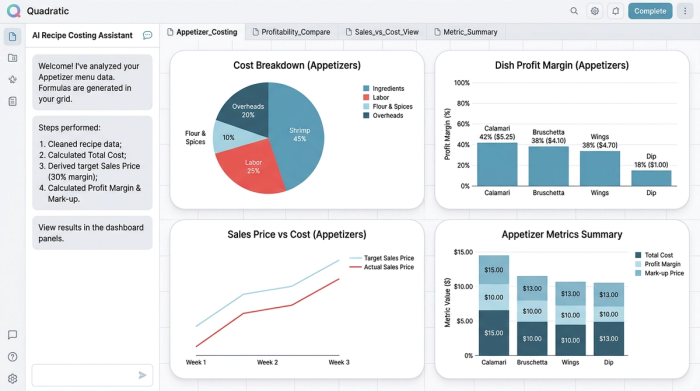
Step 4: formatting for presentation-ready recipe cards
A chef or manager needs a card that is easy to read on the line, in the prep kitchen, or during a stakeholder meeting. Quadratic allows you to easily format these sheets for professional presentation.
You can merge header rows for clear titles, apply consistent alignment across columns, and ensure a readable layout across all four sheets. The result is a standardized recipe card that looks as good as the math behind it.
Why Quadratic is the best recipe costing software for hospitality
Quadratic is a data handling powerhouse that brings the familiarity of a spreadsheet into a modern, browser-based environment, ideal for tasks like ecommerce product data management. The best recipe costing software must handle the reality of restaurant data, which includes managing messy vendor imports, supporting complex multi-sheet categorization, and providing the tools for pristine presentation.
Unlike clunky legacy inventory systems or fragile workbooks that break at the slightest formatting change, Quadratic keeps your logic, context, and outputs secure in one collaborative workspace, representing a significant step in data analytics modernization. It bridges the gap between raw, messy data and actionable financial insights.
Conclusion
Accurate recipe costing relies entirely on clean data and clear formatting. When you remove the friction of broken formulas and messy imports, you gain true visibility into your profitability and can make confident pricing decisions.
Try Quadratic to fix your broken formulas, clean up your vendor data, and build scalable, professional recipe cards today.
Use Quadratic to Master Your Recipe Costing
- Convert messy vendor data to usable numbers instantly, preventing formula errors and ensuring accurate ingredient costs from the start.
- Organize multi-sheet recipe cards for different menu categories, making complex menus easy to manage and navigate with clear separation.
- Calculate precise profit margins and sales prices by building reliable formulas on clean data, adapting instantly to ingredient cost changes.
- Format presentation-ready recipe cards that are clear, consistent, and professional for both kitchen staff and financial reviews.
- Centralize all recipe costing logic and data in a single, collaborative workspace, eliminating the pain of fragile, disconnected spreadsheets.
Take control of your menu profitability. Try Quadratic.
