
Managing a high volume of paper or PDF invoices is a major bottleneck for grocery and retail operations. Relying on manual data entry leads directly to costly errors—with typical manual data entry error rates hovering around 1% even for experienced staff—and messy inventory systems. To fix this, operations professionals need a reliable way to transform raw invoice data into standardized, enriched, and actionable inventory data. This is the core of retail product data enrichment. Finding the best retail product data enrichment approach does not mean you have to buy massive, rigid enterprise software. Instead of relying on expensive black box systems, we will show you how to execute this workflow yourself using a flexible, next generation spreadsheet.
What is the retail product data enrichment process?
At its core, the retail product data enrichment process involves taking raw, unstructured product data from vendor invoices and transforming it into a clean, standardized format. This means fixing messy descriptions, categorizing items, and adding missing attributes so the data is completely ready for your point of sale or inventory management system.
Many companies choose to outsource this work to a retail product data enrichment service, but implementing robust ecommerce product data management in-house is now highly achievable with modern tools. Standardized data ensures operational efficiency, makes products easily discoverable, prevents massive financial losses due to poor product data quality, and provides a solid foundation for robust inventory analytics. Most importantly, it allows you to maintain the critical accounting process of inventory valuation by clearly tracking the difference between unit costs and retail pricing.
The challenge: moving from PDF invoices to actionable inventory
Retail automation presents several specific pain points. Operations teams deal with a relentless volume of invoices, and extracting data from PDFs manually almost always results in data entry errors.
The biggest hurdle is the data standardization challenge. Vendors rarely use the same naming conventions. One supplier might bill you for "Hnz Ktchp 32oz" while another writes "Heinz Ketchup 32 oz bottle." This leaves inventory managers struggling with a messy excel sheet filled with inconsistent product descriptions and missing granular attributes. Traditional solutions force you into rigid Master Data Management tools or require complex coding to fix these discrepancies. Relying on outdated retail product data enrichment technology often creates more friction than it solves, leaving teams stuck between manually updating a basic inventory tracking template and navigating inflexible enterprise databases.
A hands-on retail product data enrichment solution
To see how this works in practice, let us look at a real world scenario. A grocery retail operations professional needs to process incoming PDF invoices and turn them into clean inventory data. They need a retail product data enrichment solution that is adaptable to their specific daily workflows.
This is where Quadratic serves as the ideal retail product data enrichment platform. Quadratic is an AI powered spreadsheet that combines the familiarity of a traditional grid with the power of Python, SQL, and automated logic. It allows retail professionals to build custom workflows that clean and categorize data instantly.
Step 1: ingesting and extracting PDF invoice data
The workflow begins by pulling extracted invoice data directly into Quadratic. Using standard document parsing or optical extraction tools, the user extracts the text from the PDF invoices and brings it straight into the spreadsheet canvas.
Seeing this raw data in a flexible grid rather than a rigid database provides a massive advantage. It allows for immediate visual inspection of quantities, raw descriptions, and pricing totals. This initial step of retail product data enrichment automation ensures that no data is lost in translation between the vendor invoice and your internal systems.
Step 2: normalizing brands and standardizing identifiers
Once the raw data is in the grid, the next step is data cleaning. Invoices often contain messy strings that combine quantities, brands, and product types. For example, a user might need to extract exact quantities from a string like "12x16oz Tomato Paste" to turn it into usable numerical columns for inventory counts.
Using custom logic inside Quadratic, the user can easily normalize brand information. They can write a quick formula or a short Python script right in the cell to standardize variations like "Hnz", "Heinz Co.", and "Heinz" into a single, clean brand identifier. This same process is used to standardize UPCs and SKUs, ensuring that every product maps perfectly to the existing inventory database.
Step 3: calculating unit costs and retail prices
Accurate inventory accounting is critical for grocery retail. Once the quantities and identifiers are clean, the user must determine the exact cost of each item.
Because they are working in a flexible spreadsheet environment, the user can apply predefined business rules directly to the data. They can calculate accurate unit costs by dividing the invoice totals by the newly extracted numerical quantities. From there, they can calculate the final retail price based on specific margin rules for the grocery sector. This keeps pricing accurate and ensures that profit margins remain protected.
Step 4: enriching categorical and department labels
The final step of the workflow is mapping the cleaned products to specific store departments and granular categories. This categorization is vital for improving operational reporting and organizing the store floor.
Modern workflows can utilize AI directly within the spreadsheet to speed up this process. By leveraging retail product data enrichment AI, the user can prompt the built in ai spreadsheet analyzer to automatically suggest or map categories based on the cleaned product descriptions. The AI can instantly recognize that a standardized bottle of ketchup belongs in the condiments aisle, saving hours of manual tagging.
Why a flexible workspace beats rigid enterprise software
The workflow demonstrated above highlights the immense value of handling your data in a modern, flexible workspace. Operations professionals need tools that adapt to their specific business rules, rather than forcing the business to adapt to rigid software limitations.
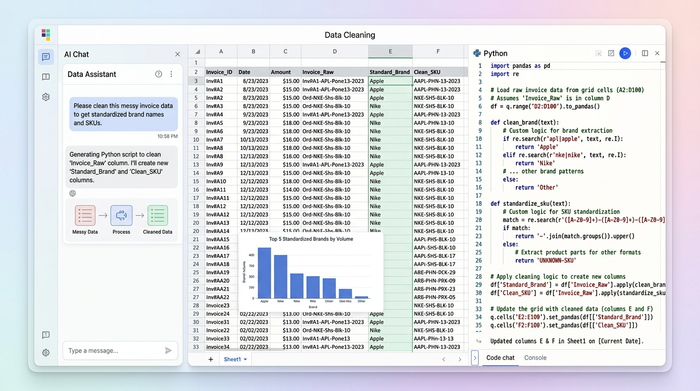
By combining Python, SQL, formulas, and AI into a single browser based canvas, Quadratic gives you the power to automate complex data cleaning tasks without losing the intuitive feel of a spreadsheet. You can connect directly to your data sources, clean incoming invoices, and calculate pricing all in one place. If you are ready to build your own automated invoice to inventory pipelines, try Quadratic today and see how fast your data workflows can be.
FAQs
What is retail product data enrichment?
It is the process of taking raw, unstructured product information and cleaning, standardizing, and categorizing it. This ensures that the data is accurate and fully prepared for inventory management and point of sale systems.
How does AI improve retail product data enrichment?
Using retail product data enrichment AI allows teams to automate tedious tasks like categorization and anomaly detection. The AI can instantly read messy product descriptions and suggest the correct department or missing attributes without manual intervention.
Why is data normalization important in retail?
Understanding the broader benefits of data normalization is key, as standardizing vendor variations into a single format eliminates duplicate assets and reporting blind spots.
Use Quadratic to do retail product data enrichment
- Ingest and inspect PDF invoice data directly in an infinite grid, making it easy to visually verify quantities, pricing, and raw descriptions.
- Standardize inconsistent vendor data and messy brand names using native Python, SQL, and formulas right inside your spreadsheet cells.
- Automate unit cost and retail price calculations based on your specific margin rules to keep inventory valuation accurate.
- Categorize products instantly using built-in AI tools to map items to the correct store departments and aisles without manual tagging.
- Connect directly to your inventory databases and schedule background updates to keep your entire pipeline running automatically.
Ready to turn messy vendor invoices into clean, actionable inventory data? Try Quadratic
