
Tax season frequently involves wrestling with monster spreadsheets filled with raw, hard-to-read data. When you are staring at thousands of rows of financial information, proper tax return presentation is not just about making things look pretty. It is about structural integrity, clarity, and preparing your documents for the second reader, whether that is an auditor, manager, or client.
This guide walks through a real-world workflow of transforming a messy, multi-sheet 2025 tax file into a premium, audit-ready document optimized for A4 printing using Quadratic, including workflows that benefit from a QuickBooks spreadsheet sync for importing bookkeeping data into a spreadsheet-ready format.
Why tax return presentation matters for audit-readiness
Visual design, print layout, and audit compliance are deeply interconnected. A poorly formatted document increases audit risk and review time. Conversely, a logically organized and visually clear document builds trust and defensibility, which is crucial for effective tax reconciliation. When an auditor or senior accountant reviews your files, they look for a clear separation of assumptions from formulas, consistent logic, and immediate visual clarity. Effective tax return presentation ensures that the reviewer spends their time verifying your accurate data rather than trying to decipher a chaotic layout.
The scenario: Taming a multi-sheet 2025 tax return spreadsheet
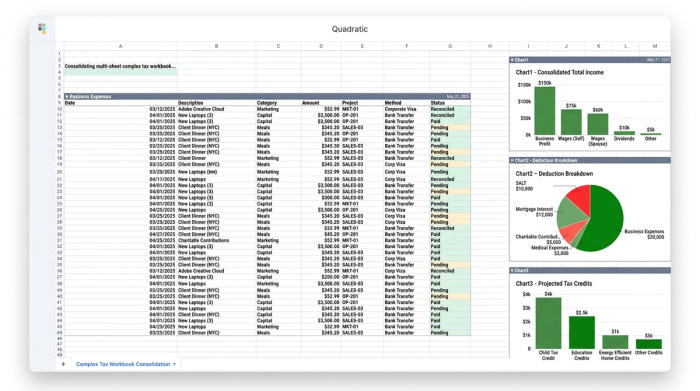
Managing a complex 2025 tax return spreadsheet can quickly become overwhelming. In this real-world scenario, a user needed to process a comprehensive workbook containing separate sheets for business, personal, and spouse tax returns. The files contained critical details including income, expenses, credits, deductions, and supporting documentation, which is why strong QuickBooks analytics workflows are so valuable when reviewing bookkeeping data before tax preparation. The primary challenge was not the accuracy of the data, but its visual chaos. The goal was to clean, structure, and format these existing sheets to a premium quality standard without having to spin up new, fragmented files or risk breaking the underlying financial logic.
Step-by-step: Formatting your tax files for the "second reader"
These formatting steps are not arbitrary design rules. They are essential actions to achieve professional clarity and print-readiness for any reviewer.
1. Establish cross-sheet consistency
Maintaining the exact same structure from tab to tab reduces friction for the reviewer, allowing them to intuitively know where to look for specific deductions or income totals. Quadratic allows users to effortlessly manage this consistency across multiple sheets without breaking formulas or duplicating work, keeping the entire tax file cohesive.
2. Apply premium visual design for readability
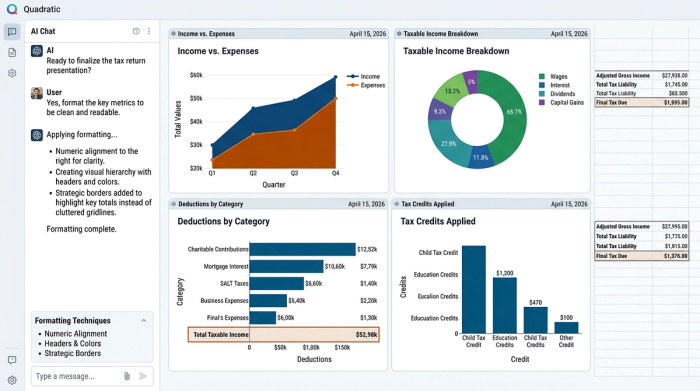
A professional layout guides the eye. Start by right-aligning numeric data and left-aligning text to make scanning numbers much easier. Next, establish a clear visual hierarchy by merging title and header cells, and applying bold, colored fills to section and column headers. Finally, remove standard, cluttered gridlines. Instead, purposefully add borders only to specific data ranges to draw attention to final totals and key financial metrics.
3. Optimize for A4 printing and PDF export
Even in a digital world, physical print layout optimization is highly sought after by accounting professionals. For this specific workflow, the user standardized all text to font size 12 and meticulously resized rows and columns for standard A4 printing. Formatting for physical or PDF output forces a level of discipline that inherently improves the document's audit-readiness. This ensures the final tax return presentation is flawless, whether reviewed on a screen or a printed page.
How Quadratic streamlines complex tax workflows
Traditional spreadsheet software often struggles with multi-sheet formatting and monster files, creating friction when you try to apply uniform styles. Upgrading your tax return spreadsheet workflow to Quadratic provides an infinite canvas where you can apply premium styling, ensure multi-sheet consistency, and organize complex tax data seamlessly. The user in our scenario was able to achieve an expert-level, polished result without needing to create new files or lose their underlying data structure. Quadratic keeps all logic, context, and outputs in one place.
Conclusion: From raw data to a defensible document
Meticulous formatting transforms a raw data dump into a professional, defensible tax document, a key component of best financial reporting. Right-aligning numeric data, applying colored headers, and optimizing for A4 printing are critical steps in the broader workflow of preparing finalized tax returns that are easy to review, submit, and audit. By prioritizing clarity, you ensure that your financial data is always ready for expert review. Try Quadratic today to build your next audit-ready financial model or tax document with speed and precision.
Use Quadratic to Streamline Your Tax Return Presentation
- Standardize multi-sheet tax files: Effortlessly maintain consistent formatting and logic across all sheets (business, personal, spouse) in a single workbook, preventing errors and ensuring structural integrity.
- Produce audit-ready documents: Apply premium visual design—like precise data alignment, clear headers, and purposeful borders—to transform raw data into a defensible, easy-to-review tax return.
- Optimize for print and PDF export: Meticulously format layouts for flawless A4 printing and professional PDF output, meeting the strict presentation standards required by auditors and clients.
- Consolidate complex tax data: Keep all financial logic, context, and outputs in one unified workspace, avoiding fragmented files and simplifying the management of comprehensive tax returns.
Prepare your next audit-ready tax document. Try Quadratic.
