James Amoo, Community Partner
Mar 9, 2026

Finance and operations leaders often begin the search for new software because they are drowning in broken spreadsheets, version control issues, and stale data. The assumption is usually that better algorithms or smarter AI will fix forecasting errors or streamline business data analysis. However, the root cause of a failed forecast is rarely the math itself. It is the friction in the process and the inability to iterate quickly when assumptions change.
The best forecasting software isn't solely defined by the complexity of its prediction engine. It is defined by the workflow it enables. It depends on how easily teams can ingest live data, collaborate on assumptions without breaking formulas, and iterate on models in real time.
When evaluating the market, you will generally encounter three main categories: traditional spreadsheets, rigid FP&A modeling suites, and modern connected platforms. Understanding which category solves your specific workflow bottlenecks is the first step toward building a forecast your team can actually trust.
Why the best forecasting software is about workflow
Most forecasting failures stem from process friction rather than statistical inaccuracy. If a finance team spends three days analyzing CSV files from different departments, the data is often obsolete by the time the forecast is presented. In this context, the best tool is one that reduces the time between data exploration and insight.
A common issue with high-end financial forecasting tools is the black box problem, highlighting the critical need for AI transparency and trustworthiness in finance. These platforms often ingest data and output a number using proprietary logic that users cannot easily see or edit. If stakeholders cannot trace the logic behind a revenue projection, they are less likely to trust it. When a forecast misses the mark, the team needs to know exactly which variable caused the variance.
Speed of iteration is another critical factor. Markets change rapidly, and a static annual budget is rarely sufficient. The best software bridges the gap between static budgeting and continuous planning, allowing teams to update inputs and see the downstream impact on cash flow instantly.
The three categories of forecasting tools
To find the right fit, it helps to map the landscape of available tools based on their flexibility and structure.
1. Traditional spreadsheets
Tools like Excel and Google Sheets remain ubiquitous because they offer unmatched flexibility. However, they rely heavily on manual data entry and fragile cell references. As models grow, they become more error-prone, with the average error rate in manual data entry at about 1%, leading to broken links and version-control nightmares. They also lack real-time connections to data sources, forcing teams into a cycle of manual updates.
2. Dedicated FP&A and demand planning SaaS
On the other end of the spectrum are dedicated SaaS platforms. These are powerful AI forecasting tools that offer structure, security, and specialized features for demand planning or financial consolidation. The downside is rigidity. Implementation can take months, and once the system is set up, changing a workflow or model logic often requires expensive consultant hours or a support ticket.
3. Modern AI and connected spreadsheets
These tools retain the familiar spreadsheet grid interface but offer backend capabilities such as SQL, Python, and direct data integrations. This allows teams to pull live data and perform advanced predictive modeling and analytics without losing the flexibility to edit cells and change assumptions on the fly. For many teams, this represents the best forecasting tools approach because it combines the power of a database with the usability of a spreadsheet.
Key criteria for evaluating forecasting software
When vetting potential solutions, look beyond the feature list to the mechanics of how work actually gets done.
Data connectivity
The tool must connect directly to your sources of truth, such as data warehouses (Snowflake, Postgres) or APIs, adhering to data management best practices in FP&A. If a tool requires you to download a CSV from your CRM and upload it manually, it introduces latency and human error. The best forecasting software automates data ingestion so your model always reflects the current reality.
Transparency and auditability
Users should be able to clearly trace the logic behind every number. Code-based approaches often provide greater transparency than deeply nested spreadsheet formulas. When the underlying logic is easy to read and understand, it becomes easier to audit and validate, which ultimately builds greater trust in the results.
Collaboration
Forecasting is a team sport, often formalized through approaches like Collaborative Planning, Forecasting, and Replenishment (CPFR). Sales leaders need to input quotas, and engineering leads need to update hiring plans. Look for multiplayer features that allow simultaneous editing without creating conflicting file versions. AI dynamic forecasting capabilities are useless if only one person can access the model at a time.
Scenario modeling speed
You need the ability to perform scenario analysis instantly. Can you duplicate a model, change the churn rate by 5%, and immediately compare the cash impact against the baseline? The ability to run these scenarios without breaking the core model is essential for strategic decision-making.
Quadratic: the AI-powered forecasting software
Modern forecasting requires more than static spreadsheets or rigid planning tools. Teams need the ability to analyze large datasets with spreadsheet automation, test different assumptions, and quickly build sales data visualizations for better forecasting.
Quadratic approaches forecasting from a different angle by combining the familiar interface of spreadsheets with the analytical power of programming languages like Python and SQL. Instead of switching between BI tools, notebooks, and spreadsheet models, Quadratic streamlines data blending and allows analysts to perform the entire forecasting workflow in a single environment.
AI-powered data analysis and visualization
Quadratic includes built-in AI agents for data analysis that help analysts explore datasets and uncover patterns that influence future outcomes. Users can prompt the AI to analyze historical data, identify trends, and suggest relevant analytical approaches for forecasting.
This significantly speeds up the early stages of building forecasting models. Instead of manually writing complex queries or scripts, analysts can quickly generate analysis code, detect correlations in historical data, and focus on refining predictive assumptions. Let’s see an example.
First, I import my dataset into Quadratic:
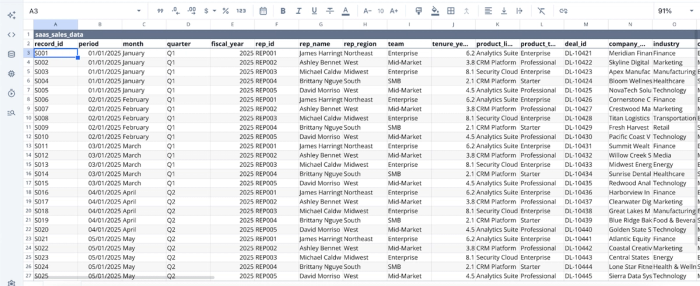
After you import your data, you can immediately begin analysis by using text prompts. Here:
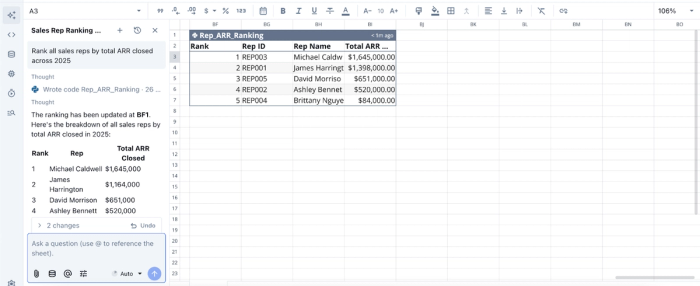
In this image, I ask Quadratic to “Rank all sales reps by total ARR closed across 2025”, and it generates a table showing the sales rep with the highest ARR in 2025.
Using this approach, Quadratic also allows users to generate charts and visualizations using AI prompts or code, making it simple to visualize trends, projections, and model outputs. Here:
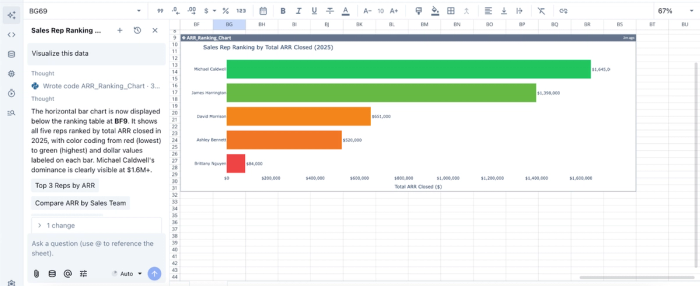
In this image, I simply tell Quadratic to “Visualize this data,” and it intelligently creates a bar chart based on the analysis we conducted earlier.
Native support for programming languages
One of Quadratic’s most powerful forecasting capabilities is being a coding spreadsheet that supports languages such as Python, SQL, and JavaScript directly within spreadsheet cells. Analysts can use Python libraries to build AI models, run regressions, and perform time-series forecasting.
Since this functionality exists directly in the spreadsheet interface, analysts can combine SQL data analytics with traditional spreadsheet workflows. This makes Quadratic particularly valuable for teams that need both flexibility and technical depth in their forecasting models.
Live connection to multiple data sources
Forecasts are only as accurate as the data behind them. Quadratic allows users to connect directly to databases, raw data, and APIs. This ensures that forecasting models can run on fresh data rather than static exports.
With real-time data access, organizations can continuously update forecasts as new information becomes available. This helps teams respond faster to changing business conditions and adjust projections accordingly.
Real-time collaboration
Finance teams, analysts, and business leaders often need to review and iterate on projections together. Quadratic is also a collaborative analytics platform, allowing multiple users to work on the same analysis or forecasting model simultaneously.
It provides a collaborative environment that makes it easier to review assumptions, validate forecasting logic, and ensure alignment across teams before decisions are made.
How Quadratic compares to other forecasting tools
In this section, we will explore how Quadratic compares to other popular forecasting tools.
| Metric | Quadratic | Anaplan | Salesforce | Aviso |
|---|---|---|---|---|
| Forecasting flexibility | Fully customizable forecasting using Python, SQL, and spreadsheet formulas | Structured planning models with limited customization | Sales pipeline forecasting is mainly tied to CRM data | Primarily sales forecasting models |
| Modeling capability | Supports AI-driven modeling and statistical models | Scenario-based planning models | CRM-driven predictions | AI-driven revenue predictions |
| Data connectivity | Direct connections to multiple databases, raw data, and APIs | Integrates with enterprise systems but requires configuration | Native Salesforce ecosystem integrations | Focused on CRM data sources |
| Data Exploration | Spreadsheet interface allows ad-hoc analysis alongside forecasts | Primarily planning dashboards | CRM dashboards | Focused revenue dashboards |
| Collaboration | Supports real-time collaboration across teams right within the spreadsheet | Enterprise planning collaboration tools | Sales team collaboration through CRM | Sales team collaboration features |
| Use Cases Beyond Forecasting | Data analysis, business intelligence, product management, sales, marketing, finance. | Enterprise planning and budgeting | CRM, sales automation, and customer management | Revenue operations insights |
Conclusion
The search for the best forecasting software should start with a workflow audit, not a feature checklist. Ask yourself where your current process breaks down. Is it data latency? Is it version control? Is it a lack of trust in the numbers?
For many teams, moving away from the spreadsheet interface entirely is a mistake because it sacrifices necessary flexibility. The goal is to upgrade the spreadsheet’s engine. By adopting tools that combine live data connectivity, transparent logic, and collaborative features, you empower your team to own the numbers. The right tool allows you to iterate faster, adapt to market changes instantly, and ultimately trust the output of your forecast.
Quadratic allows users to build a forecasting workflow with live data, editable assumptions, and scenario models your team can actually maintain and trust. Try Quadratic for free.
Frequently asked questions (FAQs)
What are the main types of financial forecasting tools available today?
The market generally offers three primary categories: traditional spreadsheets like Excel for unmatched flexibility, rigid dedicated SaaS platforms for specialized functions such as best inventory forecasting software or best AI demand forecasting tools, and modern AI spreadsheets.
How does Quadratic help teams solve common challenges in demand and financial forecasting?
Quadratic acts as a modern AI spreadsheet, allowing teams to pull live data directly via SQL and run sophisticated forecast models using Python within a familiar grid. This approach eliminates manual data handling, provides transparent logic for auditability, and enhances AI tools dynamic forecasting capabilities for applications like revenue forecasting tools or best cash flow forecasting software.
What key criteria should teams consider when evaluating the best forecasting tools?
When evaluating AI forecasting tools, it is crucial to prioritize direct data connectivity to sources of truth, ensuring the model always reflects current reality. Transparency and auditability of the logic, robust collaboration mechanics for team input, and the speed of scenario modeling are also essential for effective decision-making.
