Plaid
Plaid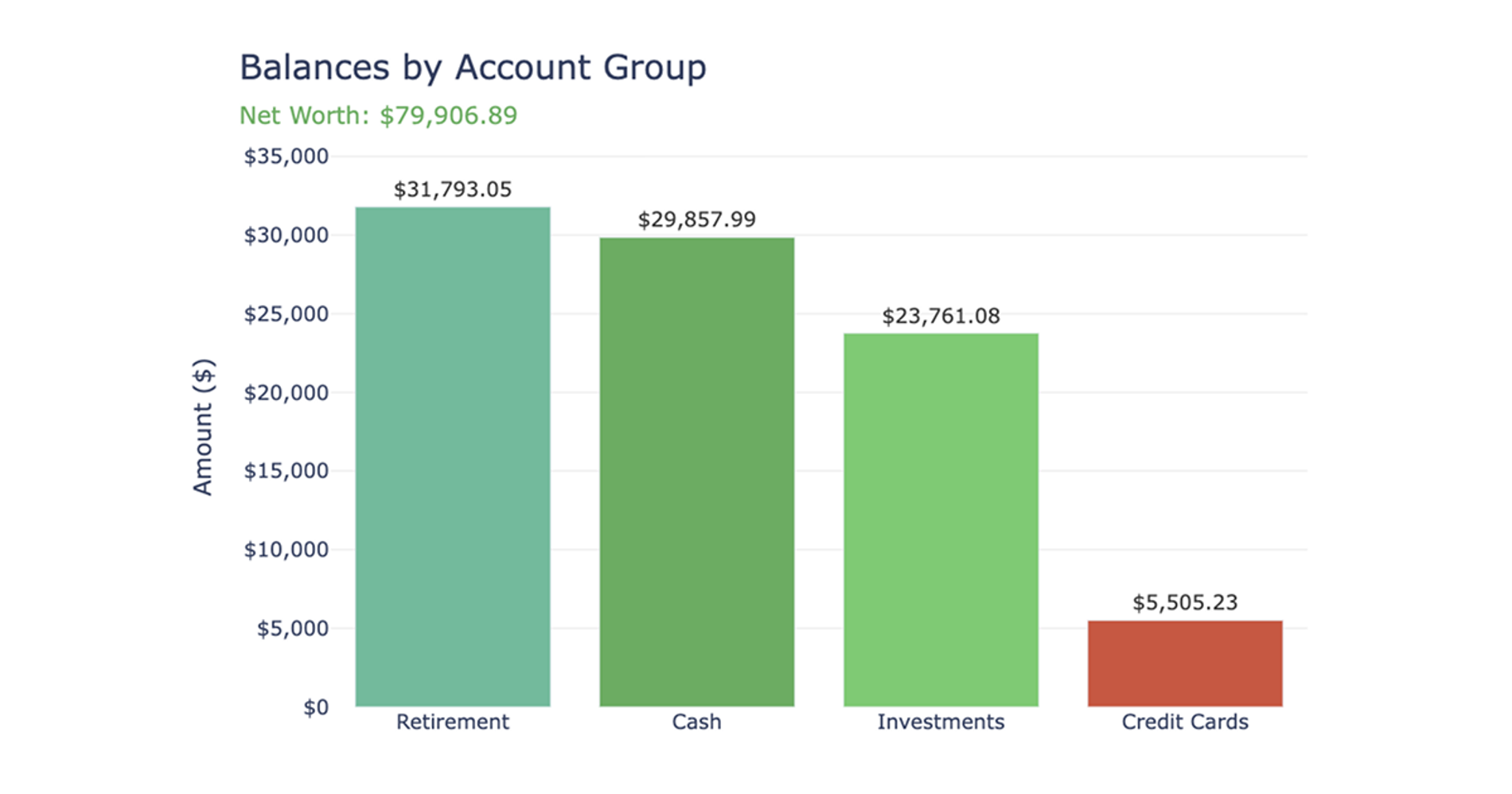
What you’ll get
- Net Worth Summary table
- Account Detail table
- Portfolio Allocation table
- Assets vs liabilities chart
- Plain-language takeaways
What this net worth calculator does
This Net Worth Calculator builds a current-state financial snapshot, much like other personal finance templates, by aggregating account balances directly from your live data connections. Instead of relying on static exports or manual budget spreadsheets, the recipe automatically pulls your latest balances and categorizes them into assets and liabilities. It then calculates your total assets, total liabilities, and overall net worth, giving you a dynamic and up-to-date view of your financial position in a single workspace.
Data sources and inputs used to calculate your net worth
To generate your financial snapshot, this recipe pulls raw data from your selected Plaid connection balance tables. It relies on the following inputs:
- Institution names, account names, account types, and subtypes from your connected financial sources
- The most recent balance dates and values for each account to ensure an accurate current-state view
- Optional manual data entry cells, which allow you to include non-connected accounts or unsupported institutions in your final calculation
How the workflow progresses
Discovery and confirmation step
Before building any tables, the recipe queries all available Plaid connections within your file. It inspects the returned accounts and makes an initial classification of your assets and liabilities. You are then presented with a structured summary of the found connections and account groups. The recipe prompts you to confirm which specific connections to include in the final scope and provides an option to generate editable input cells for any manual account additions.
Data processing and classification step
Once your scope is confirmed, the recipe standardizes the column schemas across all selected connection tables. Every account is tagged with its source institution name, and records are deduplicated to retain only the most recent balance per account.
The workflow then maps account subtypes to primary categories—such as Cash & Savings, Investments, Retirement, and Credit Cards. For those focused on growing their liquid assets, a savings account interest calculator can provide detailed projections. If specific subtypes are unclear, it applies conservative fallback classifications based on parent account types. Finally, all balance values are rounded to prevent display artifacts in your final reports.
Outputs and visualizations created
Foundation and summary tables
- Account Detail table: A comprehensive list displaying the institution, account name, type, classification, category, current balance, and data source for every included account.
- Net Worth Summary table: A high-level view calculating your total assets, total liabilities, and the final net worth.
- Accounts By Type table: A rollup that groups your balances by category and classification for quick review.
- Portfolio Allocation table: A detailed breakdown of each asset group's balance and its percentage share of your total assets.
Charts
- A bar chart comparing total assets against total liabilities, featuring a clear net worth annotation.
- A bar chart displaying balances by account group, with your overall net worth value embedded directly in the subtitle.
- A donut chart visualizing your asset allocation percentages, with total assets displayed in the center.
Plain-language takeaways
Alongside the data, the recipe generates a short text summary highlighting your final net worth figure. It identifies your largest asset and liability groups, which can be further optimized with a debt avalanche calculator or similar analysis, and offers high-level observations on your portfolio diversification. It also includes data quality notes, calling attention to any zero-balance accounts or uncertain classifications that might require your review.
Optional account group drilldown
After the main snapshot is built, the recipe supports an optional deeper analysis. It prompts you to select a specific account group—such as Investments or Credit Cards—to explore further. If chosen, the recipe filters the scope to show the individual accounts within that group, displaying their specific balances and their percentage share of the group total.
Who this net worth calculator recipe for
- Individuals looking to calculate net worth automatically using live banking data
- Users who need to consolidate and monitor balances across multiple financial institutions, potentially benefiting from a couples budget template for shared finances.
- People who want to see exactly how their net worth is calculated by breaking down their specific assets and liabilities
- Users who need to track both connected accounts and manual offline assets in a single, unified snapshot