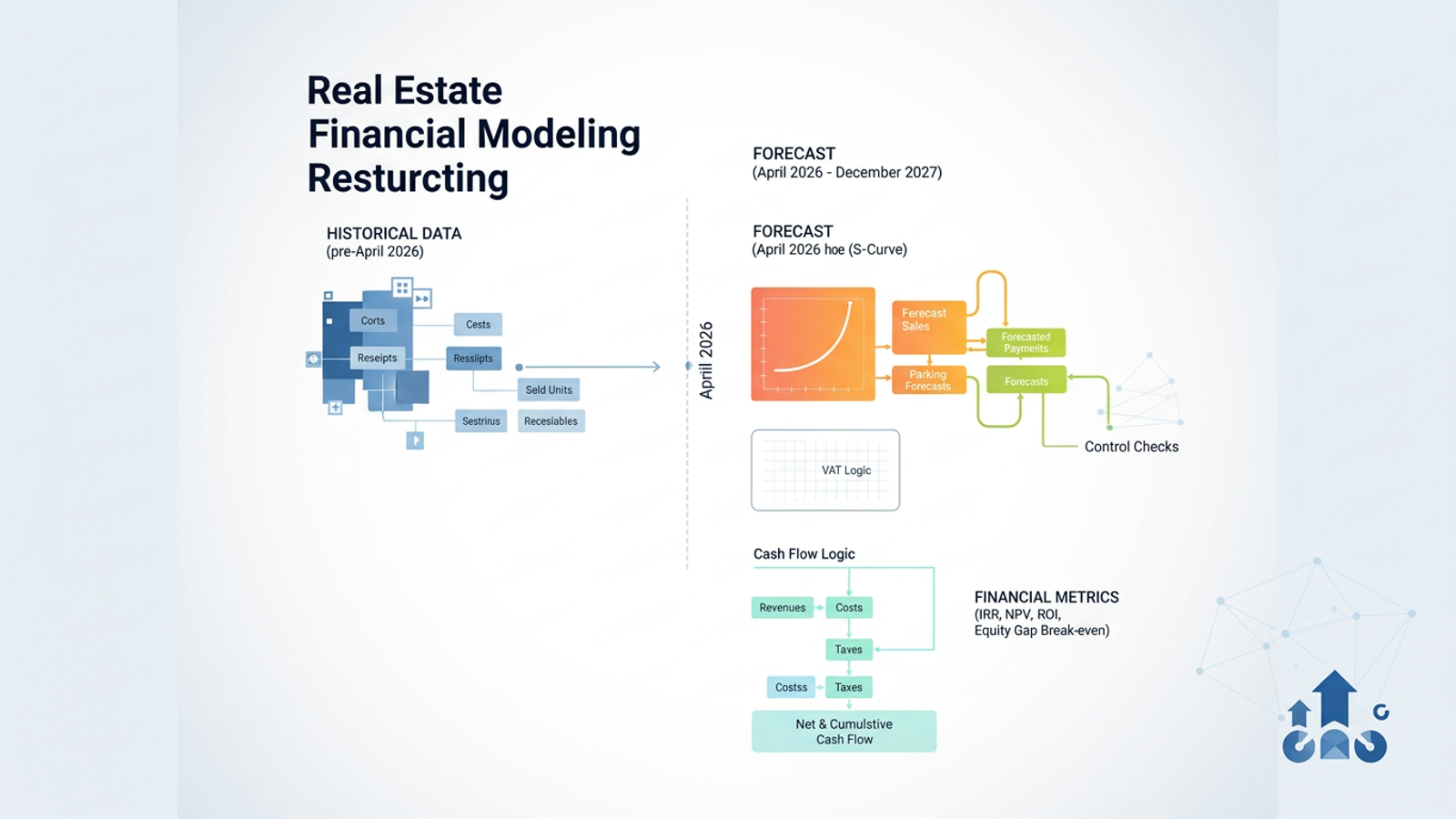
Building a new project from a blank slate is straightforward. Restructuring a live, complex model mid-project is a completely different challenge. When it comes to real estate financial modeling, whether for development projects or asset acquisition, professionals often find that as projects progress, historical actuals and future forecasts become hopelessly tangled.
This entanglement leads to broken formulas and dangerous double-counting. The solution is a forecast-only model setup, which provides a method to cleanly split historical data from future cash flows.
In this article, we will walk through a real-world scenario. We will restructure an active development model to isolate a forward-looking forecast spanning April 2026 through December 2027 using modern spatial spreadsheet techniques in Quadratic.
The challenge of restructuring real estate financial models
Most guides on financial modelling for real estate tell you to simply download a new financial forecast template. However, in the real world, you cannot just abandon your existing formulas and hard-earned project logic. You have to work with what you have.
Traditional spreadsheet tab-juggling introduces significant risks. Moving data across hidden tabs often leads to accidental data duplication and broken cell references. The ultimate goal of restructuring real estate financial models and improving overall FP&A modeling is total model clarity. You need highly distinct sections for inputs, historical data, sales, costs, VAT, cash flow, and financial metrics without losing the integrity of your original work.
Why you need strict control checks
When restructuring, error prevention is your highest priority. Separating historical actuals from future forecasts is the single most effective way to prevent double-counting revenues or costs.
Without strict boundaries, a sunk cost from last year might accidentally roll into next month's cash flow projection. Establishing dedicated control checks ensures that your active timeline remains untainted by past data.
Step-by-step workflow: Building a forecast-only model in Quadratic
When updating a real estate financial model mid-flight, you need a workspace that adapts to your logic, making Quadratic one of the best forecasting software options available. Its infinite canvas allows for superior spatial organization, letting you visually separate sections without hiding them deep in forgotten tabs.
For this tutorial, we are restructuring an ongoing development project to create a strict forecast timeline starting in April 2026 and running through December 2027.
Step 1: Isolating historical data (pre-April 2026)
- Create a clearly labeled, dedicated section on the Quadratic canvas specifically for all pre-April 2026 data.
- Move your historical costs, customer receipts, sold inventory, and outstanding receivables into this distinct block.
- Leverage Quadratic's spatial canvas to visually group this data off to the side, keeping it entirely out of the way of your active forecast while perfectly preserving your original formulas and references.
Step 2: Splitting sales contracts & adjusting inventory
- Handle active sales contracts by splitting the actual contract amounts into two categories: historical amounts received before April 2026 and forecasted payments expected from April 2026 onward.
- Deduct your already sold units from the available stock so your new forecast only calculates based on the remaining inventory.
- Create distinct visual blocks for actual contract collections versus forecast sales to eliminate the risk of overlapping revenue.
Step 3: Implementing S-curve forecasting & VAT logic
- Apply S-curve forecasting to the remaining forecast sales for the April 2026 to December 2027 period to accurately model the absorption and sales pace.
- Set up your parking forecasts alongside the residential or commercial units, which is often a component of urban infrastructure upgrades.
- Ensure your VAT rules dynamically apply only to the relevant sales categories within the new forecast period, keeping tax projections accurate and compliant.
Step 4: Structuring forecast cash flows & control checks
- Build cash flow logic that strictly includes only forecast-period revenues, costs, commissions, and taxes.
- Ensure that pre-April 2026 costs are entirely excluded from this forward-looking view.
- Calculate the net and cumulative cash flow for the remaining project lifecycle.
- Implement crucial control checks using standard formulas or native Python and SQL within Quadratic to ensure total inventory sold plus remaining inventory perfectly matches your total units, preventing any double-counting.
Step 5: Calculating forward-looking financial metrics
- Compute your core performance indicators, including IRR, NPV, ROI, break-even date, and the equity funding gap.
- Rely on these metrics with confidence, knowing they are based solely on the clean forecast period and remain completely untainted by sunk costs or historical data noise.
Upgrading your tech stack: Real estate financial modeling software
Traditional spreadsheets often struggle with this type of extensive restructuring. Rigid grids, hidden tabs, and broken links make isolating data a frustrating experience.
This is why modern teams are turning to next-generation commercial real estate financial modeling software. Quadratic provides an infinite spatial canvas that makes it easy to map out distinct model sections for inputs, historicals, sales, costs, and metrics.
Beyond spatial organization, Quadratic integrates native Python and SQL for advanced data validation. This allows you to maintain your existing Excel formulas while upgrading the overall architecture of your workflow. As a powerful real estate financial modeling software, it brings clarity to complex, data-heavy projects.
Conclusion
A forecast-only model setup delivers unmatched clarity, accuracy, and error prevention for ongoing development projects.
Restructuring an existing model does not require starting from scratch or abandoning your hard work. By utilizing the right spatial organization and implementing strict control checks, you can safely transition your data into a clean, forward-looking timeline.
If you are tired of wrestling with tangled actuals and broken formulas, try Quadratic to organize your messy models, cleanly separate your historicals, and build more reliable forecasts today.
Use Quadratic to build forecast-only real estate models
- Cleanly separate historicals from forecasts: Use Quadratic’s infinite canvas to visually isolate past project data from your active forecast timeline, preventing entanglement and preserving original formulas.
- Prevent double-counting and errors: Dedicate distinct blocks for historical and forecast data, ensuring sunk costs don't accidentally impact future cash flow projections.
- Restructure complex models with confidence: Leverage spatial organization to move and group data without breaking cell references or losing the integrity of your hard-earned project logic.
- Implement robust control checks: Use standard formulas or native Python and SQL to validate inventory, sales, and costs, ensuring total accuracy for your forecast period.
- Generate reliable forward-looking metrics: Calculate IRR, NPV, ROI, and equity funding gaps based solely on clean, untainted forecast data for confident decision-making.
Ready to bring clarity to your real estate models? Try Quadratic.
