
Most travelers start a trip with a specific number in mind. You set a budget, perhaps using a 50 30 20 calculator, book your flights, and reserve accommodation, feeling confident that you have your finances under control. However, once the trip begins, that clarity often dissolves into a "financial fog," making it easy to lose track of spending until the credit card statement arrives weeks later, with surveys showing overspending is a top vacation challenge.
When people hear the term vacation tracker, they often think of an employee vacation tracker used by HR departments to log time off. However, for the modern traveler, the term has a more critical application: financial tracking. Just as businesses use sophisticated software, like a business expense tracker, to monitor their resources, individuals need a robust system to log and analyze spending during their time off.
Traditional methods, like saving receipts in an envelope or relying on a static vacation tracker Excel sheet, are often outdated. They provide lagging indicators—telling you what you spent long after the money is gone. To truly control travel costs, you need a dynamic workflow. Using a tool like Quadratic allows you to budget, sync transactions, and visualize costs in real time, bridging the gap between your financial plan and the reality of your trip.
Why you need "corporate-level" visibility for personal travel
In the corporate world, finance teams use advanced vacation tracking software, expense management tools, and corporate travel data analytics to prevent fraud and ensure compliance. They demand real-time visibility into cash flow. As a traveler, you should demand the same level of insight for your personal finances.
The core concept here is real-time data. If you are using a manual method to track expenses, you might not realize you have overspent on dining until you are back home. Corporate-level visibility means knowing you are $50 over budget on food while you are standing outside the restaurant, giving you the agency to make a different choice in the moment.
There is also a significant psychological benefit to this approach, as studies show that mental accounting and financial monitoring can improve self-efficacy and control. Travel can be stressful when you are vaguely aware that you are spending too much money but don't know the exact figure. By strictly monitoring your personal burn rate, you remove the anxiety of the unknown. Knowing exactly where your money is going allows you to relax and enjoy the experience, confident that your financial health is intact.
Phase 1: The setup (budgeting & categories)
The most effective tracking starts well before you board the plane. In Quadratic, you can utilize the infinite canvas to set up a dashboard that fits the specific structure of your trip.
Instead of a simple, unstructured list, you should organize your data by high-level categories, a practice central to effective expense management. Common buckets include Flights, Lodging, Food/Dining, Transportation, and Entertainment. Within your spreadsheet, set up columns for "Budgeted Amount," "Actual Spend," and "Variance." This structure allows you to immediately see how much "runway" you have left in each category.
While you could download a free employee vacation tracker Excel template and attempt to modify it for expenses, these templates are usually rigid and difficult to customize. They often force you into predefined rows and columns that don't match your itinerary. A canvas-based tool gives you the flexibility to place your budget data next to your itinerary, maps, and research notes, keeping all your context in one view.
Phase 2: During the trip (syncing & monitoring)
This is the execution phase, where the Quadratic workflow differentiates itself from standard spreadsheets. The goal is to move from manual entry to automated insight.
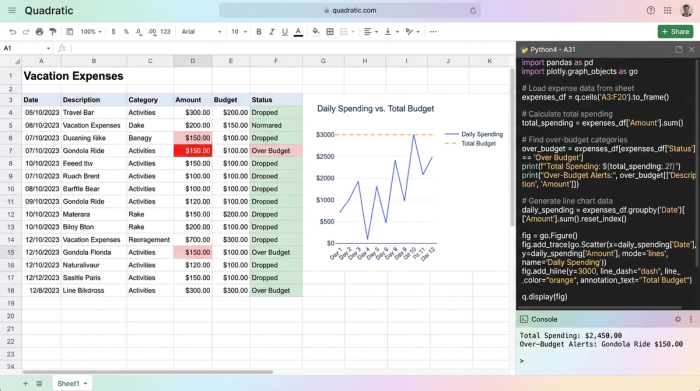
Rather than typing in every coffee purchase manually, you can ingest data by syncing card or bank transactions directly into the sheet, effectively using a bank account tracker. Once the data is in Quadratic, you can use Python or SQL—features native to the app—to automate the categorization process, a key aspect of modern financial management. For example, you can write a simple script that automatically tags any transaction containing "Uber," "Lyft," or "Train" as "Transportation." This eliminates the tedium of manual sorting and keeps your data clean with minimal effort.
To prevent overspending, you can set up conditional formatting or Python scripts to flag specific thresholds. You might configure the sheet to highlight the "Dining" cell in red once it exceeds 80% of the allocated budget. Furthermore, because Quadratic supports data visualization on the same canvas, you can create a simple chart that visualizes your daily burn rate against your remaining budget, similar to a cash flow calendar. This provides an instant visual check-in that is far faster to read than a wall of numbers.
Phase 3: The post-trip summary (analysis)
Once the trip is over, the vacation tracker transforms from a monitoring tool into an analysis tool. This is where you calculate the total cost of the trip and compare it against your initial plan through travel and expense data analytics.
Conducting a variance analysis allows you to see exactly where the "hidden costs" appeared. Did you spend 20% more on transportation because of unexpected roaming fees or surge pricing? Did currency conversion rates eat into your shopping budget?
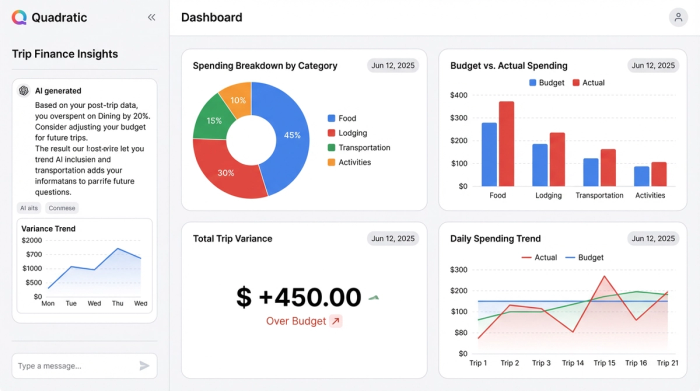
This data is invaluable for future savings. If your analysis reveals that you consistently underestimate food costs by 30%, you can adjust your allocation for the next trip. This transforms your travel budget from a guess into a data-backed financial plan.
Moving beyond static spreadsheets
It is time to elevate how we manage travel finances. While a standard vacation tracker Excel file might suffice for a weekend getaway, complex international travel requires more flexibility and power.
Standard vacation tracking tools are often designed with a specific, narrow use case in mind. A staff vacation tracker is built for HR compliance, and basic budgeting apps, like a family budget app, are often too simple for power users. Quadratic offers a unique middle ground: the ability to combine code for cleaning messy bank data, spreadsheets for structured budgeting, and an infinite canvas for visualization.
By using a tool that supports Python and SQL, you are not just listing expenses; you are building a personalized financial application. This allows you to handle complex scenarios—like splitting costs between friends, managing multiple currencies, or analyzing spending trends over several years of travel—that would break a traditional spreadsheet.
Conclusion
A vacation tracker is more than just a ledger of receipts; it is a tool for steering your financial behavior while the trip is happening. By shifting from reactive logging to proactive monitoring, you ensure that your travel memories aren't tainted by post-trip debt.
Don't let financial stress ruin your time off. Whether you are planning a massive international tour or a quick weekend escape, start building your travel dashboard using a vacation budget template in Quadratic today to keep your finances as organized as your itinerary.
Use Quadratic to track vacation finances
- Gain real-time visibility into your spending by syncing bank and credit card transactions directly.
- Automate expense categorization using Python or SQL to eliminate manual entry and keep data clean.
- Proactively monitor budgets with custom alerts and visualizations that flag potential overspending.
- Design flexible, category-based budgets on an infinite canvas that perfectly matches your trip's unique structure.
- Conduct detailed post-trip analysis to understand spending patterns and refine future travel budgets.
- Handle complex financial scenarios, such as splitting costs between friends or managing multiple currencies.
Ready to take control of your travel spending? Get started and Try Quadratic.
