
James Amoo, Community Partner
Jun 1, 2026

VBA still works. Decades after its debut, it powers monthly close models, pricing tools, and ops workflows in nearly every large company. But if you have spent any time inside a macro-heavy workbook lately, you have probably noticed that the world around VBA has changed faster than VBA has. That is why so many analysts and finance teams are actively searching for alternatives to VBA.
Modern spreadsheet work happens in the cloud, against live databases, with multiple people in the same file, and increasingly with AI in the loop. VBA was not built for any of that. Its logic lives in hidden modules that nobody opens until something breaks. Macros are brittle when source data shifts. Microsoft itself has clearly shifted investment toward Office Scripts and Power Automate. And handing off an .xlsm file to a new teammate often means handing off a black box.
Modern spreadsheet automation has evolved well beyond what macros were designed to handle, and this post is structured around the work you are actually trying to replace. We will map the most common VBA jobs to the modern tools that handle them best, then walk through how to migrate from a macro-heavy workbook without breaking what already works. If you have been looking for a clear alternative to VBA in Excel, or even a broader alternative to Excel itself, the goal here is to help you pick the right one for each job, not just the trendiest one.
What VBA was actually good at (and where it breaks down)
To choose a good alternative to Excel VBA, it helps to be honest about what VBA actually does well. Historically, VBA became the default automation layer for Excel because it solved real operational problems. Teams used it for repetitive task automation, report generation, custom functions, workbook formatting, data cleanup, and lightweight UI workflows built around forms and buttons. Those use cases still exist today. Finance teams still need recurring financial reports refreshed. Analysts still need messy CSV exports normalized. Operations teams still need spreadsheets to guide less-technical users and citizen developers through structured processes.
What has changed is the environment around those workflows. VBA can technically connect to modern systems, but it is rarely the cleanest or most maintainable path compared to Python, SQL, or native integrations. Performance also becomes a bottleneck as files grow, and collaboration around macro-enabled workbooks remains awkward. The larger issue, though, is transparency. VBA logic is buried inside modules and editor panes that most spreadsheet users never open. When something breaks, the debugging process depends on a small number of people who understand the macro internals, which creates organizational fragility over time.
This is where Quadratic offers a more modern approach. Quadratic keeps formulas, Python, SQL, charts, and AI-generated logic directly inside the spreadsheet grid rather than burying automation inside opaque macro modules. Teams can inspect calculations, edit code collaboratively, connect directly to live data sources, and rerun workflows without passing around fragile .xlsm files.
Modern alternatives to VBA, mapped to the work you're actually doing
In this section, we’ll take a look at some of the modern alternatives to VBA for spreadsheet automation, helping you choose the right approach for your workflow.
Data cleanup and transformation macros → Python (pandas) and SQL
If your VBA code is mostly looping through rows, splitting strings, deduping, joining tables, or reshaping pivots, this is where modern tooling shines hardest.
Learning Python with pandas is the most common alternative to VBA for ETL-style work. It is readable, version-controllable, and built for tabular data. A 200-line macro that cleans a sales export often collapses into a handful of pandas operations that any analyst on the team can read.
SQL data analytics is the better fit when the source data already lives in a database. Instead of exporting to Excel and cleaning with macros, run the transformation upstream and let the spreadsheet consume the result. This is faster and removes a class of macros entirely.
Compared to VBA, both options are easier to review, easier to test, and far better at large datasets. The trade-off is a learning curve, but pandas and SQL are both well-documented skills with an enormous community behind them.
Reporting and chart-generation macros → Python, BI tools, or modern spreadsheet environments
Reporting macros tend to do three things: pull data, shape it, and format an output. Each piece has a modern home.
For repeatable reports, Python libraries such as pandas, matplotlib, and openpyxl can generate consistent outputs on schedule. This is a strong fit when reports need to be produced regularly and identically.
For dashboards that used to be macro-driven, BI tools like Power BI and Tableau are usually the better answer, though teams that prefer a grid-based environment may also want to evaluate a Google Sheets alternative with built-in coding support.
For ad hoc reports, where the structure changes from week to week, a spreadsheet-native environment is still the right call. The flexibility of the grid is what made VBA reports popular in the first place. The goal is to keep that flexibility while making the underlying logic visible.
Custom functions and business logic → Python, JavaScript/Office Scripts, formulas
Custom functions remain one of VBA's strongest use cases because they let teams encode business-specific logic directly into a workbook. If you have built a library of VBA UDFs for pricing models or financial adjustments, you do not need to abandon that capability when moving beyond VBA.
The modern replacements are simply more flexible and easier to maintain. Office Scripts is Microsoft's forward-looking replacement built on TypeScript and is the most natural option for teams staying fully inside the Microsoft ecosystem. Python-based user-defined functions are often the better fit for predictive analytics, financial modeling, and automated data processing because they tap into a much broader ecosystem of libraries.
The deciding factor is usually complexity and maintainability. Use formulas where the logic can stay readable and auditable, and move into code when the workflow genuinely requires programmability.
Repetitive task automation → Power Automate, Zapier, Make, and AI agents
If your macros are really about moving data between systems or kicking off workflows, no-code and low-code platforms are usually a better fit than rewriting the logic in any spreadsheet language.
Power Automate, Zapier, and Make connect hundreds of apps with a visual builder. They are great for cross-app automation and approvals, all of which are common reasons people reach for VBA in the first place.
AI-assisted automation is a newer category worth paying attention to. For one-off cleanup, exploratory analysis, or quick transformations, natural-language prompts can often replace a macro you would have written and forgotten. AI is not a wholesale VBA replacement, but it is a powerful complement, especially for tasks that do not need to be productionized.
The limit of no-code is complexity. Once branching logic, custom calculations, or detailed data shaping enter the picture, code-based tools usually win.
Quadratic: the all-in-one alternative to VBA
Among the alternatives to VBA, Quadratic is purpose-built for the transparency and collaboration gaps that macros created. Quadratic is a coding spreadsheet where Python, SQL, and formulas all run directly in cells. Data cleaning, reporting, and custom logic live visibly on the grid instead of inside hidden modules, so a teammate can click a cell and see exactly how a number was produced. Let’s explore the capabilities of Quadratic in detail.
Build reporting pipelines that connect directly to live data
Many legacy VBA systems exist primarily to refresh or consolidate external data. Macros open files, copy rows, import CSVs, and rebuild reports every reporting cycle. These automations often fail when file paths change or when exports arrive with slightly different formatting.
Quadratic reduces that operational friction by supporting direct connections to databases, APIs, cloud warehouses, and external spreadsheets inside the same browser-based workspace. Instead of automating file movement through macros, teams can connect live data sources directly and run analysis against current information.
Finance teams can pull transactional data from Postgres or Snowflake. Operations teams can connect API-based inventory systems. Marketing teams can combine campaign exports with analytics data in one sheet. The spreadsheet evolves from a static workbook into a connected analysis environment.
Turn repetitive VBA cleanup tasks into reusable Python workflows
A large percentage of VBA automation exists because teams repeatedly clean and reshape messy exports. Monthly CSV files arrive with inconsistent headers, finance systems produce awkward date formats, or operations teams receive vendor spreadsheets with duplicate rows and missing fields. VBA became the workaround because Excel formulas alone were often too limited for those workflows.
Quadratic modernizes that process by supporting Python and SQL natively inside the spreadsheet. Instead of maintaining hundreds of lines of VBA code, analysts can use pandas-based transformations directly in cells to normalize schemas and automate recurring reporting pipelines.
The workflow also becomes easier to evolve. A Python transformation can start simple and expand incrementally as reporting requirements grow. Teams can clean incoming payroll exports, combine regional sales workbooks, standardize CRM extracts, and generate recurring KPI tables without building a separate ETL system or maintaining fragile macro dependencies.
Use AI to generate automation logic without writing everything manually
Many teams stay attached to VBA because replacing years of automation work feels overwhelming. Quadratic lowers that barrier by embedding AI directly into the spreadsheet workflow. Analysts can describe what they want in plain language and generate working formulas, Python transformations, SQL queries, or summary logic directly into the grid.
Instead of searching forums for VBA snippets, users can prompt the AI with requests like “clean duplicate customer records,” “standardize these invoice dates,” or “generate a monthly revenue variance analysis by department.” Quadratic AI produces editable logic inside the spreadsheet rather than returning disconnected advice in a side chat.
This becomes especially valuable for teams modernizing operational spreadsheets that evolved organically over the years. Existing VBA workflows can be replaced piece by piece with AI-assisted transformations that remain transparent and easy to refine. Analysts do not have to become full-time developers to modernize their automation stack.
Here’s an example of transforming a dirty dataset using AI:
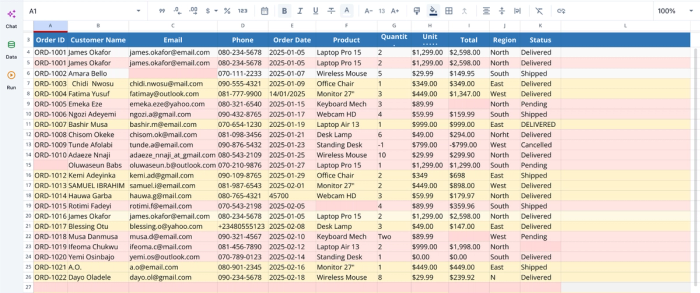
After we successfully import our data into Quadratic, we can immediately begin AI spreadsheet analysis:
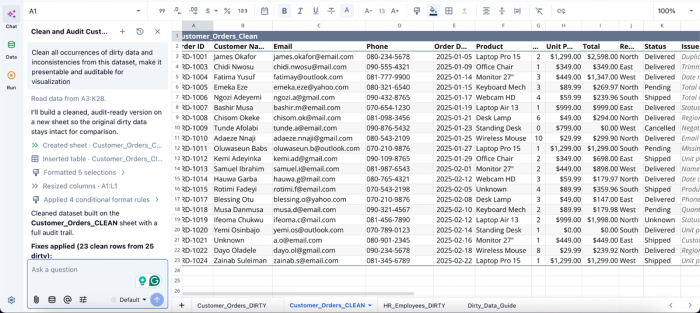
In this image, I ask Quadratic AI to “Clean all occurrences of dirty data and inconsistencies from this dataset, make it presentable and auditable for visualization.” It creates a clean version of your dataset in another sheet. For full transparency into the changes that were made, it also includes a column that shows the specific cleaning process that was made.
Replace static VBA reports with dynamic visual analysis
Traditional VBA workflows often culminate in static reports: copied charts, manually refreshed pivot tables, or emailed workbooks frozen in time. Updating those reports usually means rerunning macros and rebuilding outputs manually.
Quadratic keeps visual analysis directly connected to the underlying workflow. Charts, dashboards, summary tables, and KPI views remain tied to live spreadsheet data and connected sources. When new data arrives, the visuals update alongside the analysis logic.
AI-assisted chart generation also shortens the time between raw data and decision-ready visuals. Analysts can ask the AI to generate trend charts, cohort breakdowns, anomaly visualizations, or comparative dashboards directly from the active dataset.
Here’s how to create dynamic visualizations in Quadratic using text prompts:
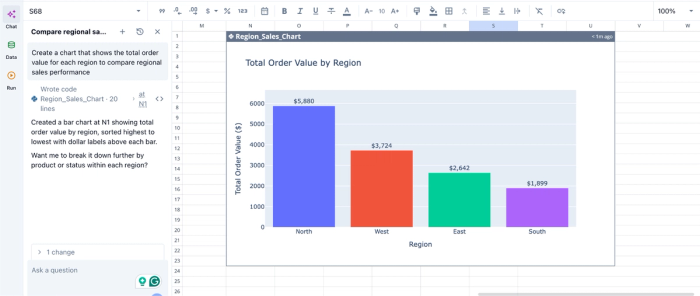
In this image, I ask Quadratic AI to “Create a chart that shows the total order value for each region to compare regional sales performance.” In seconds, it creates a visualization that displays the total revenue for each region.
Move from single-owner spreadsheets to collaborative workflows
One reason VBA-heavy spreadsheets become operational risks is that they usually belong to one person. The workbook lives on a desktop, the macros are poorly documented, and collaboration happens through emailed attachments and versioned copies.
Quadratic replaces that model with real-time browser-based collaboration. Multiple people can work inside the same spreadsheet simultaneously while sharing access to the formulas, Python, and AI-generated transformations driving the workflow.
This is especially important for finance, operations, and analytics teams managing recurring processes together. A finance analyst can update forecast assumptions while an operations manager validates incoming data, and a leadership stakeholder reviews dashboards in real time. Everyone works against the same live model rather than passing spreadsheets back and forth.
Modernize spreadsheet automation without abandoning spreadsheets
For many organizations, replacing VBA entirely with standalone software platforms introduces unnecessary complexity. Teams still want the flexibility and familiarity of spreadsheets, but they need workflows that are easier to maintain and collaborate around.
Quadratic fits this transition point well because it preserves the spreadsheet interface while modernizing the underlying execution model. Native Python replaces fragile macros. SQL replaces manual imports. AI accelerates transformations and reporting. Live connections replace static exports. Real-time collaboration replaces emailed .xlsm files.
Conclusion
VBA solved real problems and will keep running for a long time, but the criteria for good spreadsheet automation have shifted users to explore alternatives to VBA. Transparency, collaboration, and connectivity to modern data sources now matter as much as raw capability.
The most useful framing is not "what replaces VBA," but "what replaces this specific VBA job." Cleanup belongs with Python and SQL. Reporting belongs with code, BI tools, or modern spreadsheets. Custom logic belongs with formulas, Office Scripts, or Python. Cross-app automation belongs with no-code platforms and AI. Quadratic brings all of these use cases into a single environment.
If you are ready to move off macro-heavy Excel files, replace brittle VBA workflows with Quadratic’s Python, SQL, and AI-powered spreadsheet automation. Your whole team will be able to read and edit the logic, and you will not have to open the macro editor ever again. Try Quadratic for free.
Frequently asked questions (FAQs)
Is Python a good alternative to VBA?
Yes, especially for data cleanup, reporting, and analysis. Python with pandas is more readable than VBA, handles much larger datasets, and has a vast ecosystem of libraries. It is the most common alternative to VBA for ETL-style work and increasingly for custom functions as well.
What's the easiest alternative to VBA in Excel for non-coders?
For non-coders, no-code automation tools like Power Automate, Zapier, and Make handle most cross-app workflows without any scripting. For analysis and cleanup tasks, AI-assisted spreadsheet environments like Quadratic are often the easiest path, because you can describe what you want in plain language and let the tool generate the underlying code.
How does Quadratic solve the transparency problem that macro-heavy workbooks create?
Quadratic is a coding spreadsheet where Python, SQL, and formulas run directly in cells alongside your data, making all logic visible and editable by any teammate. Instead of hiding automation inside hidden VBA modules, Quadratic keeps your transformations and custom functions on the grid where anyone can click a cell and see exactly how a result was produced.
