
James Amoo, Community Partner
May 7, 2026

Messy bank data is a universal pain for finance teams, bookkeepers, and business operators. Raw bank feeds are often filled with cryptic vendor names, inconsistent formatting, and missing details. Making sense of this data is critical, but relying on manual data exploration is painfully slow, and trusting a fully automated "black-box" system can lead to costly financial reporting errors.
Effective bank transaction categorization is not a set-it-and-forget-it task. Instead, it requires a repeatable data cleaning workflow that combines strict rules, artificial intelligence, and comprehensive financial data analytics. Getting this workflow right yields massive benefits. It leads to faster month-end reporting and better strategic decision-making.
This guide will cover exactly how to categorize bank transactions from start to finish. We will explore how to design a clear taxonomy, execute a hybrid processing workflow, and establish ongoing data governance to keep your financial records pristine.
What is bank transaction categorization?
At its core, bank transaction categorization is the process of assigning standardized labels to raw bank inflows and outflows. This process has evolved significantly over the years. What used to require hours of manual data entry has shifted toward modern workflows that utilize deterministic rules and machine learning models.
Clean categorization directly impacts the accuracy of your bookkeeping, budgeting, and financial reporting. When every dollar is assigned to the correct bucket, business leaders can trust their accounting dashboards and make informed decisions about cash flow.
While modern technology dramatically accelerates this process, human oversight remains critical. Software can suggest where an expense belongs, but a human must verify the logic to ensure absolute accuracy.
Designing your categorization taxonomy
A successful workflow starts with a well-defined list of categories long before any data is processed. For SMB owners and solo operators, the very first step is ensuring a strict separation between personal and business expenses. Mingling these two categories creates unnecessary complexity and auditing risks.
Next, we recommend structuring your taxonomy around standard accounting principles. A good starting point is clearly distinguishing between operating expenses (OpEx) and cost of goods sold (COGS).
Keep your initial category list concise. Having too many hyper-specific categories leads to logic overlap and decision fatigue. Start with broad buckets like "Software Subscriptions," "Travel," and "Office Supplies," and only add sub-categories when you truly need more granular reporting.
Quadratic makes this process significantly more scalable by allowing you to apply dynamic categorization rules and refine your taxonomy over time without breaking your underlying models. This means your categorization system can evolve alongside your business while maintaining consistency, accuracy, and analytical clarity.
The 3-step categorization workflow
The most reliable way to process financial data is through a hybrid approach. This workflow moves from strict logic to AI enrichment and ends with human review.
By layering these three steps, teams can ensure high accuracy while minimizing manual data entry. Here is how to categorize bank transactions using this proven system.
1. Rules-based logic
The first step is setting up deterministic if/then rules for your recurring vendors and predictable transactions. Rules should always be your first line of defense because they are completely transparent and auditable. You know exactly why a transaction received a specific label.
For example, you can map specific merchant names or text strings directly to predefined taxonomy labels. If a bank description contains "AWS" or "Amazon Web Services," the rule automatically tags it as "Server Hosting." If it contains "Delta Airlines," it gets tagged as "Travel."
2. AI and machine learning enrichment
Strict rules will catch your predictable expenses, but they will miss the ambiguous or entirely new transactions. This is where you deploy AI agents for data analysis to handle the "long tail" of your ledger.
Bank transaction categorization machine learning models excel at parsing messy vendor data and enriching transaction descriptions. They can look at an unfamiliar string of text, analyze the context, and provide a highly probable category.
It is best to frame AI as a helpful assistant rather than a definitive authority. AI provides high-confidence suggestions that make the final review much easier, but it should never override your core deterministic rules.
3. Human-in-the-loop review
This final step is the critical differentiator between a messy ledger and a pristine financial dataset. To categorize bank transactions accurately, a human must review the outputs. Your review workflow should focus on auditing AI suggestions and manually handling any unmatched transactions.
When a human corrects a miscategorized item, that correction should feed back into the system. This allows finance teams to write a new rule or refine an existing one, improving the accuracy of future automated runs.
Common tools for categorizing transactions
Finance professionals looking to solve this problem usually turn to a familiar landscape of software tools. These generally fall into two camps: closed-ecosystem accounting platforms and flexible spreadsheet environments.
Categorizing in QuickBooks Online
When you categorize bank transactions in QuickBooks Online, you typically use its built-in bank feeds and basic rule creation features.
While this works well for straightforward expenses, the interface has limitations. It can struggle when dealing with multi-condition logic or when finance teams need to perform rapid bulk auditing across thousands of rows.
Categorizing in Excel
For more flexibility, finance professionals often export their data to spreadsheets. When you categorize bank transactions in Excel, the traditional approach involves using formulas like VLOOKUP or XLOOKUP to map vendor names against a master list.
The downside is the manual effort required to maintain these files. Formulas break over time, and static CSV exports become outdated the moment they are downloaded. Users frequently try to make Excel auto-categorize bank transactions using macros or complex scripts, but they often hit a wall due to the lack of live data connections.
Categorizing in Google Sheets
Another common option is Google Sheets, which offers a more collaborative, cloud-based alternative to Excel. Users can build categorization logic using functions like QUERY, ARRAYFORMULA, and custom scripts via Google Apps Script. This makes it easier to share workflows across teams and automate certain tasks.
However, similar limitations persist. Maintaining scripts and ensuring consistent data updates can become challenging over time. While Google Sheets improves collaboration, it still relies heavily on manual data imports or external integrations, which can introduce delays and inconsistencies in transaction categorization workflows.
Building a repeatable workflow in Quadratic
Quadratic provides the ideal environment for a hybrid categorization workflow by combining spreadsheet flexibility with modern data tools. Let’s explore the features of Quadratic in detail.
Ingest and normalize transactions from multiple financial sources
A reliable categorization workflow starts with up-to-date data. Quadratic enables direct connections to multiple sources, allowing you to leverage its Plaid integration to pull transactions from bank accounts, credit cards, and payment platforms into a single ledger.
This is critical for repeatability. By standardizing fields such as merchant name, amount, date, and account at the point of entry, you create a clean foundation for downstream categorization logic. The result is a system where every new transaction enters an already-governed structure, eliminating the need for constant manual cleanup.
Schedule automated refresh and categorization cycles
A repeatable workflow must operate without constant manual input. Quadratic allows you to schedule data refreshes and categorization processes so that new transactions are automatically ingested and classified in the background.
This spreadsheet automation ensures that your financial records remain current without requiring daily maintenance. Whether you are running weekly reconciliations or maintaining a real-time expense tracker, your workflow continuously updates itself.
Automate merchant mapping and exception handling with Python
Real-world financial data is messy. Vendor names vary, transaction descriptions are inconsistent, and edge cases are inevitable. Quadratic allows you to use native Python and SQL directly in the grid to build robust data transformation pipelines that handle these complexities.
You can implement string normalization and lookup tables to standardize merchant names across accounts. More advanced logic can detect anomalies or route exceptions into review queues.
Design layered categorization logic with rules and AI
Effective transaction categorization is rarely solved with a single approach. Quadratic supports a hybrid methodology where deterministic rules handle predictable patterns while AI fills in the gaps. You can define structured rules for known merchants, recurring subscriptions, or payroll entries, ensuring consistent classification for high-frequency transactions.
For ambiguous or new transactions, AI-powered analysis can be used to classify transactions or query a categorization logic. This reduces manual intervention while preserving control. Let’s see how this works.
First, I connect to my bank account via Quadratic’s Plaid integration:
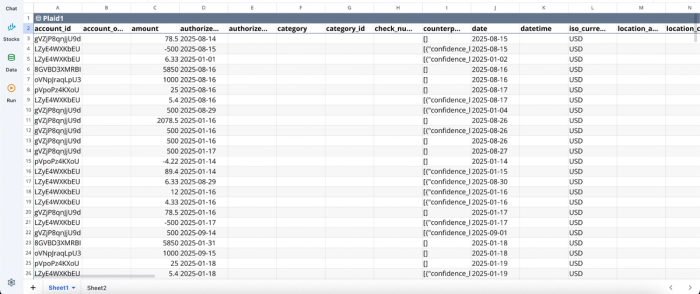
After successfully connecting to my bank account data. I can use text prompts to create custom categories for my transactions:
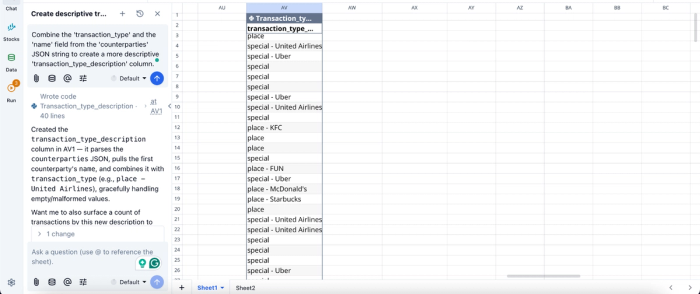
In this image, I ask Quadratic to “Combine the 'transaction_type' and the 'name' field from the 'counterparties' JSON string to create a more descriptive 'transaction_type_description' column. “ It adds a column that categorizes existing and incoming bank transactions based on the transaction type and name field.
Build real-time categorization dashboards for validation
Categorization is not complete without validation. Quadratic enables you to create dynamic financial data visualizations that summarize spending by category, track trends over time, and highlight inconsistencies. These dashboards update automatically as new transactions are processed.
This visibility is essential for quality assurance. You can quickly identify misclassified transactions and validate that your rules are behaving as expected. Visualization in Quadratic can also be done by using text prompts:
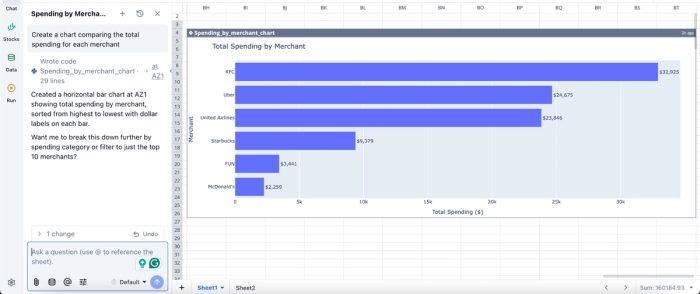
In this image, I ask Quadratic AI to “Create a chart comparing the total spending for each merchant.” In seconds, it creates a visualization that gives insights into the total spending by the merchant.
Collaborate on categorization logic with shared visibility
Transaction categorization often involves multiple stakeholders, from finance teams to operations or personal finance collaborators. Quadratic’s real-time collaboration features allow everyone to work within the same environment, eliminating version conflicts and fragmented communication.
Since all rules and transformations are visible in the grid, collaborators can easily understand how categories are assigned and propose improvements. This ensures that categorization logic evolves in a controlled and transparent manner.
Conclusion
Conquering messy bank data requires a thoughtful blend of strict rules, AI enrichment, and human review. While fully automated black-box solutions promise a hands-off experience, transparent and auditable logic will always provide a more accurate and reliable financial dataset. By keeping a human in the loop, you ensure your reporting remains trustworthy and actionable.
Connect your transaction data to Quadratic and build a repeatable categorization workflow with AI-assisted review and transparent rules. Try Quadratic for free.
Frequently asked questions (FAQs)
Why is it challenging to categorize bank transactions in Excel or QuickBooks Online?
While tools like QuickBooks Online offer basic categorization, they can struggle with complex logic or rapid bulk auditing across many transactions. Similarly, when you categorize bank transactions in Excel, it often involves manual formula maintenance or outdated CSV exports, making it difficult to reliably auto-categorize bank transactions with live data.
What role does bank transaction categorization machine learning play in modern workflows?
Bank transaction categorization machine learning models are deployed to handle the "long tail" of transactions, parsing messy vendor data and suggesting categories for ambiguous or new items that deterministic rules might miss. This AI enrichment provides high-confidence suggestions, significantly streamlining the human review process and improving overall accuracy.
How does Quadratic simplify and improve bank transaction categorization?
Quadratic connects directly to live bank and credit card data, eliminating manual CSV downloads and ensuring your financial records are always up-to-date. It allows users to build transparent categorization rules using native Python, formulas, and built-in AI, providing a flexible and auditable workflow for efficient human-in-the-loop review.
