
James Amoo, Community Partner
Apr 30, 2026

Scaling a small business means managing an ever-growing volume of financial transactions and conducting financial data analytics. For finance operations teams, the primary challenge is keeping up with this growth without getting buried in manual data entry. Finding the best expense tracker for small business is about building a reliable and automated financial process that scales with your company.
The best way to track expenses for small business is to stop depending on disconnected manual tasks and start building a unified system for SMB analytics. While basic spreadsheets like Excel and Google Sheets offer a great starting point, the best financial reporting strategy eventually evolves into a modern workflow that leverages automation and AI to streamline business data analysis and deliver real-time insights.
The evolution of expense tracking for startups
In the early days of a new company, almost every founder relies on a basic business startup expenses spreadsheet. It is accessible, requires no specialized training, and gets the job done when transaction volumes are low. However, as the business grows, the manual approach of customer data analysis quickly introduces severe friction points.
Manual data entry inevitably leads to human error and duplicate entries. Finance teams waste critical hours on end-of-month reconciliation and tracking down missing receipts. Soon, expense reporting for startups becomes a frustrating bottleneck rather than a strategic asset.
The trigger for an upgrade usually hits when scaling complexities make it impossible to get a clear picture of cash flow. Leadership needs real-time financial visibility to make hiring or purchasing decisions, and they cannot afford to wait three weeks after the month closes for a finalized report.
At this stage, operational requirements begin to outgrow the capabilities of static tools. Startups need automated data processing systems that can enforce expense policies and standardize categorization across teams. Without these controls, spending becomes inconsistent and difficult to audit.
The rise of distributed teams and digital payments also introduces new layers of complexity that are best handled by coding spreadsheets. Expenses are incurred across multiple geographies and payment methods, making centralized tracking increasingly difficult. The best expense tracking for small business addresses this by integrating directly with cards, bank feeds, and accounting systems, enabling continuous tracking and data exploration.
Core stages of a modern expense workflow
To achieve real-time visibility, finance teams need to stop viewing expense management as a once-a-month chore and start treating it as a continuous data analytics lifecycle. Modern systems should be designed to capture and reconcile expenses in real time. This transforms expense tracking from a reactive back-office task into a proactive financial control system.
The first stage in this lifecycle is automated capture, which eliminates the need to chase physical receipts or manually input transactions. By integrating directly with bank feeds and digital invoices, modern tools can ingest expense data in real time. Optical character recognition (OCR) and structured PDF and image extraction further enhance this process by converting raw documents into usable financial data.
Once captured, transactions must be consistently classified through standardized categorization. This involves applying predefined rules and mappings that align each expense with the company’s chart of accounts. As transaction volumes grow, this becomes critical for generating reliable financial statements and enabling accurate budget tracking without constant manual intervention.
The final stage is seamless syncing, where validated and categorized data flows directly into core accounting dashboards without manual handoffs. This ensures that the general ledger is continuously updated, eliminating the inefficiencies of exporting and importing CSV files. By automating this step, businesses create a tightly connected financial ecosystem where reporting and decision-making are all based on the same data.
The false dichotomy: spreadsheets vs. budget apps
Small businesses are often presented with a false dichotomy: either suffer through disconnected and error-prone spreadsheets or abandon flexibility entirely for a dedicated application. This framing oversimplifies the problem and ignores the reality that modern finance operations require both adaptability and structure. As transaction volumes increase and reporting needs become more sophisticated, neither extreme is sufficient on its own.
Dedicated tools might promise simplicity, but the best expense tracking software for small business should never restrict your financial analysis. Rigid apps often force teams into predefined workflows and reporting templates, making custom variance analysis or ad hoc queries difficult to execute. Conversely, traditional spreadsheets suffer from stale data and version control issues, leaving teams uncertain about data accuracy and undermining confidence in financial reporting.
The ideal solution isn’t choosing between a budget app or spreadsheet, but adopting a hybrid approach. Finance ops teams need a live workspace that retains the flexibility of a spreadsheet while automating the data ingestion, validation, and syncing capabilities of modern software. This allows teams to build custom logic and iterate quickly without sacrificing or operational efficiency.
How Quadratic streamlines expense tracking
For finance ops teams looking to modernize their workflow, Quadratic offers an ideal bridge between spreadsheet flexibility and automated app functionality. Often, the best app to track expenses for small business isn't a traditional app at all, but an AI-powered spreadsheet designed for live data. Let’s see how Quadratic helps to streamline expense tracking.
Direct connections to multiple sources
Quadratic enables direct integration with a wide range of financial data sources via its built-in Plaid integration. Instead of manually importing CSV files or reconciling across tools, expense data flows continuously into a centralized workspace where it can be analyzed in real time. This makes Quadratic the best expense tracker app for small business.
Direct connectivity is crucial for modern expense tracking because it eliminates data silos and ensures consistency across systems. Whether you are reconciling transactions or generating reports, you are always working with the most current data. For growing businesses, this creates a single source of truth that scales with increasing transaction volume and complexity.
AI-powered data analysis
Quadratic integrates AI directly into the spreadsheet workflow, allowing teams to use AI agents for data analysis without relying on external tools. From categorizing expenses to detecting anomalies and identifying trends, AI can process large volumes of transaction data with speed and consistency.
More importantly, this analysis can be customized to your business logic. You can define rules for expense policies, flag unusual spending patterns, or generate insights on cost drivers, all within the same environment. This transforms expense tracking from a passive recording function into an active system for financial intelligence and decision support. Let’s see how this works.
First, I connect to my bank account (via Quadratic’s Plaid integration):
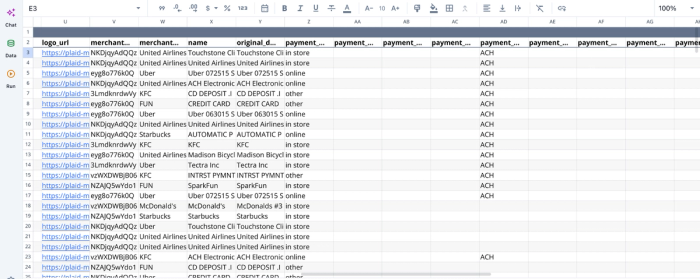
After successfully connecting to my data (which shows details of transactions and expenses), I can then proceed to the analysis immediately. Here:
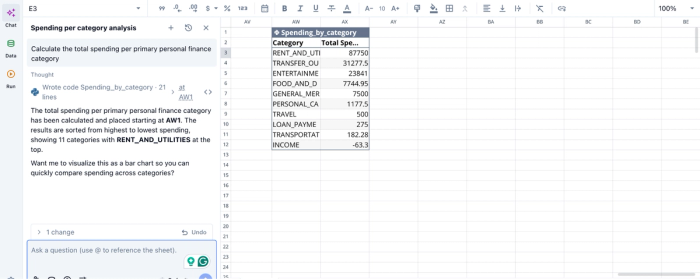
In this image, I ask Quadratic AI to “Calculate the total spending per primary personal finance category”. It instantly generates a table that shows the breakdown of my expenses across 10 categories. Quadratic streamlines question-driven data analysis, as users can ask any question about their data and get instant results.
AI data visualization
Understanding expense data requires more than raw tables; it requires clear and actionable visualization. Quadratic allows users to generate charts, dashboards, and summaries directly from live data using AI-assisted workflows. This makes it easier to monitor spending patterns and surface anomalies at a glance.
Since these financial data visualizations are built on real-time data, they update automatically as new transactions are recorded. This ensures that decision-makers always have access to the latest financial picture. Let’s see how we can create a visualization for the analysis we conducted earlier:
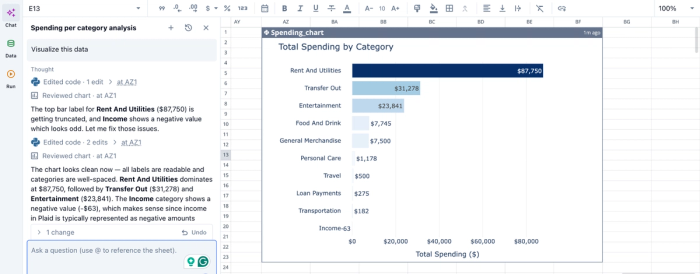
In the image above, I simply ask Quadratic to “Visualize this data”. In seconds, it creates a bar chart that shows the breakdown of total spending by category. No coding expertise required, just simple text prompts.
Native support for programming languages
One of Quadratic’s defining features is its native support for programming languages like Python and SQL within the spreadsheet interface. This allows teams to go beyond basic formulas and implement advanced data transformations, validations, and financial models directly where the data lives.
For expense tracking, this means you can build highly tailored workflows without exporting data to separate environments. This ensures that your system can adapt as your business grows, rather than forcing you into predefined constraints.
Collaboration
Expense management is inherently cross-functional, involving finance, operations, and leadership teams. Quadratic provides a collaborative analytics platform that enables multiple users to work on the same dataset simultaneously while maintaining full visibility into changes and updates.
With built-in version control and auditability, teams can track who made changes, when they were made, and why. This is essential for maintaining accountability and ensuring that expense data remains accurate and trustworthy.
Conclusion
Transitioning your financial operations from manual entry to an automated workflow doesn't have to be an overwhelming project. Start by mapping out your core expense categories and connecting your live accounting data to a modern and connected spreadsheet workspace.
The ultimate goal is to spend less time on manual data entry and more time analyzing category-level trends and overall financial health. By bringing your live data, AI automation, and spreadsheet flexibility into one collaborative environment, you can finally get the best expense tracker for small business that scales with your company. Try Quadratic for free to build an expense dashboard that updates automatically.
Frequently asked questions (FAQs)
What is the best way to track expenses for small business growth?
The best way to track expenses for small business is to move beyond manual tasks to a unified and automated system. This involves automated data capture, standardized categorization, and seamless syncing of approved data into core accounting systems.
Why do business startup expenses spreadsheets become problematic for growing companies?
While a business startup expenses spreadsheet is a common starting point, increasing transaction volumes quickly lead to manual data entry errors and reconciliation challenges. This makes expense reporting for startups a frustrating bottleneck, as finance teams spend valuable time fixing issues instead of analyzing cash flow.
How does Quadratic serve as the best expense tracking app for small business teams?
Quadratic connects directly to live data sources like QuickBooks, acting as an AI-powered spreadsheet that automates raw expense data capture. Its built-in AI flows standardize vendor labels, detect anomalies, and transform transactions into report-ready formats.
What are the important features for startups in an expense management platform?
Important features for startups in an expense management platform include live data syncing to eliminate manual imports and automated variance views to spot budget discrepancies in real time. AI-driven categorization helps standardize expense labels, and anomaly detection identifies unusual spending or duplicate entries. These capabilities ensure precise and timely financial reporting.
