James Amoo, Community Partner
Mar 30, 2026

Managing a small law firm's finances using outdated and manual processes creates a significant operational strain. For many firm owners and office managers, finding the best accounting software for small law firms feels like the ultimate solution to these administrative headaches. However, modernizing your accounting requires building a seamless and repeatable workflow that connects your billing, expenses, and reporting.
The ultimate goal of transitioning to integrated tools is straightforward. You need to minimize manual data entry while maximizing financial clarity for firm leadership. By moving away from disconnected systems, your firm can establish a financial data analytics strategy that supports sustainable growth and confident decision-making.
Essential criteria for law firm accounting software
When evaluating accounting software for law firms, it is easy to get lost in endless feature comparisons. Instead, focus on capabilities that drive operational efficiency. The right foundation should handle your daily administrative tasks smoothly so you can focus on client work.
Look for these core functions when building your financial workflow:
- Automated billing and invoicing to streamline payment processing and improve overall cash flow.
- Built-in trust accounting and IOLTA compliance tracking to maintain basic financial hygiene and ensure client funds are handled correctly.
- Reliable expense tracking and seamless bank reconciliation to keep your books accurate with minimal manual intervention.
- Time tracking and billable hour management are integrated directly into the accounting system, allowing lawyers to capture billable time in real time and reduce revenue leakage from missed entries.
- Customizable financial reporting that goes beyond standard profit and loss statements to include metrics like revenue per lawyer, realization rates, and trust balances by client.
By prioritizing these capabilities, small law firms can move beyond basic bookkeeping and establish a financial system that supports both compliance and strategic decision-making.
Transitioning from manual spreadsheets to integrated workflows
Leveraging traditional spreadsheets like Excel and Google Sheets for daily financial management introduces significant operational risks. Hidden costs pile up when staff spend hours copying and pasting data, increasing the likelihood of human error.
Beyond errors, spreadsheets lack real-time visibility. By the time financial data is consolidated, reviewed, and shared, it becomes stale data. This makes it difficult for firm leaders to make timely decisions around cash flow or matter profitability. Version control also becomes a persistent issue, with multiple team members working on different copies of the same file.
There are also compliance implications. For law firms handling client funds, particularly under trust accounting and IOLTA requirements, manual processes increase the risk of regulatory breaches. Without automated safeguards and audit trails, it becomes harder to ensure that every transaction is properly recorded and reconciled. This could lead to serious legal and financial consequences.
The first step toward solving these challenges is to integrate your time tracking, billing, and expense management into a single financial source of truth. When these systems are connected in an automated spreadsheet, data flows seamlessly from one function to another without the need for manual intervention. Time entries automatically feed into invoices, expenses are logged against specific matters, and payments are reconciled in real time. This creates a unified workflow that reflects the true financial state of the firm at any given moment.
Additionally, integrated workflows improve financial transparency at the matter level. Firms can see exactly how much time and cost have been invested in each case versus the revenue it generates. This enables more informed decisions about pricing strategies and resource allocation.
Automating the month-end close process
The month-end close is notoriously stressful for legal practices. However, the right accounting software stack transforms this multi-day administrative burden into a fast and repeatable workflow. By automating routine tasks, your firm can close the books efficiently and accurately.
An automated close process reduces reliance on manual intervention. Instead of assembling financial data from multiple disconnected sources, transactions are continuously recorded and reconciled throughout the month. This shifts the workload from a single end-of-month spike to an ongoing and manageable process.
Beyond efficiency, this automation has strategic implications. Adopting the best financial reporting is the foundation for informed decision-making. When firm leadership can rely on up-to-date numbers immediately after month-end, they can confidently assess performance and make proactive adjustments to pricing, staffing, or client strategy.
Automation also strengthens auditability and compliance. With built-in audit trails, every transaction and reconciliation step is documented and traceable. This is particularly critical for law firms managing client trust accounts, where transparency and accuracy are non-negotiable. Specific tasks that should be automated include reconciling trust accounts against bank statements, categorizing operational expenses, and generating financial reports.
Moving beyond basic reports: the need for advanced analytics
Traditional accounting tools are effective for record-keeping, but they often fall short when firms need deeper insights and real-time visibility into their finances. Quadratic bridges this gap by combining the familiarity of spreadsheets with AI-powered analysis, automation, and coding. The result is a modern financial workflow that enables law firms to streamline data exploration and reduce administrative overhead. Let’s explore this in detail:
Direct connections to multiple sources
Quadratic connects directly to multiple data sources, eliminating the need for manual exports and fragmented workflows. Law firms can pull in live data from databases, APIs, and raw files, creating a centralized financial environment where all relevant information is immediately accessible.
Crucially, Quadratic integrates directly with accounting platforms like QuickBooks, allowing firms to connect their general ledger, invoices, expenses, and trust account data in real time. Once connected, there is no need to download CSVs or reformat data; users can immediately begin financial analytics within the same interface.
This unified data layer is especially valuable for law firms that rely on multiple systems, such as practice management tools, billing platforms, and payroll software.
AI-powered data analysis
Quadratic integrates AI directly into the spreadsheet experience, enabling law firms to analyze financial data using natural language instead of complex formulas. This lowers the barrier to advanced analysis, allowing legal professionals to quickly extract insights using AI agents for data analysis.
For example, firms can instantly assess revenue by client, track trust account balances, or analyze realization rates. Quadratic AI can also surface anomalies, helping firms catch issues early before they escalate into compliance risks or financial losses.
With Quadratic’s Plaid integration, you can connect to your law firm’s bank accounts. Here:
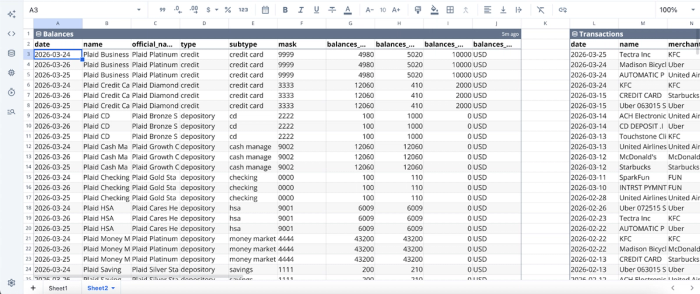
After successfully connecting to your data, you can begin analysis immediately. Here:
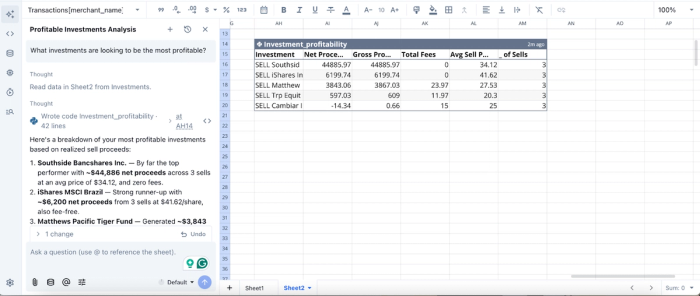
In this image, I ask Quadratic, “What investments are looking to be the most profitable?” and it generates a table to show the most profitable investments based on sales proceeds. It also gives insights into net proceeds, gross proceeds, total fees, and other relevant data.
AI data visualization
Financial insights are only as valuable as they are understandable. Quadratic simplifies this by enabling AI-driven finance data visualization, allowing users to generate different chart types, dashboards, and reports instantly from live financial data.
Law firms can visualize key metrics such as billable vs. non-billable hours, revenue by practice area, or trust account balances over time. These visuals are automatically updated as underlying data changes, ensuring that partners and stakeholders are always working with the most current information.
Visualization in Quadratic can also be generated using text prompts. Here:
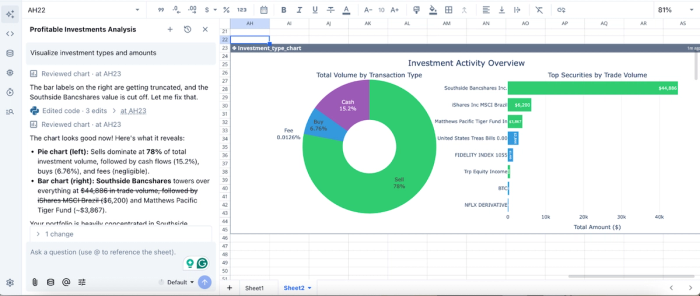
In this image, I prompt Quadratic AI to “Visualize investment types and amounts”. In seconds, it creates a pie chart to show the total volume by transaction type. It also generates a bar chart that displays the top securities by trade volume. Quadratic intelligently selects the best chart type based on your data.
Native support for programming languages
Quadratic’s native support for programming languages like Python and SQL provides a powerful layer of extensibility for firms that need more advanced financial workflows. Within the same spreadsheet interface, users can write scripts to automate complex calculations, build custom financial models, or perform AI spreadsheet analysis.
For small law firms, this coding spreadsheet opens up capabilities typically reserved for larger organizations. For instance, firms can create custom logic to allocate shared expenses across matters, forecast future cash flow based on historical billing patterns, or automate trust account reconciliations with greater precision.
Collaboration
Accounting in a law firm is inherently collaborative. Quadratic enhances collaboration by providing a collaborative analytics platform that lets multiple users interact with the same financial data simultaneously.
Instead of emailing spreadsheets back and forth, teams can work within a centralized environment with built-in version control. Comments, updates, and analyses happen in one place, ensuring alignment across the firm. Role-based access controls also ensure that sensitive financial and client data remains secure while still enabling appropriate visibility.
Conclusion
Modernizing a small law firm's accounting is a journey from selecting foundational software to building an automated and insightful financial workflow. The best accounting software for small law firms is one that scales with your firm and provides actionable data, rather than just checking the box for basic compliance. By automating routine tasks using finance AI tools like Quadratic, you free up valuable time to focus on strategy and growth.
Quadratic supports seamless connection to QuickBooks, allowing you to build a law-firm-friendly financial reporting dashboard for monthly reviews. Try Quadratic for free.
Frequently asked questions (FAQs)
What are the essential features of the best accounting software for solo law firms?
The best accounting software for solo law firms should offer automated billing, built-in trust accounting for IOLTA compliance, and reliable expense tracking. These core functions help streamline daily administrative tasks and ensure financial hygiene.
What are the risks of using manual spreadsheets for a solo law firm's accounting?
Relying on manual spreadsheet exports for a solo law firm's financial management introduces significant operational risks, including hidden costs from staff time and increased human error. This method hinders the creation of a unified financial workflow and accurate reporting.
How does Quadratic improve financial insights beyond typical accounting software for law firms?
Quadratic connects directly to core accounting systems like QuickBooks, pulling live data into a spreadsheet-like environment. This allows law firms to build sophisticated, automated management dashboards and detailed matter-level reports that update automatically.
Can accounting software for law firms truly automate the month-end close process?
Yes, the right accounting software for law firms can transform the month-end close from a multi-day burden into a fast, repeatable workflow. It automates tasks like reconciling trust accounts and categorizing expenses, ensuring efficiency and data accuracy for leadership review.
