James Amoo, Community Partner
Mar 30, 2026

Running a business in the construction and trades industries involves unique financial complexities of the construction and trades industries that standard retail or service businesses rarely face. Between managing fluctuating material costs and navigating delayed invoicing cycles, effectively managing construction budgets and keeping your finances organized is a constant challenge.
Selecting the best bookkeeping software for contractors simplifies job costing and replaces manual spreadsheets like Excel and Google Sheets. When you implement the right financial tech stack, you improve your bookkeeping use case beyond basic data entry and unlock a clear view of your operational health.
This guide covers everything you need to know about evaluating financial tools for your trades business. We will explore the essential features to look for in choosing the best bookkeeping software for contractors, and show you how to overcome the limits of standard reporting to build a truly dynamic financial workflow.
The need for specialized contractor bookkeeping software
Generic small business accounting advice often falls short for contractors, especially when it comes to managing complex small business operations. A standard setup might work perfectly for a local coffee shop tracking daily sales, but it quickly breaks down when applied to a multi-phase construction project.
Contractors deal with industry-specific financial hurdles that require specialized bookkeeping software and a solid data analytics strategy. Some of the most common challenges include:
- Paying upfront for costly materials before receiving the first client deposit.
- Managing complex payroll that changes based on prevailing wages or specific job roles.
- Tracking payments to multiple subcontractors across overlapping project timelines.
- Dealing with retainage and delayed invoicing that stretches out the cash conversion cycle, contributing to common cash flow problems.
Depending on manual tracking methods or budget spreadsheets to manage these variables is risky. Manual data entry is prone to human error, and a single mistake can easily wipe out a project's profit margin. Transitioning to automated systems and contractor accounting tools is necessary to protect your margins and ensure long-term business sustainability.
Essential features for construction and trades
When evaluating your options, it is important to look past generic accounting features like basic invoicing and bank feeds. The best tools for the trades focus on capabilities that directly impact operational efficiency and real-time profitability. When searching for software tools that streamline bookkeeping for independent contractors, keep the following features in mind:
Granular job costing
In the trades, profitability is determined on a project-by-project basis. Job costing software allows you to allocate every single expense to a specific project.
To be effective, your software must let you track subcontractors independently for each job, adhering to granular job costing best practices. Capturing these granular expenses prevents margin fade. When you know exactly what every phase of a job costs, you can ensure every project remains profitable.
Work in progress (WIP) reporting
Construction projects span weeks, months, or even years. This means that standard profit and loss statements can be misleading. Work in progress (WIP) reporting methodology, or WIP reporting, is critical for accurately matching your revenues to your expenses over the entire lifecycle of a project.
WIP schedules show you if you are over-billing or under-billing on a job relative to the costs incurred. Furthermore, having reliable historical job cost data within your software directly improves your construction estimating. When you know exactly what past jobs actually cost, you can bid on future work with total confidence.
Real-time cash flow management
The cash flow crunch is a notorious problem in contracting. It is incredibly common to pay for lumber, piping, and labor weeks before a client pays their first invoice.
Effective contractor cash flow management requires software features that track payables and invoicing dynamically. Your contractor bookkeeping platform should give you a clear view of your cash position, helping you anticipate cash shortages before they disrupt your ability to make payroll or start a new job.
Integrations with field apps
Your back office and your field crew need to be perfectly synced. Core accounting platforms must be able to connect with specialized field management and time-tracking applications.
A seamless integration eliminates the need for double data entry. When a worker logs their hours on a job site through a mobile app, that data should flow directly into your bookkeeping software for payroll and job costing allocation.
The limitations of static bookkeeping tools
While platforms like QuickBooks and Xero are excellent for core data entry and compliance, they share a major gap: their out-of-the-box reports are often rigid and limited, a common issue among the limitations of standard accounting software reporting.
Standard bookkeeping software is built to generate standardized financial statements. However, as a contracting business grows, owners frequently need custom views of cash flow and job profitability that these standard platforms cannot easily generate.
Another major limitation is the lack of real-time analytical flexibility. Data in these platforms is typically locked behind fixed dashboards, meaning users cannot easily drill down or recombine data on the fly. For contractors managing multiple jobs simultaneously, this makes it difficult to answer operational questions quickly.
This limitation leads to a painful and familiar workflow. Instead of working within a truly automated spreadsheet environment, they manually clean, restructure, and reconcile data across multiple tabs. This introduces a high risk of human error, version control issues, and inconsistencies between reports. By the time the spreadsheet is finalized and visualizations are created, it becomes stale data.
Additionally, collaboration becomes fragmented. Traditional bookkeeping tools are not designed for cross-functional financial analysis, so insights often live in isolated spreadsheets shared over email or messaging platforms. This creates silos between finance, operations, and project managers, slowing down decision cycles and reducing organizational alignment.
Building custom dashboards with Quadratic
Modern contractors need systems that can transform raw financial data into actionable insights in real time. Traditional accounting platforms focus heavily on record-keeping and compliance, but they often fall short in flexibility and decision support. This is where Quadratic stands out. It combines the familiarity of spreadsheets with the power of AI and programming for more advanced bookkeeping techniques. Let’s explore this in detail:
Direct connection to multiple sources
Quadratic connects directly to multiple data sources without requiring manual imports. Contractors can integrate live data from databases, APIs, and raw data files into a single working environment. In practical terms, this allows teams to pull in project management data, payment records and operational metrics alongside their bookkeeping data.
Quadratic also integrates directly with tools like QuickBooks, enabling users to connect their accounting data and move straight into business data analysis without any intermediate steps. Once connected, financial records can be queried, transformed, and visualized in real time.
AI-powered data analysis
Quadratic introduces a different approach to financial analysis and bookkeeping for contractors. Instead of manually building formulas or complex pivot tables, contractors can perform financial analytics in plain language. This makes it significantly easier to uncover trends such as cash flow fluctuations, project profitability, or cost overruns without requiring deep technical expertise.
For contractors managing multiple jobs, this capability is especially valuable. Quadratic AI can quickly identify anomalies, allowing business owners to act proactively rather than reactively. Let’s see how this works.
First, I connect to my data in QuickBooks:
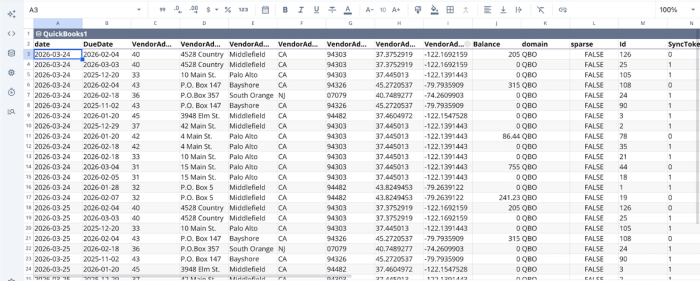
After successfully importing your data into Quadratic, you can begin analysis immediately. Here:
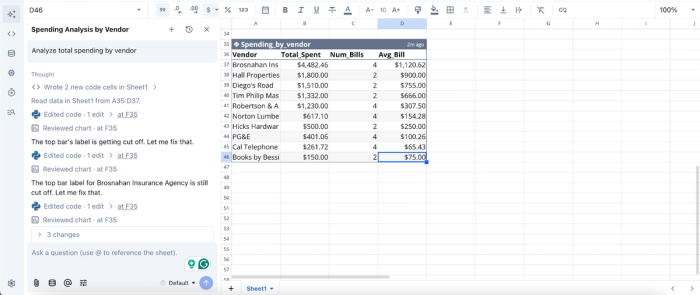
In this image, I ask Quadratic to “Analyze total spending by vendor” and it instantly generates a table that shows the vendors and the total amount spent by each vendor. Contractors do not need expertise in programming languages or spreadsheet formulas to analyze their data.
AI data visualization
Beyond analysis, Quadratic simplifies how insights are communicated through AI-driven finance data visualization. Instead of manually building charts and dashboards, users can instantly generate visual representations of their data, whether it’s cash flow trends, expense breakdowns, or revenue by project.
This is useful for contractors who need to present financial updates during weekly meetings or stakeholder reviews. More importantly, these visualizations remain accurate and up to date without constant manual intervention. Let’s see how we can visualize the analysis we conducted earlier:
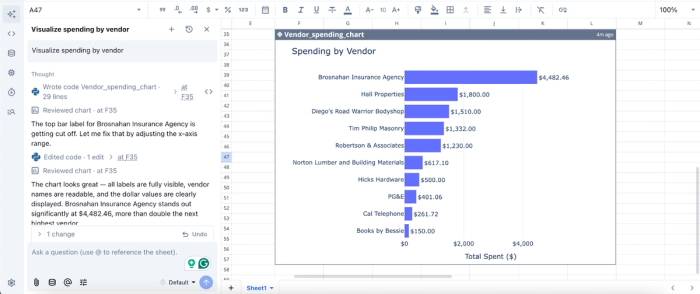
In this image, I prompted Quadratic with “Visualize spending by vendor,” and it instantly generated a bar chart that shows the ranking of top spending vendors.
Native support for programming languages
One of Quadratic’s most powerful differentiators is its native support for programming languages like Python and SQL within the spreadsheet interface. It provides a coding spreadsheet that enables advanced users to go beyond basic bookkeeping for general contractors and perform sophisticated data modeling, forecasting, and data transformations directly where their data lives.
For example, contractors can build custom scripts to allocate overhead costs across projects, forecast future cash flow based on historical trends, or automate reconciliation processes. This eliminates the need to move data into external tools, reducing friction and maintaining a single source of truth. It also future-proofs the workflow, allowing businesses to scale their financial analysis capabilities as they grow.
Collaboration
Bookkeeping is rarely a solo activity in a growing contracting business. It involves coordination between finance teams, project managers, and leadership. Quadratic enhances collaboration by providing a collaborative analytics platform that lets multiple stakeholders interact with the same dataset simultaneously.
Unlike traditional workflows that rely on sending spreadsheets back and forth, Quadratic ensures everyone is working from the latest version of the data. Teams can leave comments and align on financial insights without version control issues. This leads to faster decision-making and better alignment across departments.
Conclusion
The ultimate financial setup for a growing trades business combines a solid core accounting platform with a flexible and dynamic analysis tool for the best financial reporting. The software handles the critical tasks of compliance and data entry, while a modern data spreadsheet unlocks the customized insights required to run a profitable operation.
Moving beyond the limitations of basic software to the best bookkeeping software for contractors empowers faster and more accurate business decisions. When you can see exactly where your cash is tied up and which jobs are driving your profits, you can bid smarter and grow your business with confidence.
Quadratic supports direct integration with QuickBooks, allowing you to build a contractor bookkeeping dashboard for cash and profitability. Try Quadratic for free.
Frequently asked questions (FAQs)
Why do contractors need specialized bookkeeping software?
Generic accounting tools often fall short in addressing these industry-specific challenges, making specialized bookkeeping software essential for accurate financial tracking. The right solution helps manage these variables effectively to protect profit margins and ensure business sustainability.
What essential features should the best bookkeeping software for contractors offer?
The best bookkeeping software for contractors should include granular job costing to track project-specific expenses, work in progress (WIP) reporting for accurate revenue and expense matching, and real-time cash flow management. Additionally, seamless integrations with field management and time-tracking apps are crucial for operational efficiency and eliminating double data entry.
How does Quadratic enhance a contractor's bookkeeping workflow?
Quadratic bridges the gap between standard bookkeeping software and advanced financial analysis by connecting live data from tools like QuickBooks. This allows contractors to build custom dashboards for real-time job profitability tracking and cash flow forecasting. It transforms static reports into automated intelligence, helping contractors make more accurate business decisions without manual data exports.
