James Amoo, Community Partner
Jun 1, 2026

Most teams looking for the best PDF to Excel API tools are trying to solve a familiar problem. They have unstructured content trapped inside PDFs, like invoices, bank statements, regulatory filings, or vendor reports, and they need it as structured rows in a spreadsheet or downstream system. The PDF is a dead end. The data inside it is the asset.
The trigger moments tend to repeat. A finance team receives monthly financial reports from dozens of vendors and needs to consolidate them, a classic invoice data capture problem. An operations team has to ingest carrier reports that arrive only as PDFs. A data team is asked to convert PDF to Excel API outputs as part of a recurring pipeline feeding a warehouse. A founder needs to pull line items from purchase orders into an internal app.
In all of these cases, the search starts with extraction, but the real job extends further. Getting rows out of a PDF is step one. Cleaning those rows, validating them, standardizing the schema, and turning them into something usable is where the value actually lands. The best workflow is the one that closes the gap between extraction and analysis, not just the one with the highest raw OCR accuracy.
Quadratic helps close the gap between extraction and usable analysis. Instead of stopping at OCR output or raw spreadsheet exports, Quadratic provides a collaborative spreadsheet environment where extracted PDF data can immediately be cleaned, transformed, validated, analyzed, and visualized using Python, SQL, formulas, and AI-assisted workflows in the same grid.
How PDF to Excel APIs actually work
Before evaluating any PDF to Excel converter API, it helps to understand what these tools are really doing under the hood. PDFs are a presentation format, not a data format. There is no native concept of a table, a column, or a row in the file itself. Whatever structure you see on the page has to be reconstructed by the extraction tool, sometimes from a real text layer and sometimes from pixels.
Different APIs take different approaches, and the approach drives both accuracy and failure modes.
Native (text-layer) table parsing
When a PDF was generated programmatically (think exported financial reports or system-generated invoices), it usually has an underlying text layer with positional coordinates. Native parsers read that layer and reconstruct tables based on alignment, whitespace, and visual cues.
This approach is fast, cheap, and reasonably accurate when the layout is predictable. It also breaks easily. Slight changes in column widths, merged headers, or unexpected line wrapping can cause the parser to misalign rows or drop fields entirely.
OCR-based extraction
When a PDF is scanned or image-based, there is no text layer to read. The API has to run optical character recognition to convert pixels into characters, then attempt to infer table structure from the recognized text and its bounding boxes.
Numeric fields are especially vulnerable, because a misread digit looks plausible and rarely triggers a downstream error until someone notices the totals are off. This is a particular risk when dealing with OCR financial statements at scale.
Intelligent document processing (IDP) and LLM-assisted extraction
The newer wave of tools combines OCR with layout-aware machine learning models, often trained on specific document types like invoices, receipts, or tax forms. These IDP platforms can handle more variation than a pure parser, but they typically require setup or template training to perform well.
LLM-assisted extraction takes a different angle: feed the document (or its OCR output) to a large language model with a prompt describing the schema you want. This is flexible and impressively good at messy inputs, but it introduces cost and the possibility of hallucinated fields that look correct but were never actually in the source.
Hybrid pipelines are emerging as the pragmatic default. Native parsing first, OCR fallback for scanned pages, and an LLM pass to verify or fill gaps. The right mix depends on document complexity and tolerance for error.
Why PDF extraction breaks in production
Most evaluation guides stop at extraction accuracy. The harder question is what happens when extraction silently fails, because that is where stale data enters your pipeline.
Layout inconsistency and schema drift
Vendors change templates without warning. A new column appears, a header shifts, and a footer becomes a sub-table. Pipelines built against last quarter's PDFs quietly start producing misaligned output. Multi-page tables with repeated or shifted headers are particularly fragile, because the parser may treat repeated header rows as data, or lose track of where a table actually ends.
Scanned, low-quality, or mixed-format documents
OCR confidence drops on poor scans or unusual fonts. A document with mixed scanned and native pages is even worse, because the same API has to switch strategies mid-document and often does not. Numeric fields get misread, and the resulting spreadsheet looks fine until someone reconciles totals.
Complex tables: merged cells, multi-line rows, nested structures
Financial statements, invoices, and regulatory filings love merged cells and nested subtotals. Most standard parsers flatten these into single rows or misalign them entirely. The output technically populates a spreadsheet, but the relationships between line items and their parent groupings are gone.
Validation and trust gaps
A successful extraction is not the same as a correct one. Even well-performing APIs produce outputs with silent errors: a transposed digit, a missing row, a field assigned to the wrong column. In high-stakes contexts like finance, banking, or compliance, 'looks reasonable' is not a sufficient bar.
How Quadratic streamlines the PDF analysis workflow
Quadratic is an AI spreadsheet analysis tool that imports PDF data directly into the grid, removing the extract-then-move step entirely. Once the data is in the sheet, you can use AI prompts, Python, SQL, or formulas to clean fields, standardize schemas, flag anomalies, and build the analysis. Let’s explore the capabilities of Quadratic in detail.
Move directly from PDF extraction to analysis
Most PDF-to-Excel API workflows stop at extraction. The API returns structured JSON, CSV, or spreadsheet output, and the real work begins afterward. Teams still need to clean inconsistent fields and produce reporting layers in separate tools.
Quadratic compresses those steps into a single workflow. PDFs import directly into the spreadsheet grid, where extracted tables immediately become usable data instead of intermediate artifacts. Analysts can move from data exploration to transformation, modeling, and reporting without bouncing between converters.
That distinction matters in practical business workflows. A finance team reconciling vendor invoices does not ultimately care about OCR quality in isolation. The real objective is identifying discrepancies and producing accurate reporting quickly. Quadratic shifts the focus from extraction mechanics to decision-making.
Build repeatable PDF transformation workflows with Python and SQL
Some document-processing workflows eventually outgrow simple cleanup rules. Multi-step reconciliations, classification logic, predictive analytics, and recurring data transformation pipelines often require code-backed processing.
Quadratic supports native Python directly inside spreadsheet cells, which makes it possible to turn exploratory data analysis into reusable analytical systems. Teams can use pandas for reshaping extracted tables, automating recurring reconciliation logic, and detecting anomalies.
A revenue operations team might extract customer invoices from PDFs, use Python to classify billing categories, and generate a monthly sales data visualization automatically. A finance analyst could reconcile extracted bank statements against ERP exports and calculate cash flow metrics in the same workbook.
Use AI to structure and clean extracted PDF tables
Raw PDF extraction almost always produces inconsistencies. Multi-row headers split unpredictably, dates appear in mixed formats, subtotal rows interrupt datasets, and merged cells distort table structures.
Quadratic uses AI agents for data analysis directly inside the spreadsheet to accelerate cleanup and restructuring. Teams can describe the desired transformation in plain language and apply it immediately to extracted tables. Columns can be standardized, and malformed records isolated for review.
This workflow is especially useful for recurring operational datasets. A procurement team can standardize invoice formats from multiple vendors. A legal operations group can extract structured contract metadata from PDF agreements. A finance department can normalize quarterly statements before downstream reporting begins.
Here’s an example of this workflow in Quadratic:
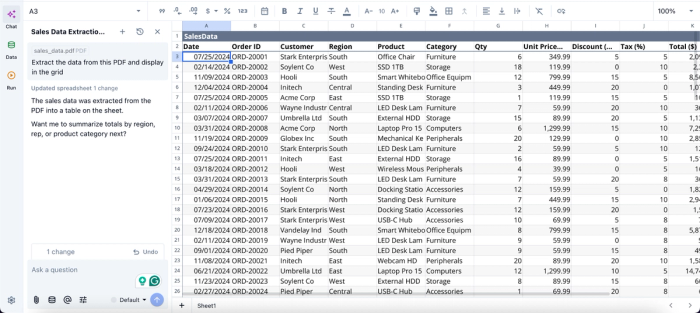
In this image, I simply attached my PDF to Quadratic’s built-in AI chat panel and asked it to “Extract the data from this PDF file and display the grid.” It instantly extracted the PDF data (which is exactly what I have in my PDF file) into the grid.
Once the PDF data is extracted to the grid, I can immediately begin analysis using simple text prompts:
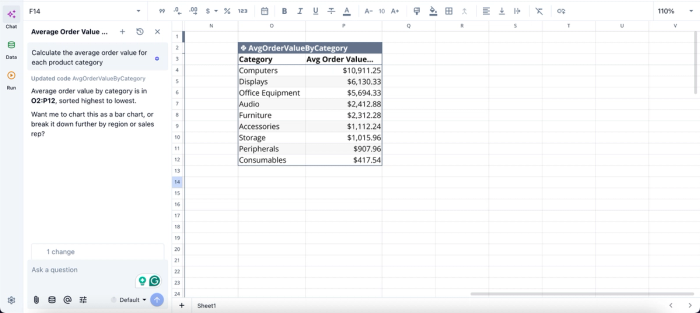
In this image, I ask Quadratic AI to “Calculate the average order value for each product category.” It instantly scans the data in the grid and generates a table that shows the average order value for each category.
Build dashboards and visualizations from live extracted data
Traditional PDF extraction pipelines frequently end with static exports. Teams receive cleaned spreadsheets but still need another data visualization tool to produce dashboards or stakeholder-facing reporting.
Quadratic keeps visualization directly connected to the extracted and transformed data. Charts, summaries, KPI dashboards, and operational reports can all reference the live tables produced from imported PDFs.
An accounting dashboard can update automatically as new billing statements are processed. A compliance team can visualize recurring risk indicators across extracted regulatory reports. An operations group can track vendor performance trends directly from imported invoice data.
Visualization in Quadratic can also be done using text prompts:
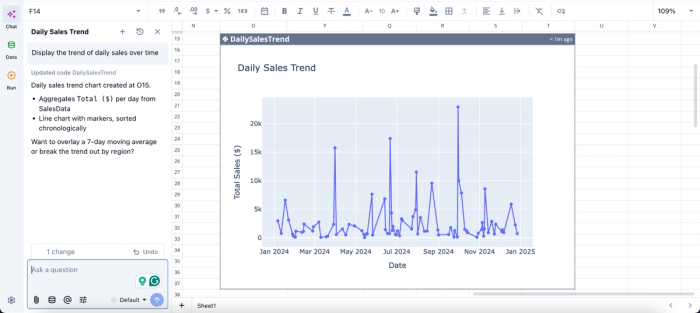
In this image, I ask Quadratic AI to “Display the trend of daily sales over time.” It generates a chart that shows the daily sales trend based on your PDF data.
Collaborate on document-driven analysis in real time
PDF workflows often become fragmented across teams. One person handles extraction, another cleans the data, and someone else builds reporting in a separate file entirely.
Quadratic centralizes the process in a browser-based collaborative analytics platform. Teams can review extracted rows together, validate cleanup logic, inspect AI-generated transformations, and build dashboards collaboratively in real time.
That improves both speed and trust. Analysts, operators, and finance stakeholders can all inspect the same workflow directly instead of passing static exports back and forth over email.
Choosing the right approach for your team
When evaluating the best PDF to Excel API tools, the decision usually comes down to four factors: document complexity, processing volume, team structure, and downstream use case. Simple native PDFs differ significantly from scanned or complex layouts, and analyst-heavy teams often need simpler workflows than engineering-driven ones.
If the job ends at extraction and feeds a system, a dedicated API is the right answer. If the job extends into cleanup, validation, and analysis, a unified spreadsheet environment usually delivers more value for less effort.
That’s where Quadratic comes in. It allows you to extract your PDF directly into a familiar spreadsheet environment and turn it into clean spreadsheet data you can analyze, visualize, and export. Try Quadratic for free.
Frequently asked questions (FAQs)
Why does a free API to convert PDF to Excel often fall short for production use?
Free APIs typically come with significant limitations: page caps, request throttling, reduced accuracy on complex layouts, or limited support for edge cases like merged cells and multi-currency amounts. While they are useful for prototyping or occasional low-volume extraction, most free tiers cannot reliably handle the variability of real-world documents at scale.
How does Quadratic solve the gap between PDF extraction and analysis?
Quadratic is an AI spreadsheet that extracts PDF data directly into the grid, eliminating the extract-then-move workflow that slows down traditional pipelines. Once the data is in Quadratic, you can use AI prompts, Python, SQL, or formulas to clean fields, standardize schemas, flag anomalies, and build analysis.
When should I use a standalone PDF to Excel API instead of a unified spreadsheet environment?
A standalone API is the right choice when extraction is one stage in a larger engineered pipeline with dedicated engineering support, when you need high-volume headless processing without human review, or when the extracted data feeds a custom application or data warehouse.
