
James Amoo, Community Partner
Apr 30, 2026

Table of contents
- Why look for a Copilot Money alternative?
- The traditional dilemma: Budgeting apps vs. spreadsheets
- How to build your own personal finance system
- Quadratic: The ultimate hybrid Copilot Money alternative
- Copilot Money vs Quadratic for financial planning
- Take control of your financial future
- Frequently asked questions (FAQs)
Copilot Money has earned a reputation for its beautiful interface and streamlined approach to personal finance. It makes tracking daily expenses visually appealing and effortless. However, behind that polished design lies a set of predefined constraints. As your financial life grows more complex, you may find yourself hitting a wall, unable to mold the app to fit your specific finance needs.
The true Copilot Money alternative isn't just another budgeting app with a different color scheme. It is an automated spreadsheet. By combining the automated data processing of modern apps with the limitless flexibility of a spreadsheet canvas, you can transform your routine from passive tracking into active financial data analytics.
Quadratic stands out as the best alternative by merging spreadsheet usability with AI-powered analysis and data automation. With Quadratic, you’re not limited by predefined templates; you can design the best financial reporting that evolves with your needs, making it a more powerful and adaptable solution than traditional budget apps or spreadsheets. This guide will show you how to achieve the best of both worlds.
Why look for a Copilot Money alternative?
Many users start their financial journey with out-of-the-box apps because they are incredibly easy to set up. But as you begin managing investments or running a side business, those streamlined features can quickly become frustrating limitations.
When evaluating Copilot Money alternatives, the core issue is usually a tension between convenience and analytical flexibility. You want your transactions categorized automatically, but you also want the power to define exactly what those categories are and how they roll up into larger financial models. As your financial picture becomes more sophisticated, you naturally require more granular control over your data. You need a system that adapts to your logic, rather than forcing you to adapt to its default settings.
There is also the issue of long-term scalability. As your financial data grows over time, you may want to analyze trends across years or collaborate with partners or advisors. Traditional spreadsheets like Excel and Google Sheets are not built for this level of depth, often lacking robust data structures or flexible reporting capabilities needed for more advanced business data analysis.
Copilot Money still excels in delivering a user-friendly experience for everyday financial tracking. Its automated transaction syncing, clean visualizations, and intuitive categorization make it ideal for users who prioritize simplicity and quick insights. For individuals focused on budgeting and monitoring spending habits, it remains one of the most efficient and enjoyable tools available.
The traditional dilemma: Budgeting apps vs. spreadsheets
For years, personal finance management has forced users to make a difficult compromise. You either choose the convenience of an app or the control of a budgeting app or spreadsheet. Understanding this historical trade-off is key to building a better system.
The pitfalls of fixed financial apps
Traditional financial apps are built for the masses. They lock you into predefined categorization rules and offer a fixed set of accounting dashboards. While these tools excel at seamless bank syncing and showing you how much you spent on groceries last month, they fall short when you need to dig deeper.
If you want to run a multi-year forecast, model a complex "what-if" scenario for buying a house, or track a highly specific spending habit, fixed apps simply cannot accommodate you. Furthermore, you rarely own your raw data in a meaningful way, making it impossible to build bespoke financial models that reflect your actual life.
The drawbacks of traditional spreadsheets
On the other end of the spectrum are legacy spreadsheets. They offer total control, allowing you to build any model or chart you can imagine. However, maintaining them is notoriously painful.
A traditional spreadsheet requires tedious manual CSV uploads at the end of every month. Searching for a Copilot Money free alternative often leads users back to these basic spreadsheets, only for them to realize that the "free" option actually costs hours of manual labor. Managing complex finances in older tools frequently results in fragile formulas and painful monthly cleanups just to figure out your net worth.
The emerging middle ground: Automated spreadsheets
A new category of tools is emerging to bridge this gap, platforms that combine the automation of apps with the flexibility of spreadsheets. Solutions like Quadratic allow users to automatically sync financial data while still retaining full control over how it is structured, analyzed, and visualized. Instead of choosing between rigidity and manual effort, users can build dynamic financial systems that evolve with their needs, enabling deeper insights without sacrificing convenience.
How to build your own personal finance system
Setting up a custom financial tracker doesn't have to be overwhelming. By focusing on the architecture of your data, you can build a robust personal finance tracker in three straightforward steps.
Step 1: Consolidate your account data
Start by bringing all your financial information into a single environment, a process often referred to as account aggregation. Connect your checking accounts, savings accounts, credit cards, and brokerage accounts to create a unified bank account tracker. The goal here is to establish a reliable, automated data pipeline that serves as your single source of truth. When all your raw data flows into one place automatically, you eliminate the friction that causes most budgeting habits to fail.
Step 2: Build custom categorization logic
Once your data is flowing, build the rules that organize it. Instead of manually tagging every coffee shop purchase, set up logical rules or write simple scripts to automatically categorize transactions as they arrive. Focus on creating a dynamic system that learns and adapts to your specific spending patterns over time, ensuring your data remains clean and organized with minimal ongoing effort.
Step 3: Design bespoke dashboards
With clean data, you can build the financial data visualizations that actually matter to you. Design custom budget burndown charts, track your savings rate over time, or build a comprehensive net worth tracker. Because you have access to the raw data, you can answer highly specific financial questions that out-of-the-box apps simply cannot address.
Quadratic: The ultimate hybrid Copilot Money alternative
For users exploring alternatives to Copilot Money, the core limitation is often a trade-off between automation and flexibility. Most apps handle transaction tracking well, but restrict how deeply you can customize your financial logic. Quadratic removes this constraint by combining automated data syncing with a fully programmable spreadsheet environment. Let’s talk about the features of Quadratic in detail:
Sync all your financial accounts into one live workspace
Quadratic connects directly to banking, credit card, and brokerage accounts via a secure Plaid integration. This allows your transactions, balances, and investment data to flow into a continuously updating sheet.
This eliminates the need for manual imports or juggling multiple apps. Your entire financial picture lives in one centralized environment.
Build custom budgeting systems that match your lifestyle
Rather than relying on rigid categories, Quadratic allows you to define your own budgeting logic using formulas, rules, and scripts. You can create dynamic categories or goal-based allocations tailored to your habits.
This is critical for long-term financial clarity. Your budget evolves with your lifestyle instead of forcing you into static templates.
Track investments alongside everyday finances
Quadratic allows you to integrate stock market data directly into your personal finance system. You can monitor portfolio performance, asset allocation, and returns alongside your spending and savings data.
This unified view provides a more complete understanding of your financial health. You can make decisions with full visibility across all aspects of your finances.
Design advanced financial models with Python and SQL
For users who want deeper control, Quadratic supports native Python and SQL directly within the spreadsheet. You can build forecasting models, simulate scenarios, or create custom financial logic.
This brings a level of analytical power typically reserved for professional tools into a personal finance workflow.
Use AI to analyze spending patterns and surface insights
Quadratic’s AI can automatically categorize transactions, detect unusual spending behavior, and highlight trends across your financial data. You can also ask it to summarize monthly patterns or identify areas for cost optimization.
This transforms raw transaction logs into actionable insights. Instead of manually reviewing expenses, you get intelligent guidance on where your money is going. Let’s see how this works. First, I connect to my bank account via Quadratic’s Plaid integration:
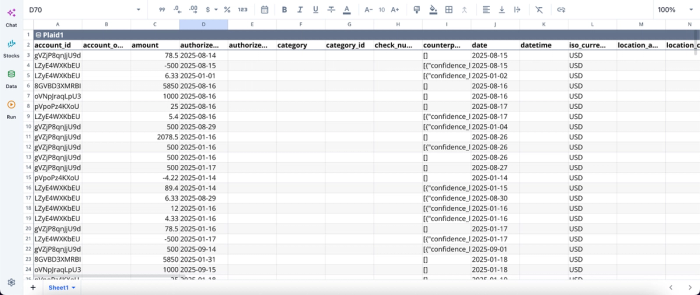
After successfully connecting to your finance data, you can immediately begin analysis using text prompts:
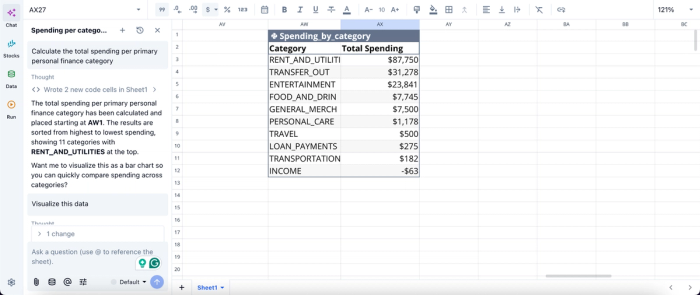
Here, I ask Quadratic AI to “Calculate the total spending per primary personal finance category.” It generates an adequately formatted table that gives insights into spending by category. This table automatically updates as new data comes in.
Create personalized financial dashboards with live visuals
Quadratic enables you to build charts and dashboards that visualize spending trends, savings progress, and investment performance. These visuals update automatically as new data flows in.
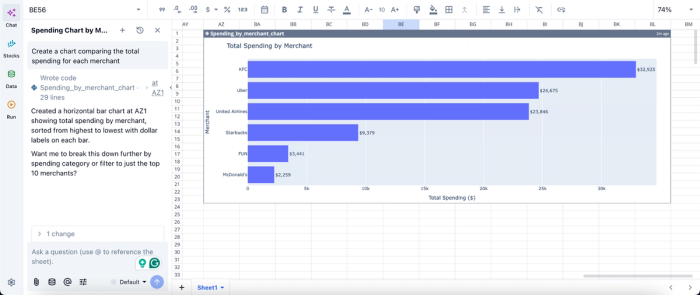
This makes it easier to track progress toward goals and quickly identify changes in your financial behavior. Visualization in Quadratic can also be done by using text prompts:
In this image, I ask Quadratic to “Create a chart comparing the total spending for each merchant.” In seconds, it generates a visualization that gives insights into the spending data for each merchant.
Collaborate on shared financial planning
Quadratic supports real-time collaboration, making it easy for partners, families, or financial advisors to work together on the same financial model.
This collaborative analytics platform improves transparency and alignment, especially for joint budgeting or long-term planning.
Copilot Money vs Quadratic for financial planning
In this section, we’ll see how Copilot Money and Quadratic compare using key finance metrics, helping you choose the right tool for your personal finances.
| Metric | Copilot Money | Quadratic |
|---|---|---|
| Customization of budgeting logic | Fixed budgeting structures with limited ability to modify logic | Fully customizable using formulas, Python, and AI tailored to your financial habits |
| Data integration | Primarily limited to synced financial accounts within the app ecosystem | Connects to banks, credit cards, brokerages, APIs, and external datasets in one workspace |
| AI-driven financial insights | AI focuses mainly on categorization and basic spending insights | AI analyzes spending, generates summaries, builds models, and answers custom financial queries |
| Investment tracking & analysis | Basic investment tracking with limited analytical depth | Advanced portfolio tracking with custom metrics, allocation models, and performance analysis |
| Visualization | Predefined dashboards with limited customization options | Fully customizable dashboards and charts tied to live data across all financial areas |
| Collaboration | Primarily single-user experience with limited transparency into calculations | Real-time collaboration with full visibility into formulas, data sources, and logic |
Take control of your financial future
Moving from a constrained app experience to a fully customizable Copilot Money alternative changes the way you interact with your money. You no longer have to settle for rigid tools that force your unique financial life into generic boxes. By leveraging a smart spreadsheet, you can transform passive tracking into proactive financial management.
Stop compromising between convenience and control. Quadratic allows you to build a custom personal finance dashboard with connected account data and editable logic. Try Quadratic for free.
Frequently asked questions (FAQs)
Why should I consider a Copilot money alternative?
Copilot Money offers a polished interface for tracking expenses, but its predefined constraints can become limiting as your financial life grows more complex. Users often seek a copilot money alternative when they need deeper customization and the ability to mold their finance system to unique analytical needs.
What are the main limitations of typical budgeting apps and traditional spreadsheets?
Traditional budgeting apps lock users into fixed categorization rules and reporting, hindering deep analysis or complex scenario modeling. While a Copilot Money alternative like a basic spreadsheet offers control, it demands tedious manual data entry and upkeep, often leading to fragile formulas and significant time investment.
How does Quadratic provide a robust Copilot Money alternative?
Quadratic merges app-like automation with the flexibility of a spreadsheet, offering a powerful copilot money alternative. It connects directly to bank and brokerage data via Plaid, allowing users to apply custom categorization logic using Python, SQL, or formulas, and build bespoke dashboards for comprehensive financial management.
