
James Amoo, Community Partner
Apr 17, 2026

Free market data tools are incredibly popular among analysts and finance students building their first models or analyzing stock data in Excel. They provide immediate access to historical pricing and volume metrics without the need for expensive enterprise subscriptions. However, relying on free financial data presents a significant hurdle, as highlighted by the common limitations of free financial data APIs. The raw information is often messy and requires rigorous data transformation to be truly trustworthy.
If you are using yfinance Python scripts to download historical stock data for your daily pulls, moving beyond basic downloads to build robust, repeatable workflows is essential. Financial analysts need programmatic market data that is consistently clean and ready for reliable financial data analysis. Integrating Python yfinance workflows systematically ensures that your foundational data is accurate before any data modeling or forecasting begins.
Getting started with the yfinance Python library
Before building complex data pipelines, you need to understand the foundational mechanics of the tool. Installing the yfinance Python library and retrieving basic historical data for a specific ticker takes only a few simple commands.
For a complete list of parameters and supported asset classes, always refer to the official yfinance Python documentation. A quick review of the yfinance documentation Python resources will help you structure your initial queries correctly and avoid common syntax errors.
Also, if you’re not using a coding spreadsheet, it is highly recommended to set up a clean virtual environment before you begin coding. Isolating your workspace prevents frustrating dependency conflicts with other financial packages and keeps your analysis environment stable.
Once your environment is configured, the next step is to validate your setup with a simple data exploration workflow. Start by importing the library, defining a ticker symbol, and pulling a small slice of historical data. This initial test serves as a sanity check, confirming that your installation and dependencies are functioning as expected before you scale to more complex queries or larger datasets.
As you progress, it’s important to understand how yfinance structures its returned data, particularly in the form of pandas DataFrames. Building this data analytics strategy early allows you to manipulate and integrate financial data more efficiently into broader analytical workflows or machine learning pipelines.
Building a reusable data cleaning workflow
Transitioning from writing one-off data pull scripts to leveraging Python exploratory data analysis using Pandas is a major step forward for any analyst. A systematic workflow should automatically handle the most common data wrangling tasks.
Your reusable functions should include systematic steps for standardizing data types and filtering out extreme outliers. One of the most critical steps is adjusting historical data for corporate actions. Accounting for stock splits and dividends also ensures your pricing history reflects reality and maintains accuracy for backtesting.
Standardizing this data cleaning phase guarantees reproducibility across all future analysis sessions. It saves hours of Excel formatting and ensures every team member is working from the same baseline of clean data. To make your workflow truly reusable, design your cleaning functions with parameterization and configurability in mind. Instead of hardcoding assumptions, allow inputs such as date ranges, column mappings, and interpolation methods to be passed as arguments.
Another important enhancement is integrating validation checks and automated testing into your workflow. Implement assertions or validation rules that flag anomalies such as duplicate timestamps or inconsistent price movements. By embedding these safeguards, you move beyond simple data preparation into a robust pipeline.
Alternatives to yfinance Python
There comes a tipping point where analysts outgrow free scraping tools. When your models require guaranteed uptime or higher frequency data, it is time to look at alternatives to yfinance Python.
Enterprise-grade or dedicated financial APIs serve as reliable next steps for institutional needs. These services offer dedicated support and strict service level agreements. While these premium services require a subscription, you must contrast the cost of paid APIs with the time spent building robust error handling for free libraries.
Beyond reliability, another key differentiator among alternatives is the depth and breadth of data coverage. Some platforms also provide access to fundamental data via a financial statements API, earnings reports, macroeconomic indicators, and even alternative datasets like sentiment or news feeds. This enables analysts to build multi-factor models without relying on fragmented data sources.
Another emerging alternative is the use of integrated analytical platforms that combine data ingestion, transformation, and analysis within a single environment. Tools like Quadratic allow you to connect directly to financial data sources, clean and transform datasets, and apply Python and SQL for data analysis without managing separate pipelines. This reduces the operational overhead of stitching together multiple tools and can accelerate iteration cycles.
If you are evaluating an alternative to yfinance Python, refer to a comprehensive financial data API and prioritize services that offer native Python wrappers, comprehensive documentation, and seamless financial API integration into your existing workflows.
Streamline financial API integration with Quadratic
As financial workflows mature, the challenge shifts from simply retrieving data to ensuring its integrity across the entire pipeline. Quadratic addresses this by combining the flexibility of Python with a collaborative environment for data validation. Instead of fragmenting your workflow across scripts and dashboards, Quadratic consolidates these steps into a single interface where data ingestion, transformation, and financial data visualization happen in sync.
Direct connections to multiple Sources
Quadratic lets you connect to different data sources from within the same workspace. This means you can pull in live stock market data alongside other datasets, such as CSV files, databases, or API, without manually combining them. Having everything in one place reduces the chances of mismatched data or outdated files.
This also makes it easier to compare and validate your data. For example, you can check yfinance results against another source to confirm accuracy. Instead of exporting and reloading data between tools, you can do these checks directly.
Real-time data validation workflows
With Quadratic, your data updates and results can be seen immediately as changes are made. When you adjust a function or update a dataset, you do not need to rerun an entire pipeline to see the impact.
This makes it easier to catch issues early. Instead of waiting until the end of a process to validate your data, you can confirm each step as you go. This reduces mistakes and makes your workflow more efficient.
AI-powered stock market analysis
Quadratic includes AI agents for data analysis that help you analyze your data more efficiently. Instead of manually checking every column or running multiple scripts, you can use AI to quickly identify patterns, gaps, or unexpected values in your dataset.
This is especially helpful when working with large datasets where issues are not obvious. Quadratic AI can highlight areas that need attention, allowing you to focus on fixing problems rather than searching for them. This makes your workflow faster and more reliable. Let’s see how this works.
You can either pull live stock market data using AI or use Quadratic’s built-in asset research template for stock market analysis. Here:
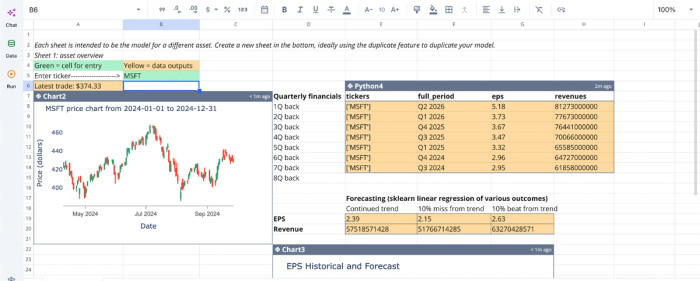
This asset research template provides financial tracking for key metrics, machine-learning powered trend forecasting, automated scenario analysis, and more. Even with these out-of-the-box features provided, users can still conduct analysis on specific aspects using text prompts. For example, we can get insights into the average EPS for all quarters:
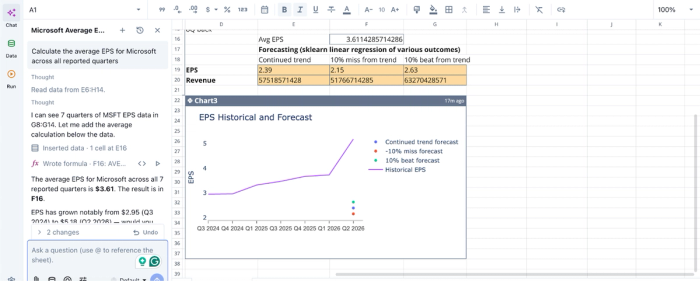
Here, I ask Quadratic AI, “Calculate the average EPS for Microsoft across all reported quarters”, and it instantly generates the result as a single row. This approach simplifies asset research as users can ask questions about any stock using simple text prompts. This replaces hours and even days of stock market analysis.
AI Data Visualization
Visualization plays a key role in confirming whether your data is correct. Quadratic can automatically generate charts that help you see trends, spikes, or gaps in your yfinance data without extra setup.
These visuals make it easier to catch issues that might not be clear in raw numbers. For example, a sudden jump or drop in a price chart can quickly show if something is wrong. By reviewing charts alongside your data, you can validate results with more confidence. Visualization in Quadratic is also done by using text prompts. Here’s an example:
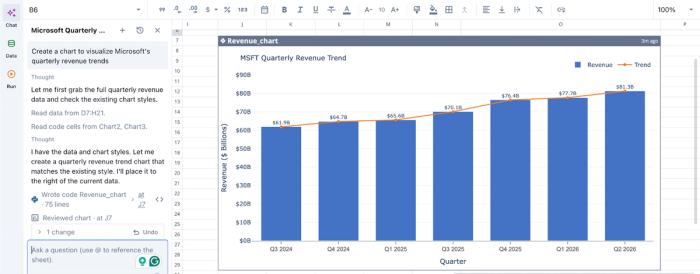
Here, I ask Quadratic AI to “Create a chart to visualize Microsoft’s quarterly revenue trends.” In seconds, it generates a line chart that gives visual insights into Microsoft’s revenue trend across various quarters.
Native support for programming languages
Quadratic allows you to write Python and SQL code directly in the same environment where your data lives. This means you can clean, transform, and analyze your yfinance data without moving between notebooks and spreadsheets.
In addition to Python and SQL data analytics, you can also use simple formulas, depending on what fits your task. This flexibility makes it easier to work in a way that feels natural while keeping everything organized in one place.
Collaboration
Quadratic supports working with others in the same workspace. It provides a collaborative analytics platform where multiple users can view, edit, and comment on the same data, making it easier to share insights and review results together.
This reduces the need for back-and-forth file sharing. Instead of sending spreadsheets or scripts, your team can work in one place and stay aligned. It also makes it easier to maintain consistent data standards across projects.
Conclusion
Evolving from manual data pulls to validated financial workflows is a crucial step for any data-driven professional. Combining programmatic Python cleaning with visual grid validation is the key to ensuring complete data trust and reproducibility.
It is time to modernize your financial analysis toolkit with reliable softwares for stock market analysis and eliminate the friction of disconnected scripts and terminal outputs. Quadratic allows you to easily run Python-based stock market analysis in a spreadsheet without boilerplate setup. It also allows you to leverage AI to generate yfinance Python code directly in the grid and visually verify updated data. Try Quadratic for free.
Frequently asked questions (FAQs)
Why is yfinance Python not working?
The yfinance Python library relies on scraping Yahoo Finance, which makes it vulnerable to backend changes on the website. Users frequently encounter issues like IP rate limiting, sudden structural alterations to the scraped pages, or temporary server blocks. These factors can cause your yfinance Python scripts to fail unexpectedly..
What are the key steps to ensure data quality when using the yfinance Python library?
To ensure trustworthy data, you should implement reusable Python functions for systematic cleaning, including standardizing data types, interpolating missing values, and adjusting for corporate actions like stock splits. Programmatic and visual validation checks are also crucial to confirm data completeness and accuracy before use.
How does Quadratic help improve yfinance Python workflows and data trust?
Quadratic provides a unique workspace that unifies complex Python data cleaning with intuitive spreadsheet validation. It allows you to leverage AI to generate Python yfinance code directly in the grid, schedule these workflows for automation, and visually verify updated data. This approach ensures your market data is consistently clean, validated, and ready for analysis.
