James Amoo, Community Partner
Apr 30, 2026

Anyone who has conducted business data analysis knows the quiet dread of a shoebox full of crumpled and fading paper receipts. Manual receipt tracking is chaotic and incredibly time-consuming, especially without a dedicated accounting dashboard for financial reporting. Even worse, thermal paper degrades rapidly, meaning the physical records you rely on today might be completely illegible by the time an auditor requests them.
Embracing data analytics modernization is essential, but simply extracting text from an image is not enough. An effective receipt scanner OCR (Optical Character Recognition) setup is the foundation of an audit-friendly expense management system. To survive rigorous financial reviews, your system requires strict data wrangling and seamless reconciliation.
This guide will help business owners, bookkeepers, and finance teams move beyond basic text extraction to build a digital audit trail for every business expense, serving as the foundation for the best expense tracker for small business.
The limits of a standalone receipt scanner OCR
Digital capture is undeniably more efficient than manual data entry, but depending entirely on basic OCR technology introduces significant risks. Standalone extraction tools are notorious for high error rates when confronted with real-world conditions.
Poor image quality, bad lighting, crumpled paper, and highly varied document formats frequently cause even a specialized OCR receipt scanner to misread critical data. A faded "8" easily becomes a "3," and a misplaced decimal point can turn a standard office supply purchase into a massive red flag.
More importantly, raw extraction lacks context. A standalone tool simply reads text; it cannot verify if an expense is legitimate. Without surrounding processes, raw OCR makes it impossible to detect fraudulent submissions or identify non-compliant spending.
True financial security requires shifting your perspective from finding a simple extraction tool to designing a comprehensive and integrated expense workflow that includes robust predictive analytics capabilities.
Core components of an audit-ready expense workflow
Combining technology with structured routines is the best financial reporting technique to ensure true compliance. A reliable receipt scanner with OCR is just the starting point of an end-to-end receipt processing system. To build a system that auditors can trust, you need to implement tightly integrated components that enforce consistency and accuracy at every stage.
Reliable capture and document ingestion
The best way to prevent lost or faded paper trails is to digitize receipts immediately at the point of sale. Your ingestion system must be flexible enough to handle multiple file formats seamlessly, particularly PDFs and standard image files like JPEGs and PNGs.
Beyond format flexibility, ingestion pipelines should incorporate automated metadata tagging (e.g., timestamp, geolocation, user ID) at the moment of upload. This ensures every document is traceable from origin to archive, which is critical during audits. Systems that support real-time syncing and offline capture capabilities further reduce the risk of stale data, particularly for distributed teams or field employees operating in low-connectivity environments.
Data validation and fraud detection
Once data is extracted, it must be validated against a strict set of rules. You can set up logic to catch OCR inaccuracies and suspicious activity automatically via spreadsheet automation. A robust validation step should look for inconsistencies like impossible or future dates, unusually high transaction amounts, and duplicate submissions.
However, rule-based validation alone is not sufficient for audit-grade systems. Layering anomaly detection models or behavioral heuristics can help identify subtler fraud patterns, such as repeated transactions just below approval thresholds. A human-in-the-loop review process remains essential for flagged or ambiguous cases, ensuring that automation does not override contextual judgment.
Smart routing and accounting categorization
Extracted data is only useful if it aligns with your financial records, which is why implementing robust business category classification methods is essential. This requires mapping receipt data to specific accounting categories, typically defined within a chart of accounts. Standardized bank transaction categorization logic ensures that a purchase from a specific airline is always routed to "Travel," preventing messy discrepancies in the general ledger and maintaining consistency across reporting periods.
To further enhance audit readiness, categorization systems should support rule versioning and audit logs that track how and why a transaction was classified. This creates a transparent decision trail that auditors can follow without ambiguity.
Daily and monthly reconciliation routines
Another important step in proving every expense has a clear and verifiable trail is reconciliation, a process significantly enhanced by modern financial data analytics. This workflow involves matching your OCR-extracted receipt data against live financial sources, such as credit card statements or bank feeds. Regular reconciliation routines and tools for accuracy in payment transaction reporting allow finance teams to identify missing receipts or mismatched amounts quickly.
More importantly, continuous reconciliation using financial reconciliation tools transforms audit preparation from a reactive exercise into a proactive discipline. Instead of scrambling at month-end, automated bank reconciliation ensures discrepancies are resolved in near real-time. Automated alerts and exception dashboards can further streamline this process by giving finance teams immediate visibility into unresolved issues.
Secure storage and audit trail management
An audit-ready workflow is incomplete without a secure and well-structured document storage system. Every receipt should be stored in a centralized repository with strict access controls. This ensures that sensitive financial information is protected while remaining easily retrievable during audits or compliance checks.
Another important action is maintaining a comprehensive audit trail that logs every action taken on a document, from upload and data extraction to edits, approvals, and final posting. Immutable logs provide verifiable proof that your processes are consistent and tamper-resistant. When paired with retention policies and compliance standards, this component ensures your expense workflow stands up to even the most rigorous financial scrutiny.
Evaluating solutions for your finance stack
When choosing the right setup for your organization's data analytics strategy, it is critical to focus on audit-readiness features, such as a repeatable spreadsheet for taxes workflow, rather than getting distracted by pricing models.
Many teams begin their search looking for the best OCR receipt scanner or a free OCR receipt scanner, only to find that basic tools lack the necessary depth for compliance, leading them to consider the choice between a dedicated budget app or spreadsheet. A simple OCR receipt scanner app or basic expense and income tracker might be sufficient for a sole proprietor tracking a few metrics, but growing businesses require flexible and comprehensive data platforms.
Consider the decision axes between rigid software and customizable environments. You need a solution that offers strong integrations and programmatic access. Connecting your receipt data to broader financial systems often requires connecting to databases and APIs, and sometimes utilizing an OCR receipt scanner API or the best PDF to Excel API tools to build custom routing logic. The ideal solution gives you the freedom to structure data exactly as your compliance standards demand.
Building a verifiable audit trail with Quadratic
For teams that need more than rigid software, Quadratic provides an ideal and flexible data environment to build an audit-ready system. Instead of fighting with isolated apps, users can import receipt PDFs or images directly into a familiar spreadsheet interface to extract structured data. Let’s explore the features of Quadratic in detail:
File and image uploads for receipt processing
Quadratic natively supports PDF and image data extraction, making it easy to ingest receipt PDFs, scans, and photos directly into the workflow. These files can be processed with OCR and immediately linked to structured data within the spreadsheet.
Beyond simple storage, uploaded files remain accessible and contextually linked throughout the workflow. Users can click from a data row directly to the original receipt image, verifying accuracy without searching through separate systems.
Direct connection to multiple sources
Quadratic allows you to connect directly to a wide range of data sources, including databases, APIs, and raw data. This eliminates the need for manual exports or CSV uploads, ensuring that your receipt data and financial records are always in sync with live systems. For OCR workflows, this means extracted receipt data can be immediately cross-referenced against bank feeds or expense platforms without delay.
These integrations are important for auditability because they reduce data fragmentation. Instead of reconciling across siloed tools, all data flows into a single environment where lineage is preserved.
AI data analysis
Quadratic’s built-in AI capabilities allow you to move beyond basic OCR extraction into intelligent data processing. After extracting fields such as vendor names, dates, and amounts from receipts, Quadratic’s AI agents for data analysis can be used to analyze and suggest corrections based on historical patterns.
AI-driven analysis can also be tailored to your organization’s specific audit requirements. You can define custom validation rules, train models on your expense history, and continuously refine detection logic. Let’s see how we can analyze receipt data from an image. Here’s the receipt we’ll be working with:
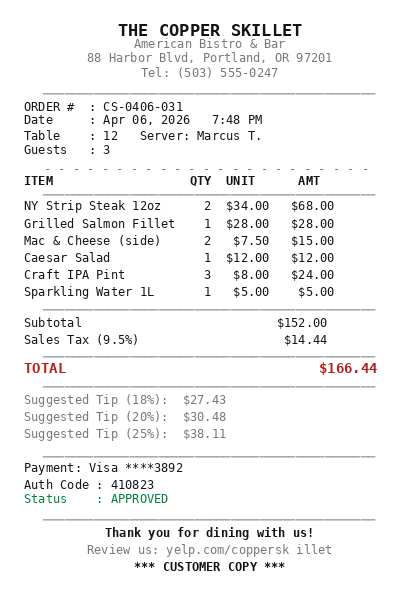
We can simply add this receipt to Quadratic’s interface and ask questions about it. Here:
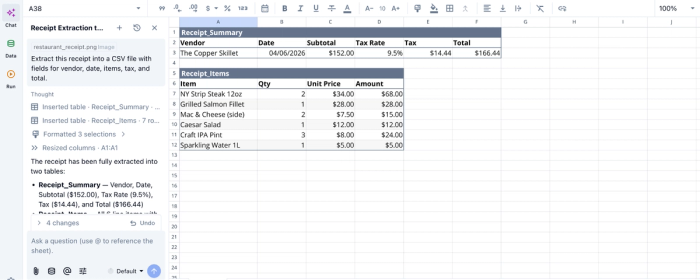
In this image, I ask Quadratic AI to “Extract this receipt into a CSV file with fields for vendor, date, items, tax, and total.” It instantly creates two tables, one to display the receipt summary and another to give a detailed breakdown of the items in the receipt.
You can also ask analytical questions based on your receipt. For example, if we wanted to get a bill breakdown for each guest:
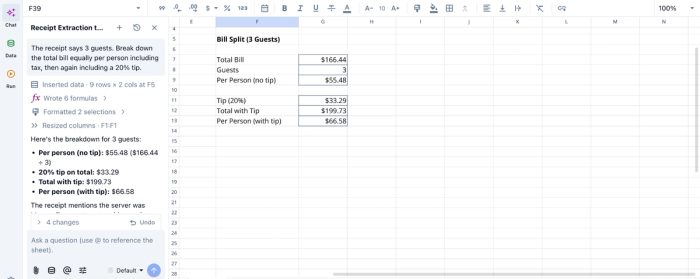
In this image, I prompt Quadratic AI, “The receipt says 3 guests. Break down the total bill equally per person, including tax, then including a 20% tip.” It gives a breakdown that shows the bill for each guest, and then the bill per person when a 20% tip is applied.
AI data visualization
Raw data alone is not sufficient for audit readiness; clarity and interpretability are equally important. Quadratic acts as a data visualization software that enables AI-powered visualization of expense data directly within the workflow, transforming rows of extracted receipt data into intuitive charts and dashboards. This allows finance teams to quickly identify trends or compliance risks without manually building reports.
These visual layers also enhance audit transparency. Instead of depending solely on static reports, auditors can interact with live dashboards that reflect the underlying data in real time. Let’s see how this works:
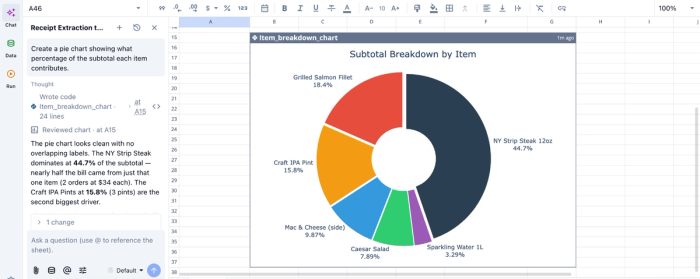
In this image, I ask Quadratic AI to “Create a pie chart showing what percentage of the subtotal each item contributes.” In seconds, it creates a pie chart based on our receipt data. Even when you do not explicitly state the chart type, Quadratic intelligently suggests the best chart type based on your dataset.
Collaboration and review workflows
Audit readiness requires structured human oversight. Quadratic provides a collaborative analytics platform that supports real-time collaboration. It allows multiple stakeholders to review and approve expense data within the same environment. Finance teams, auditors, and managers can all interact with the same dataset.
In addition, built-in version control and change tracking create a clear record of who made what changes and when. This collaborative audit trail is invaluable during compliance reviews, as it demonstrates not only data accuracy but also governance discipline.
Next steps: Automate your expense management
Transitioning from chaotic manual entry to a fully automated and validated receipt workflow is one of the most impactful changes a finance team can make. Moving beyond a basic receipt scanner OCR to an integrated system saves countless hours and provides total confidence when financial reviews occur.
By prioritizing validation reconciliation, you transform raw data into an unassailable audit trail.
Quadratic allows you to import receipts as PDFs or images, convert PDF to spreadsheet, extract structured data, and build a clean expense log and summary report. Try Quadratic for free.
Frequently asked questions (FAQs)
What is a receipt scanner OCR, and why is it crucial for expense management?
A receipt scanner OCR (Optical Character Recognition) is a technology that extracts text data from physical or digital receipt images, converting it into a structured format. This digitization is crucial for businesses to move away from manual tracking, reduce errors, and build a reliable, audit-proof expense management system.
Why are basic OCR receipt scanner tools insufficient for robust financial compliance?
Basic OCR receipt scanner tools often struggle with real-world conditions like poor image quality or varied formats, leading to high error rates in data extraction. More importantly, standalone tools lack the context and integrated processes needed for validation, fraud detection, and proper accounting categorization.
How does Quadratic enhance the receipt scanner OCR process for audit-proof workflows?
Quadratic allows users to import receipt PDFs and images directly into a familiar spreadsheet interface, where AI flows can extract structured data efficiently. It then enables the use of native Python, SQL, and formulas to clean, validate, and categorize this expense data using custom logic. This environment also facilitates seamless reconciliation by connecting extracted receipt data to live financial sources.
What are the essential steps beyond using a receipt scanner with OCR for an audit-ready system?
Beyond using a receipt scanner with OCR for reliable capture, an audit-ready system requires robust data validation, smart routing for accounting categorization, and regular reconciliation routines. Validation involves programmatic checks for errors and suspicious activity, while smart routing ensures expenses align with your chart of accounts.
