
James Amoo, Community Partner
Mar 30, 2026

End-of-month reporting is a massive time sink for most finance teams, with the average time spent on this process often ranging from 20 to 50 hours per month. Exporting raw data from QuickBooks into static spreadsheets takes hours of manual formatting, copying, and pasting. Finding the best AI for QuickBooks can completely change this workflow, but the goal is not just automating basic receipt scanning.
The real value of artificial intelligence lies in transforming raw ledger data into automated and repeatable reports. This guide will show SMB owners, bookkeepers, and accountants how to leverage AI finance tools to speed up reporting efficiently without sacrificing strict accounting rigor or losing control of their numbers.
The shift to AI-assisted accounting in QuickBooks
The finance industry is moving rapidly away from highly manual bookkeeping processes. Today, AI tools for data analysis are becoming the standard, with nearly three-quarters of businesses already piloting or using AI in their financial reporting processes. However, the objective of this technology is not to replace human accountants. Instead, it empowers finance professionals through a hybrid approach that pairs smart spreadsheet automation with expert human oversight.
One of the most significant shifts is the move from historical reporting to forward-looking analysis. Traditional accounting workflows are inherently backward-looking, summarizing what has already happened. AI changes this dynamic by enabling predictive analytics, such as data modeling and early detection of financial risks by forecasting software. This allows businesses to anticipate issues before they arise rather than reacting after the fact.
AI agents for data analysis also enhance decision velocity. In traditional workflows, answering even simple financial questions often requires exporting data, building custom reports, and validating calculations. With AI layered on top of QuickBooks, users can conduct financial analytics in natural language and receive context-aware responses. This shortens the time between question and answer, leading to more informed decisions across the business.
There is also a meaningful impact on productivity and resource allocation. By automating time-consuming tasks such as reconciliations, report generation, and tax preparation, AI frees up capacity within finance teams. This allows accountants to spend more time on high-value activities like financial planning and advising leadership on strategic initiatives.
Top AI use cases for QuickBooks reporting and analysis
Finance teams can save countless hours of manual spreadsheet work by applying AI and QuickBooks to the right workflows. The most valuable use cases focus strictly on a question-driven data analysis and visualization framework, rather than altering your underlying ledger data. Here are the top ways to put AI to work for your financial operations:
Automating monthly variance analysis
Monthly variance analysis is traditionally a tedious process of comparing multiple spreadsheets. AI can instantly compare your actuals against budgets or historical data pulled directly from QuickBooks. It can automatically calculate percentage changes, detect unusual anomalies, and even help tell data stories for why certain expenses came in over or under budget.
Building real-time financial dashboards
Static reports become stale data the moment you share them. AI can assist in constructing dynamic and real-time dashboards tied directly to your live QuickBooks data. This gives stakeholders an always-up-to-date view of cash flow, revenue trends, and departmental expenses. You get complete visibility without the burden of manual data entry.
Streamlining reconciliation support
Reconciling accounts across multiple systems is notoriously time-consuming. AI can support the reconciliation process by quickly matching complex datasets from databases and APIs, then flagging discrepancies for review. In this workflow, AI acts strictly as an assistant. It prepares the data and highlights potential issues so a human professional can make the final call.
Generating automated financial narratives and reports
AI for QuickBooks can convert raw financial data into human-readable reports. Instead of manually compiling management reports or board decks, finance teams can leverage AI to generate summaries that explain key trends, highlight risks, and contextualize performance. These narratives can be tailored to different audiences, ensuring that insights are communicated clearly and consistently without requiring hours of manual writing.
Cash flow forecasting and scenario modeling
AI enhances financial planning by analyzing historical data from QuickBooks to generate forward-looking cash flow projections. It can incorporate patterns in receivables, payables, and seasonality to produce more accurate forecasts. Additionally, teams can model different scenarios and instantly see the financial impact. This allows businesses to plan proactively and maintain liquidity with greater confidence.
Ensuring accuracy in QuickBooks AI bookkeeping
A major concern for finance professionals is the risk of over-relying on fully automated systems. While AI can dramatically accelerate reporting and analysis, it does not inherently understand business context or regulatory nuance. Left unchecked in a closed system, this can lead to subtle but impactful errors. That is why strict accounting rigor demands transparency and explainability. In practice, this means working with AI systems where calculations are visible, assumptions are explicit, and every number can be traced back to its source.
Maintaining accuracy in AI-assisted workflows requires a deliberate balance between automation and human oversight. Rather than replacing accountants, AI should function as an augmentation layer. This “human in control” model ensures that efficiency gains do not come at the cost of reliability or trust.
A strong starting point is establishing clean and well-governed data practices within QuickBooks. AI systems are only as reliable as the data they operate on, so inconsistencies in categorization, incomplete records, or unreconciled accounts will inevitably propagate into analysis. Ensuring that your ledger is accurate and standardized before applying AI is foundational to maintaining output quality.
A demand for transparent logic is also important. Finance teams should prioritize tools and workflows that allow them to inspect and modify the underlying calculations rather than relying on opaque black box outputs. This level of visibility is critical for audit readiness and regulatory compliance, where every reported figure must be defensible.
It is also essential to define clear boundaries for automation. Not every financial process should be fully automated, particularly those involving judgment-heavy decisions such as revenue recognition policies or compliance-sensitive classifications. In these areas, AI should assist by preparing data and highlighting relevant inputs.
How Quadratic transforms QuickBooks data into trusted insights
To achieve a greater level of automation and control, you need an AI tool for data analysis built for modern data workflows. Quadratic is an AI-powered spreadsheet designed to connect directly to your QuickBooks account. It pulls your live financial data into a familiar grid where built-in AI generates editable SQL, Python, or standard formulas for custom reporting. Let’s explore the features in detail:
Direct connections to multiple sources
Quadratic removes the need for manual exports by connecting directly to multiple data sources, including databases, APIs, and raw datasets. Most importantly, it integrates seamlessly with QuickBooks, allowing finance teams to pull in general ledger data, invoices, expenses, and transaction records in real time.
Once connected, teams can immediately begin analyzing their data without the need for data cleaning or transformation in external tools. For organizations working across multiple systems, such as billing platforms, payroll tools, or CRM systems, this capability ensures that all reporting is based on consistent, up-to-date inputs, eliminating fragmentation and reducing reconciliation overhead.
AI data analysis
Quadratic acts as a QuickBooks AI assistant, enabling users to interact with QuickBooks data using natural language. Instead of writing complex formulas or building manual reports, finance teams can ask questions like “What drove the increase in operating expenses this month?” or “Which customers have the highest outstanding balances?” and receive immediate, structured answers.
This significantly reduces the time required to move from raw data to insight. AI can also automatically identify anomalies, detect trends, and highlight key drivers of financial performance, helping teams focus on what matters most. Let’s see how this works.
First, I connect to my QuickBooks data from Quadratic:
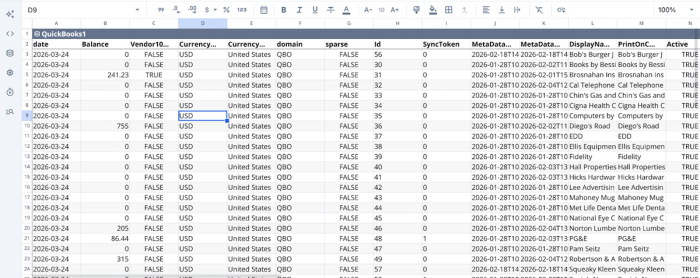
After connecting to QuickBooks, we can immediately begin analysis. Suppose I want to get insights into the location of vendors:
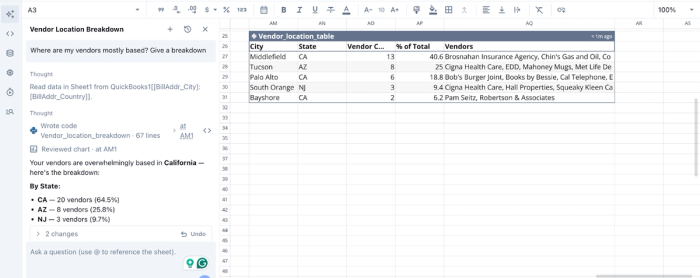
In this image, I prompt Quadratic “Where are my vendors mostly based? Give a breakdown”, and it instantly generates a table to give insights into vendor locations.
AI Data Visualization
Turning financial data into clear, actionable insights requires effective finance data visualization. Quadratic simplifies this process with AI-driven charting and dashboard creation. Users can generate visual representations of their AI QuickBooks data without manually building each component.
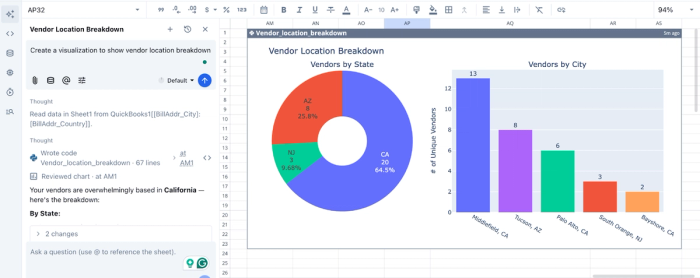
Since visualizations are tied directly to live data sources, they update automatically as new transactions are recorded. This ensures that dashboards remain accurate and relevant at all times. For leadership teams, this means faster access to insights and more confident decision-making. Let’s see how we can visualize the analysis we conducted earlier:
In this image, I prompt Quadratic: “Create a visualization to show vendor location breakdown”. It instantly generates visualizations for our data based on the prompt.
Native support for modern programming languages
Quadratic extends beyond traditional dashboards by offering native support for programming languages like Python and SQL within its spreadsheet interface. This allows finance teams to perform advanced data transformations and automate complex workflows directly on top of QuickBooks data.
By enabling this level of customization within a single environment, Quadratic eliminates the need to move data into separate analytics tools, preserving data integrity and improving efficiency.
Collaboration
Financial reporting and analysis are inherently collaborative processes. Quadratic provides a collaborative analytics platform where multiple stakeholders can work with the same dataset simultaneously.
This eliminates the inefficiencies of sending spreadsheets back and forth and ensures that everyone is working from a single source of truth. Teams can collaborate on analyses, annotate findings, and align on key insights within the platform. Role-based access controls ensure that sensitive financial data remains secure while still enabling transparency where needed
Conclusion
Transitioning from manual CSV exports to an AI-assisted reporting workflow is one of the highest-ROI moves a finance team can make. The best AI for QuickBooks gives you back hours of your time while keeping you in complete control of the logic and final outputs.
Stop wasting days on routine spreadsheet updates. Connect QuickBooks to Quadratic and use AI to generate a monthly reporting pack and variance dashboard you can trust. Try Quadratic for free.
Frequently asked questions (FAQs)
What problem does the best AI for QuickBooks Online solve for finance teams?
The best AI for QuickBooks automates the time-consuming process of end-of-month reporting and analysis. It transforms raw ledger data from QuickBooks into repeatable reports and variance analyses, eliminating hours of manual data export and spreadsheet formatting. This allows finance professionals to focus on strategic financial planning rather than basic data entry.
How does Quadratic improve reporting and analysis for QuickBooks users?
Quadratic serves as an AI-powered spreadsheet that connects directly to your live QuickBooks account, pulling data into a familiar grid. Its built-in AI generates editable SQL, Python, or standard formulas for custom reporting. This allows finance teams to save and schedule reporting templates, ensuring consistent, automated monthly insights without manual refreshing.
Can artificial intelligence replace human accountants in QuickBooks workflows?
No, AI is intended to empower finance professionals, not replace them, by adopting a "human in the loop" approach. This means AI automates complex data analysis and reporting, while human expertise provides oversight, ensures accuracy, and applies critical business context. The goal is a hybrid approach that combines smart automation with expert human control.
What advanced financial tasks can the best AI for QuickBooks automate?
The best AI for QuickBooks can automate several advanced financial tasks, including monthly variance analysis by comparing actuals against budgets or historical data. It can also assist in building real-time financial dashboards that provide up-to-date views of cash flow and revenue trends. Additionally, AI streamlines reconciliation support by quickly matching complex datasets and flagging discrepancies for human review.
