
James Amoo, Community Partner
May 26, 2026

If you've started wiring AI agents for data analysis in your workflows, you've probably run into the term spreadsheet MCP. MCP, short for Model Context Protocol, is an open standard that enables AI clients to interact with external systems such as ChatGPT, Claude, Cursor, and VS Code through a consistent interface. An MCP server is the component that connects AI clients to spreadsheet data, whether that data lives in a local Excel file, a Google Sheet, or a cloud-native spreadsheet analysis platform.
The catch is that not all spreadsheet MCP servers are created equal. The ecosystem has split into two broad camps: local open-source servers you run on your own machine, and hosted solutions that connect to live spreadsheets over the network. The choice between them shapes everything from how teammates collaborate to whether the AI can actually write back to your sheets, run formulas, or execute Python and SQL.
This post maps the spreadsheet MCP landscape, walks through capability tradeoffs, and provides insights around compatible AI clients. If you're exploring an Excel MCP option specifically, you'll find that some advice in here too, since most local servers in the wild are Excel-focused.
The spreadsheet MCP landscape today
The current spreadsheet MCP ecosystem falls into roughly three loose tiers. Hosted or remote MCP servers are tied to live spreadsheet platforms and accessed through OAuth or token-based authentication. Self-hosted MCP servers sit in the middle, where teams deploy and manage the infrastructure themselves but still expose it over a network for AI clients. A
At the lowest level are local MCP servers, which run on a single machine and communicate with desktop AI tools over stdio. These have grown quickly, but they are typically small projects maintained by individual developers or small communities.
Local MCP servers usually follow a predictable pattern. They are distributed via npm, uvx, Docker, or standalone binaries, and configured per client through JSON configs in tools like Claude Desktop, Cursor, VS Code, or similar environments. Their core strength is simplicity and control: data stays on your machine, there are no external dependencies, and the codebase is often easy to modify. However, they are fundamentally file-centric rather than connection-centric.
Hosted MCP solutions move in the opposite direction. Instead of local installs, they rely on a single connection layer that multiple clients can reuse across devices and users. These systems typically support a broader capability surface, including reading and writing spreadsheet data, inserting formulas, generating charts, and executing code directly against live data. They also introduce governance features like permissions and centralized access control, which make them more viable for team workflows.
This is where Quadratic sits in the hosted tier in a particularly practical way. Quadratic’s MCP-enabled spreadsheet environment bridges the gap between file-based tools and fully live systems by giving AI clients bidirectional access to real spreadsheets, Python, SQL, and charts inside a single workspace. Instead of juggling local servers or stitching together file exports, teams can work in a shared environment where AI actions happen directly on the live grid. That removes the fragmentation between tools and turns MCP from a developer experiment into a spreadsheet automation layer.
Why file access alone is not a true spreadsheet MCP
Here’s the most important distinction in this space, and one that’s easy to miss when skimming GitHub READMEs: reading a spreadsheet file is not the same as operating on a live spreadsheet. A file-reading MCP can ingest an .xlsx, extract its contents, and let an AI summarize reports at that moment. That is useful for inspection-style tasks, where the goal is to understand static data or answer one-off questions.
A true spreadsheet MCP goes beyond data exploration and supports interaction with the working environment itself. That means writing values back into cells, inserting and editing live formulas rather than generating static outputs, and creating charts or visualizations directly inside the sheet. It also includes the ability to execute Python or SQL against the data in context, while preserving structure, formatting, and references so the workbook remains intact and usable.
Many local MCP servers stop short of this interactive layer. They can answer questions like “what is the average of column B,” but they cannot meaningfully participate in the workflow by updating cells, generating a SUMIFS formula, building a chart, or transforming data in place. That limitation creates a clear boundary: file-reading MCPs are summarization tools, while full spreadsheet MCPs are execution environments. This is the line that separates systems that describe your data from systems that actually work inside it.
Compatible AI clients and how they connect
The standard set of clients using MCP for data analysis is fairly consistent: Claude Desktop, ChatGPT, Cursor, VS Code, Cline, and Continue. Where they diverge is not in capability but in the transport and connection model. Local MCP servers are typically wired through a JSON configuration that points to a local command following the MCP specification for stdio-based communication.
This means every developer or analyst has to install and configure the server separately on each machine and within each client environment, whether that is Claude Desktop, Cursor, or VS Code. The setup is technically straightforward, but operationally repetitive, especially in teams or multi-device workflows.
Hosted MCP servers take the opposite approach. Instead of local configuration per client, they connect through a remote MCP URL and OAuth-based authentication. Once authenticated, the connection persists across sessions and can be reused across multiple tools. In practice, this makes hosted MCPs far more portable: if you switch from Claude Desktop to Cursor, you simply point the new client at the same endpoint and authorize access again, without reinstalling or reconfiguring anything locally.
Local servers, by contrast, require repeating the install-and-configure cycle for every client and every machine, which creates friction that becomes more noticeable as workflows scale or as users move between environments.
Team shareability: the hidden selection criterion
This is the criterion most spreadsheet MCP comparisons skip entirely, and it often turns out to be the deciding factor.
Local MCPs are inherently single-user. Each teammate must install the server, configure their clients, keep the version in sync, and maintain their own copy of the underlying file. There's no shared state. If two analysts are working on "the same" sheet through local MCPs, they're really working on two copies, and reconciling them is a manual chore.
Hosted MCPs flip this. A team shares a single connection to live spreadsheets, with consistent permissions and one source of truth. Whether one teammate is asking Claude to analyze last week's data in a Claude spreadsheet and another is asking Cursor to update a forecast, both are operating on the same sheet in the same state.
If your spreadsheet work is solo and exploratory, this may not matter. If multiple humans and multiple AI clients are touching the same dataset, it matters a lot.
Quadratic MCP: best spreadsheet MCP for analysis
Quadratic MCP sits at the hosted, full-capability end of the spectrum. It gives AI clients OAuth-secured access to live Quadratic sheets with a capability surface that covers the full stack. Let’s explore the features in detail.
Connect AI workflows to live databases and APIs
One of the most important differences between lightweight spreadsheet automation and production-grade analytical workflows is live connectivity. Static spreadsheets are useful for one-time analysis. Connected spreadsheets support repeatable systems and exploratory data analysis.
Quadratic includes direct connections with databases, APIs, and platforms such as Postgres, Snowflake, Google Analytics, and other operational data sources. Through MCP, AI clients can operate directly on top of these connected systems instead of relying solely on pasted CSVs or uploaded exports.
That allows workflows to persist over time. An AI-generated revenue model can refresh from the underlying warehouse each month. A dashboard built from API-driven operational metrics can update continuously. A forecasting workflow can rerun against fresh data without rebuilding the spreadsheet or re-uploading files.
Build financial and operational models with Python, SQL, and formulas together
Hosted access only matters if the underlying workspace is capable enough to support serious analytical work. Quadratic combines spreadsheet formulas, Python execution, and SQL data analytics directly in the same grid, giving MCP-connected AI clients access to a full analytical stack rather than a lightweight spreadsheet surface.
That changes the types of workflows AI can support. A finance team can connect live accounting dashboards and warehouse data, ask the AI to perform cohort analysis in Python, generate database queries against operational tables, and produce spreadsheet-native summaries in the same workspace. A market analyst can pull API-based stock data, calculate technical indicators in Python, and create an auditable stock screener without leaving the spreadsheet.
Analyze live spreadsheets with built-in AI agents
A major limitation of local spreadsheet tooling is that it often operates against exported files rather than continuously shared environments. The spreadsheet becomes a moving target: one version lives on a local machine, another in email attachments, another in cloud storage, and the AI workflow only sees whichever copy was uploaded most recently.
Quadratic MCP exposes a live spreadsheet workspace directly to AI clients. The AI reads from and writes to the same browser-based sheet human collaborators are actively using. Changes made in the spreadsheet appear immediately to connected AI tools for data analysis, and outputs generated through MCP become visible instantly inside the shared workspace.
This creates a much tighter operational loop. Analysts are no longer synchronizing files between tools or wondering whether the AI analyzed the latest export. The spreadsheet becomes the shared analytical state across both human and AI participants. Let’s see how this works.
First, I connect to my financial data via Quadratic’s Plaid integration:
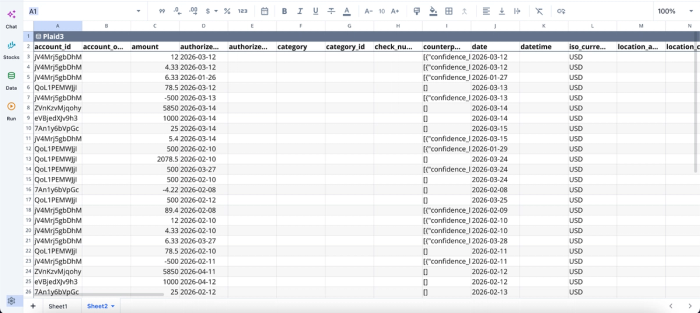
We can then begin analysis immediately after a successful connection:
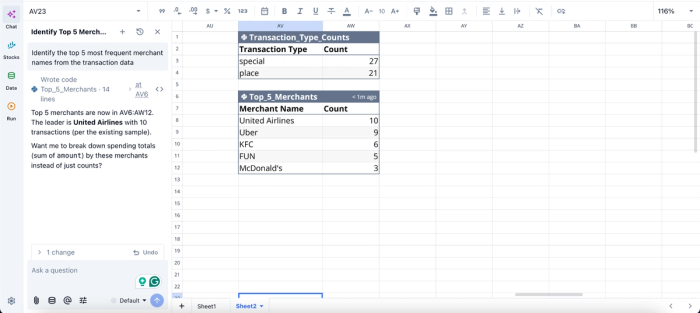
In this image, I ask Quadratic AI to “Identify the top 5 most frequent merchant names from the transaction data” for my personal finance dashboard. It instantly creates a table that shows the top 5 merchants based on my transactions, simplifying bank transaction categorization.
Create visualizations directly inside the spreadsheet environment
Visualization workflows become significantly more practical when the AI can generate charts directly where the data already lives. In many local MCP workflows, charting still requires exporting data into separate BI tools or a notebook environment. That fragmentation slows iteration and disconnects the visuals from the data transformation logic behind them.
Quadratic MCP allows AI clients to create charts and visualizations directly inside the spreadsheet itself. The same workflow that imports data, cleans columns, and computes metrics can also generate trend lines, operational dashboards, forecast charts, or executive summaries in place.
Here’s an example:
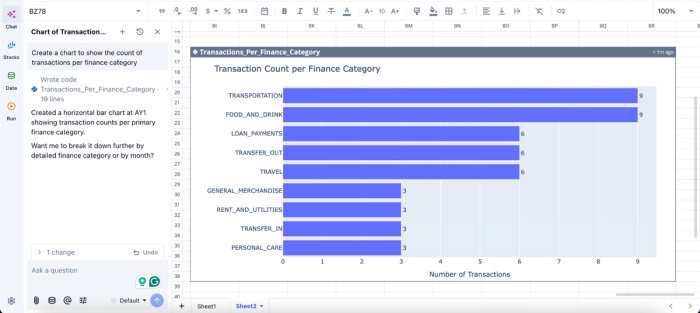
In this image, I ask Quadratic AI to “Create a chart to show the count of transactions per finance category.” In seconds, it generates a dynamic chart that shows the transaction count per finance category, all based on my account data for AI personal finance tracking.
Keep collaboration and AI access in the same workspace
Local MCP setups often separate the AI-accessible environment from the human collaboration environment. Analysts work in one interface while the AI operates through another, creating synchronization problems and reducing transparency.
Quadratic avoids that split by making the spreadsheet itself the collaborative analytics platform. The browser-based sheet that teammates edit in real time is the exact same workspace exposed through MCP to AI clients like ChatGPT, Claude, Cursor, and VS Code.
This improves both collaboration and auditability. Team members can see formulas the AI inserted, inspect Python scripts generated through prompts, review SQL transformations, and modify outputs directly inside the same environment, acting as powerful financial reconciliation tools. AI actions stop feeling like external automations and instead become native parts of the spreadsheet workflow.
For organizations managing financial reporting, operations dashboards, or recurring KPI tracking, this shared-surface model reduces fragmentation significantly.
Move from experimental AI workflows to operational systems
The difference between a local MCP experiment and a production analytical workflow is usually durability. Experimental setups often work for a single user and a single dataset, but become difficult to maintain as workflows expand across teams and connected systems.
Quadratic MCP is designed for repeatable workflows. AI-generated logic remains stored directly in the spreadsheet. Python scripts, formulas, SQL queries, charts, and outputs stay attached to the live data environment they operate on. Teams can revisit workflows months later and still understand how the analysis works.
For organizations with stricter operational requirements, Quadratic also supports enterprise-oriented deployment and governance models, including SOC 2 and HIPAA compliance, optional self-hosting, and zero-day retention policies for AI interactions. That infrastructure layer makes hosted MCP workflows viable in environments where local prototypes would not satisfy security or compliance expectations.
Conclusion
The spreadsheet MCP space splits cleanly into local open-source servers and hosted full-capability solutions, and the right choice depends less on setup convenience than on three things people often underweight: whether you need write-back, whether you need code execution on spreadsheet data, and whether multiple people will share the same connection. For solo and security-strict workflows, a local server can be the right tool. For teams and serious power users, hosted full-capability MCPs are the practical default.
If you want a hosted spreadsheet MCP that covers reads, writes, formulas, charts, and Python or SQL execution on live sheets, install Quadratic MCP for free and connect your spreadsheets to ChatGPT, Claude, VS Code, or Cursor in minutes.
Frequently asked questions (FAQs)
Is there an official Excel MCP server?
Microsoft has not published a first-party Excel MCP server. The current Excel MCP options are community-built local servers, generally distributed through GitHub, or hosted spreadsheet platforms that offer their own MCP server as an alternative path to Excel-style workflows.
What's the difference between a spreadsheet MCP and an AI spreadsheet add-on?
Add-ons like Copilot or GPT for Sheets live inside the spreadsheet UI and bring AI to the user. MCP goes the other direction: it exposes the spreadsheet to external AI clients so the AI can read and act on the data from wherever the user is working. The two integration directions can complement each other, but they solve different problems.
How does Quadratic's spreadsheet MCP handle write-back and code execution?
Quadratic MCP is a hosted, full-capability server that goes beyond file reading to support writes, formula insertion, chart creation, and Python or SQL execution against spreadsheet data. Quadratic is browser-based with real-time multiplayer collaboration, so the same connection works across ChatGPT, Claude, Cursor, VS Code, and other MCP-compatible clients without per-machine setup, and multiple teammates see the same live state whether they're editing in the browser or through an AI client.
